SEO Friendly URLs: 10 Rules for Slugs That Rank

Artificial Intelligence
October 17, 2026
You changed one word in a slug to make it "cleaner." A week later, a page that sat at position four is nowhere, the old address returns a 404, and three internal links point at nothing. The URL looked like a cosmetic detail. It was actually the page's identity.
That's why SEO friendly URLs deserve a proper standard. The short answer: use a short, lowercase, hyphen-separated URL that describes the page in plain words, keep the folder structure shallow, avoid dates, IDs and tracking parameters, and never change it without a 301 redirect. Get that right once, and every page you publish starts from a clean foundation.
Below are ten rules, bad-versus-good examples, URL patterns for different site types, a safe process for changing existing URLs, and a quick audit method for the site you already have.
What Makes a URL SEO Friendly
A URL does three jobs. It tells a crawler where a page lives, tells a person what to expect before they click, and acts as the page's permanent ID across links, bookmarks and analytics.
Google's URL structure guidance boils down to a simple idea: make URLs that are simple, descriptive and consistent, so both people and crawlers can make sense of them. Everything else in this guide follows from that.
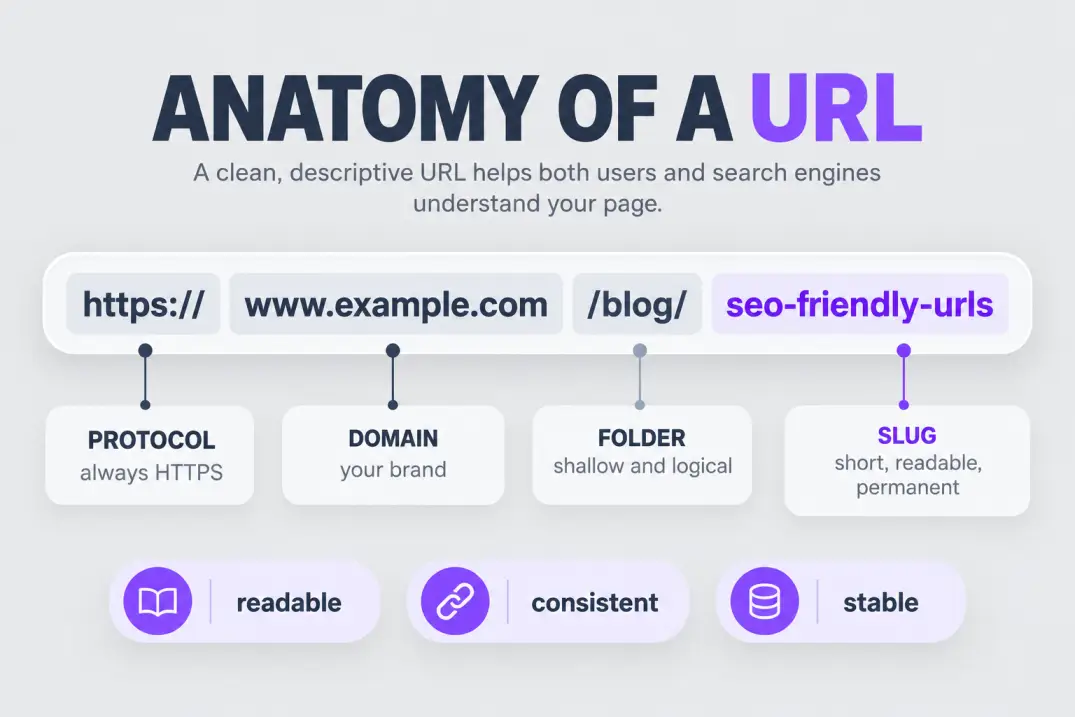
Here's a quick anatomy of a typical URL and which parts you control.
| Part | Example | Do you control it? |
|---|---|---|
| Protocol | https:// | Yes. Always use HTTPS |
| Subdomain | www. or blog. | Yes, but changing it is a migration |
| Domain | example.com | Rarely |
| Folder path | /blog/ | Yes, at setup |
| Slug | seo-friendly-urls | Yes, every time you publish |
| Parameters | ?utm_source=news | Partly, and best kept out of indexed URLs |
The slug is the part you'll touch most, so most of the rules below are about getting it right.
Treating the URL as something the CMS decides. Most platforms generate a slug from your title by default, and it often includes stop words, dates or the whole sentence. Review it before you hit publish.
Why URLs Matter Beyond Rankings
It's tempting to treat the URL as a ranking factor and nothing else. In practice its value is broader, and most of that value shows up in places you can actually measure.
Trust at a glance. People glance at the address in a result or a shared link before deciding to click. A clean /blog/seo-friendly-urls signals a real page about the topic. A string of IDs and parameters signals a database dump.
Shareability. Short URLs survive being pasted into chats, emails, slides and social posts without wrapping into a mess. They're also easier to say out loud in a podcast or presentation.
Cleaner analytics. When every page has a readable, stable address, reports in your analytics platform and Search Console make sense at a glance. You can scan a list of top pages and know what each one is without opening it.
Easier maintenance. Redirect maps, internal link audits and migrations all become faster when URLs follow a pattern. Teams that skip this early pay for it during every restructure.
Citations and mentions. When other sites, newsletters or AI tools reference your page, the URL often appears alongside the title. A tidy, descriptive address makes the reference look credible and easy to verify.
The so-what: the benefit of good URLs compounds quietly. You rarely see a dramatic jump from one slug, but you also never pay the price that messy URLs charge every time you audit, migrate or report.
The 10 Rules for SEO Friendly URLs
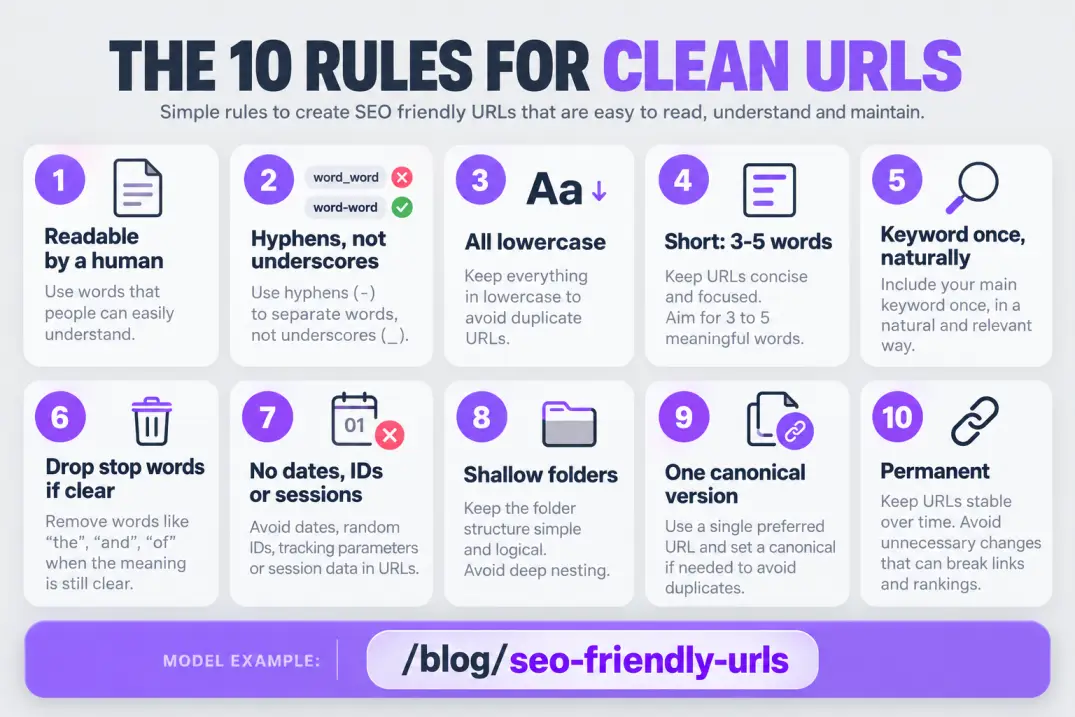
Think of these as an editorial standard. Write them into your publishing checklist and nobody has to debate slugs again.
1. Make it readable by a human
Read the URL out loud. If a stranger could guess what the page is about, it passes. /blog/seo-friendly-urls works, and /blog/p=48213 doesn't.
URLs also show up in search results, in browser bars, in shared links and in citations. A readable one builds trust before the click, and a messy one looks spammy even when the page is excellent.
2. Use hyphens to separate words
Google recommends hyphens over underscores, because hyphens read as word separators while underscores can join words together. So seo-friendly-urls, never seo_friendly_urls and never seofriendlyurls.
Avoid spaces too. They're encoded as %20, which makes links ugly and easy to break when copied.
3. Stay lowercase
URL paths are case-sensitive on many servers, so /Blog/Guide and /blog/guide can resolve as two different pages. That creates duplicates, broken links when someone retypes an address, and redirect headaches.
Use lowercase everywhere, and redirect any uppercase variants to the lowercase version.
4. Keep it short
There's no official length limit for SEO, but shorter URLs are easier to read, share and remember. A practical rule is a slug of three to five meaningful words and a total path that stays comfortably under about 75 characters.
If the slug runs long, cut the filler first: articles, repeated words and anything that restates the folder.
5. Include the primary keyword once, naturally
If the page is about a topic, the topic belongs in the slug: /blog/url-structure-guide. Use the phrase once, in its natural form. Don't repeat it or stack variants.
/blog/seo-friendly-urls-seo-urls-url-seo-tips is not optimization, it's noise. We'll cover how much a keyword in the URL actually matters in a moment.
6. Drop stop words only when the slug stays clear
Words like "a," "the," "of" and "for" can usually go. /blog/how-to-write-a-blog-post becomes /blog/write-a-blog-post or /blog/how-to-write-blog-post without losing meaning.
But don't mangle it for the sake of brevity. If removing a word makes the slug confusing, keep it.
7. Avoid dates, IDs and session parameters
A year in the URL makes evergreen content look stale and forces a URL change when you update the page. IDs and session codes mean nothing to readers and can create endless duplicate URLs.
Use /blog/seo-friendly-urls, not /2026/10/08/seo-friendly-urls?id=48213&sessionid=x7Fk. If you need a date for readers, display it on the page instead.
8. Keep folder depth shallow and logical
Each folder should add useful context. /blog/seo-friendly-urls is clean. /blog/category/seo/technical/urls/seo-friendly-urls buries the page and makes the address long for no benefit.
Two or three levels are enough for most sites. Match the folders to how people think about your content, not to how your CMS stores it.
9. Pick one canonical version and stick to it
http vs https, www vs non-www, trailing slash vs none, uppercase vs lowercase: each combination is technically a different address. Choose one version of each, redirect the others to it, and link to the preferred version everywhere.
For pages in a path, /guide and /guide/ can be treated as separate URLs. Pick a convention and apply it sitewide. If duplicates do slip through, Google's guide to consolidating duplicate URLs explains how canonicals work, and our piece on canonical tag issues covers when Google overrides your choice.
10. Make URLs permanent
A URL is a promise. Every internal link, backlink, bookmark and analytics record points at it. Changing it breaks all of those unless you redirect, and even then you add a small risk and a delay.
Choose carefully at publish time, and treat the slug as final.
Bad vs Good: Real URL Rewrites
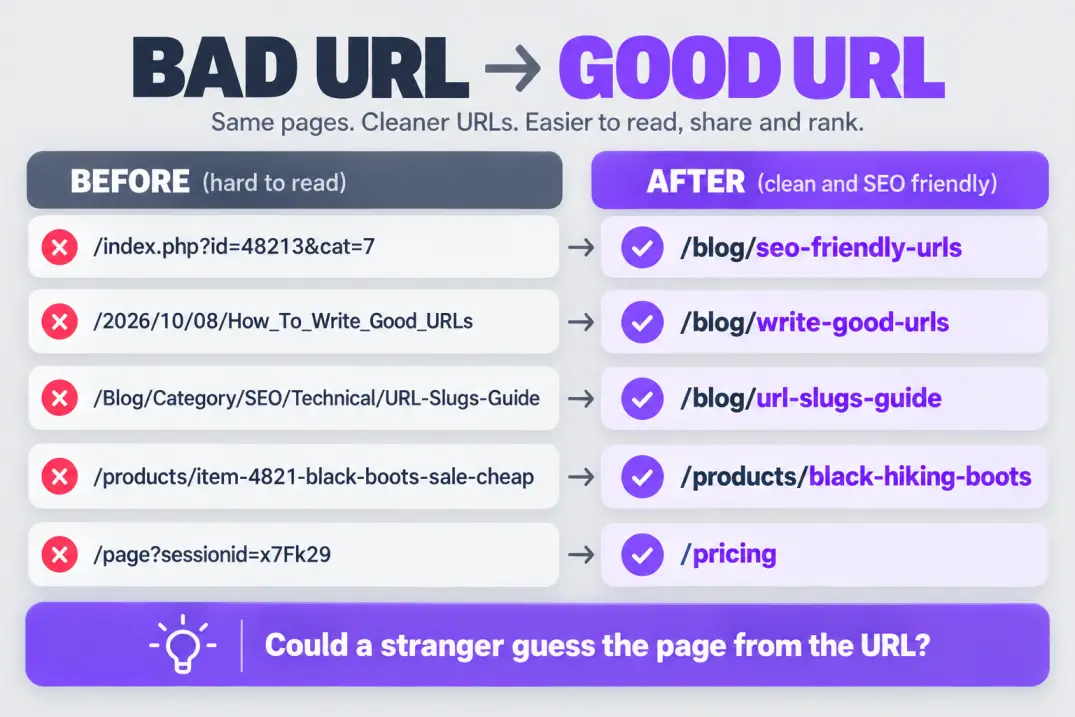
Rules stick better with examples. Here's how typical bad URLs should be rewritten.
| Bad URL | What's wrong | Better URL |
|---|---|---|
/index.php?id=48213&cat=7 | Parameters, no meaning | /blog/seo-friendly-urls |
/2026/10/08/How_To_Write_Good_URLs_For_Your_Blog | Date, caps, underscores, too long | /blog/write-good-urls |
/Blog/Category/SEO/Technical/URL-Slugs-Guide | Mixed case, deep folders | /blog/url-slugs-guide |
/products/item-4821-black-boots-sale-cheap | ID plus stuffing | /products/black-hiking-boots |
/blog/the-ultimate-complete-guide-to-url-optimization-for-seo-in-2026 | Overlong, dated, padded | /blog/url-optimization |
/page?sessionid=x7Fk29 | Session ID creates duplicates | /pricing |
Every "better" URL could be understood by someone who has never seen the page. That's the benchmark.
Write the slug before you write the post. A slug you can't state in three to five words often signals that the page doesn't have a clear single topic yet.
Do Keywords in URLs Actually Help?
Honestly, a little, and mostly indirectly. Words in a URL are a lightweight signal at best. Google's SEO Starter Guide notes that URLs appear in search results and that descriptive words help people understand a page, which is a user benefit before it's a ranking one.
Here's where a keyword in the URL does earn its place.
- Click-through. A readable URL under the title reassures searchers that the page matches the query.
- Anchor text by default. When someone pastes your bare URL as a link, the words in it become the visible anchor.
- Clarity for you. Descriptive URLs make analytics, reports and redirects far easier to read.
- Consistency. A topic-based slug reinforces the page's single focus.
And here's what it won't do. It won't rescue thin content, outweigh intent or compensate for weak links. If a page ranks poorly, changing the slug is almost never the fix, and it carries real risk.
The so-what: get the URL right when you publish, because it's cheap. Don't chase URL "optimization" on existing pages unless something is genuinely broken.
URL Patterns by Site Type
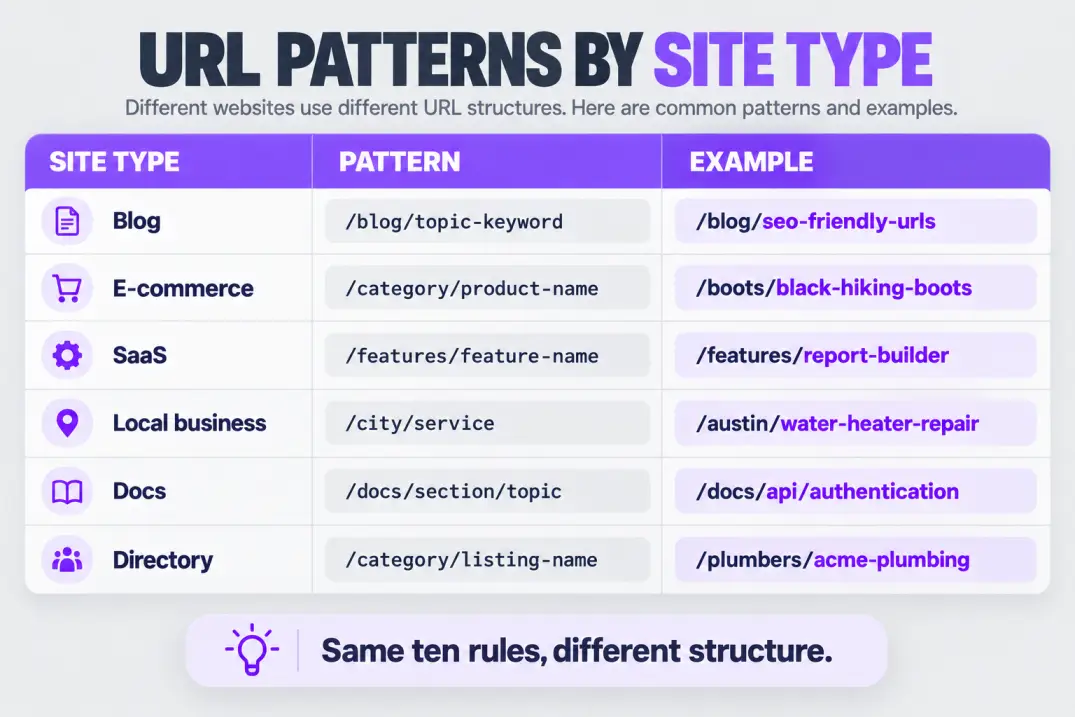
The ten rules stay the same, but the structure changes with the kind of site you run.
| Site type | Pattern | Example |
|---|---|---|
| Blog | /blog/topic-keyword | /blog/seo-friendly-urls |
| E-commerce | /category/product-name | /boots/black-hiking-boots |
| SaaS | /product/feature, /use-cases/job | /features/report-builder |
| Local business | /city/service | /austin/water-heater-repair |
| Docs or help center | /docs/section/topic | /docs/api/authentication |
| Marketplace or directory | /category/listing-name | /plumbers/acme-plumbing |
A few notes on each.
Blogs do best with a flat structure. Skip date folders and deep category trees, since categories change but posts shouldn't.
E-commerce needs care because the same product can appear in several categories. Pick one canonical product URL and make every category link point to it, rather than letting the path change with the browse route.
SaaS sites benefit from folders that mirror the product's logic: features, use cases, integrations, comparisons. That makes it simple to see how much content each area has.
Local sites should keep location and service in the path where there's a real page for each, and avoid thin duplicate pages for every nearby suburb.
Docs need hierarchy because the content is naturally nested, but keep the slug of each page descriptive on its own.
A Worked Example: URLs for a New Content Cluster
Suppose you're planning six articles around technical SEO for a blog. Here's how you might set the URLs before writing a word.
| Planned post | Slug | Why |
|---|---|---|
| A guide to site structure | /blog/site-structure | Short, one topic |
| How to write good slugs | /blog/seo-friendly-urls | Primary phrase, no filler |
| Canonical tags explained | /blog/canonical-tags | Names the single concept |
| Handling redirects | /blog/301-redirects | Common shorthand people search |
| Parameters and filters | /blog/url-parameters | Clear and specific |
| Sitemaps in practice | /blog/xml-sitemaps | Standard term |
Notice what the table avoids. There are no years, no "ultimate guide" padding, and no category folders that would force a URL change if you reorganize the blog later. Every slug could stay valid for a decade.
Then check the set as a group. Do any two slugs compete for the same idea? Would a reader know which one answers which question? If two slugs feel interchangeable, the posts probably overlap, and merging them is better than shipping both.
Folder Structure: Flat or Deep?
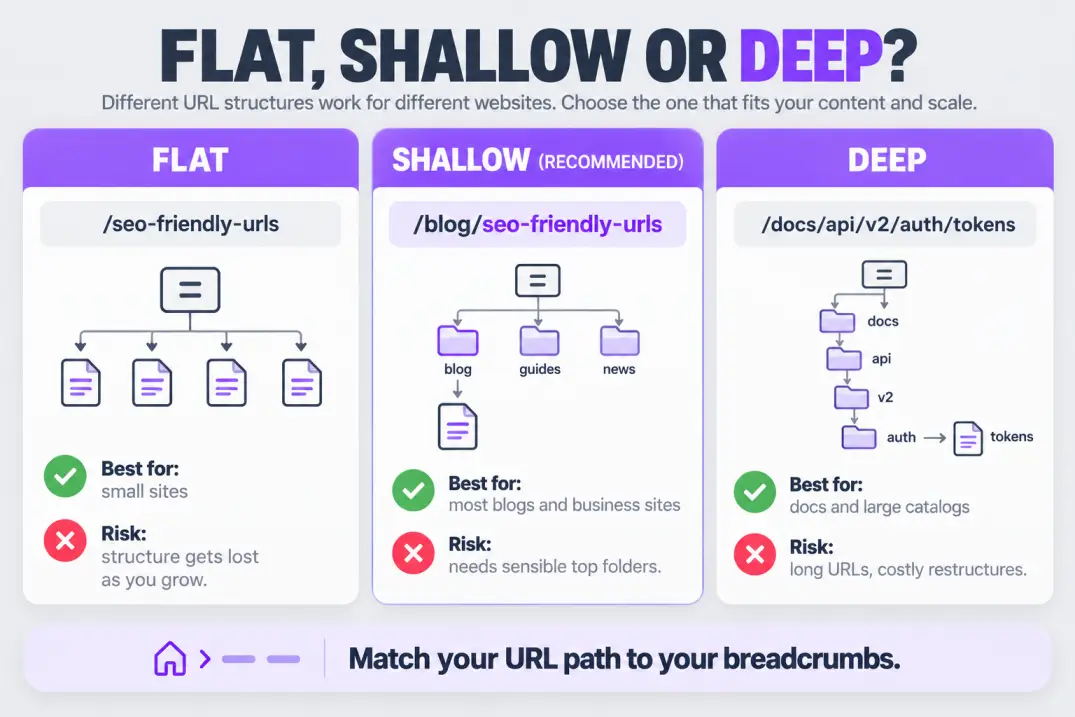
Folder depth is a trade-off, and the right answer depends on how much content you have and how people navigate it.
| Approach | Example | Best for | Watch out for |
|---|---|---|---|
| Flat | /seo-friendly-urls | Small sites, standalone pages | Hard to see structure as the site grows |
| Shallow hierarchy | /blog/seo-friendly-urls | Most blogs and business sites | Needs a sensible set of top folders |
| Deep hierarchy | /docs/api/v2/auth/tokens | Documentation, large catalogs | Long URLs and costly restructures |
A shallow hierarchy is the safe default. It gives search engines and readers a clear signal about what section a page belongs to, without locking you into a rigid tree.
Make the URL path match your breadcrumbs and navigation where possible. When the path says /guides/technical/ and the breadcrumb says "Home > Resources > Articles," you've created two competing maps of the same page.
If you're deciding whether a section should be a folder or a separate subdomain, the trade-offs are covered in subdomains vs subdirectories.
The Link Between URLs and Internal Links
Clean URLs also make internal linking more reliable. When every page has one stable, predictable address, you can link to it confidently from anywhere, and your link reports stay readable. A solid internal linking strategy depends on addresses that don't change.
Slugs for Different Content Types
Not every page is a blog post. Here's how to treat the other common types so the whole site feels consistent.
| Content type | Recommended slug approach | Example |
|---|---|---|
| Blog post | Topic keywords, no date | /blog/seo-friendly-urls |
| Category or hub page | One plural or topic word | /blog/technical-seo |
| Tag pages | Use sparingly; consider noindex for thin ones | /tag/url-structure |
| Author page | Person's name | /authors/maya-chen |
| Landing page | The offer or intent in plain words | /seo-audit-checklist |
| Comparison page | Both names, alphabetical or by convention | /compare/tool-a-vs-tool-b |
| Pagination | Predictable page numbers | /blog/page/2 |
Two ideas run through the table. First, consistency beats cleverness: if one hub uses plurals and another doesn't, readers and editors will keep tripping over it. Second, use the same words in the slug that you use in the navigation and headings, because that repetition keeps the site's structure obvious.
Parameters, Filters and Tracking Codes
Parameters are the part of a URL after the question mark, and they cause more trouble than any other part. Used well, they power search, sorting and filtering. Used carelessly, they can multiply one page into thousands of duplicate URLs.
| Parameter type | Example | Should it be indexed? |
|---|---|---|
| Tracking | ?utm_source=newsletter | No. Point it to the clean URL with a canonical |
| Session | ?sessionid=x7Fk29 | No. Avoid putting it in the URL at all |
| Sorting | ?sort=price | Usually no |
| Filtering | ?color=black&size=10 | Only if the combination has real search demand |
| Pagination | ?page=2 | Yes, with each page self-canonical |
| Search results | ?q=boots | No. Keep internal search pages out of the index |
The practical approach has four parts. Keep indexable pages parameter-free where you can. Use canonical tags so parameter versions point at the clean URL. Block or noindex low-value combinations. And only let filter pages into the index if they match a real query.
If your site has filters or facets, the full treatment is in faceted navigation SEO, and uncontrolled parameters are a common cause of index bloat.
Putting tracking parameters in internal links. Every time you link internally with `?utm_` codes, you create a new URL for the same page and corrupt your analytics. Use tracking codes on external campaigns only.
Special Characters, Languages and Case
URLs have a limited safe alphabet: letters, numbers, hyphens and a few separators. Anything outside that gets percent-encoded, which turns café into caf%C3%A9. It works, but it's ugly and easy to mishandle in scripts, spreadsheets and redirects.
A few practical rules cover almost every case.
- Avoid special characters such as
&,%,#,+, quotes and brackets in slugs. Spell them out or drop them. - Use plain ASCII for the slug where you can, even on a non-English site, and keep the accented or native spelling in the title and body where it reads naturally.
- If you serve a non-Latin language, it's fine to use native characters in URLs, but follow Google's guidance to use UTF-8 and make sure links are percent-encoded consistently. Test every redirect.
- Normalize case at the server so that uppercase requests redirect to lowercase.
For multilingual sites, use a consistent structure, such as /en/ and /es/ folders, and keep slugs aligned across languages where it makes sense. Mixing patterns across languages makes redirects and audits painful.
How to Change URLs Safely
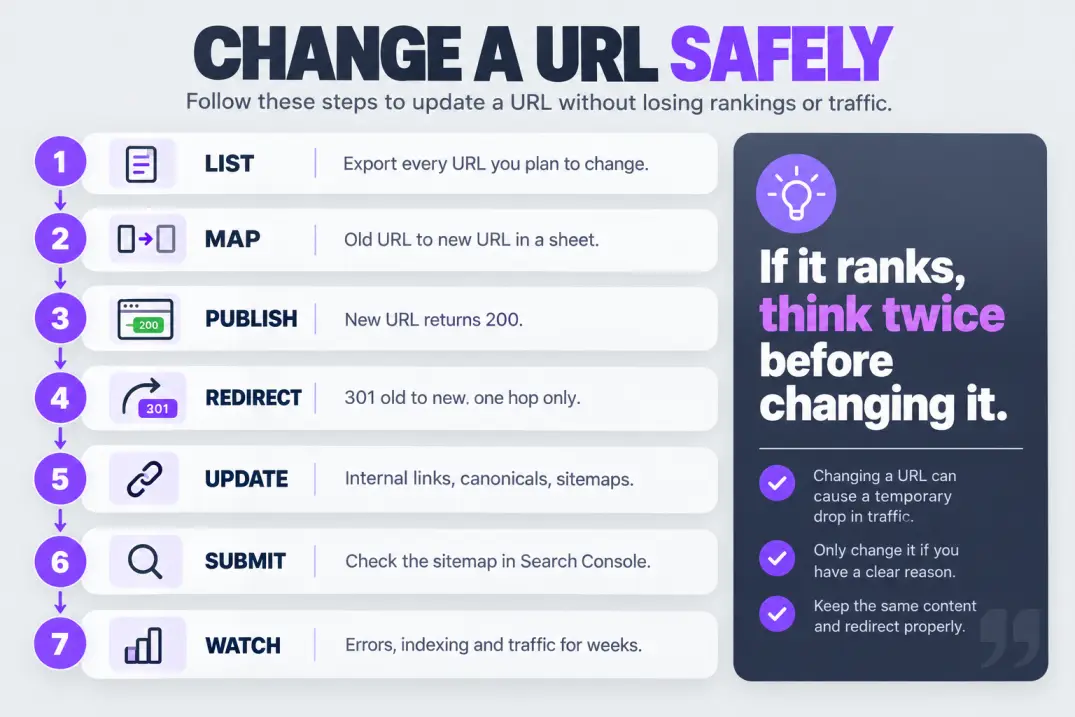
Sometimes you have to. A migration, a rebrand, a restructure or a clearly bad URL on a high-value page can justify a change. The goal is to change it once and make the transition invisible to search engines and visitors.
First, decide whether you should
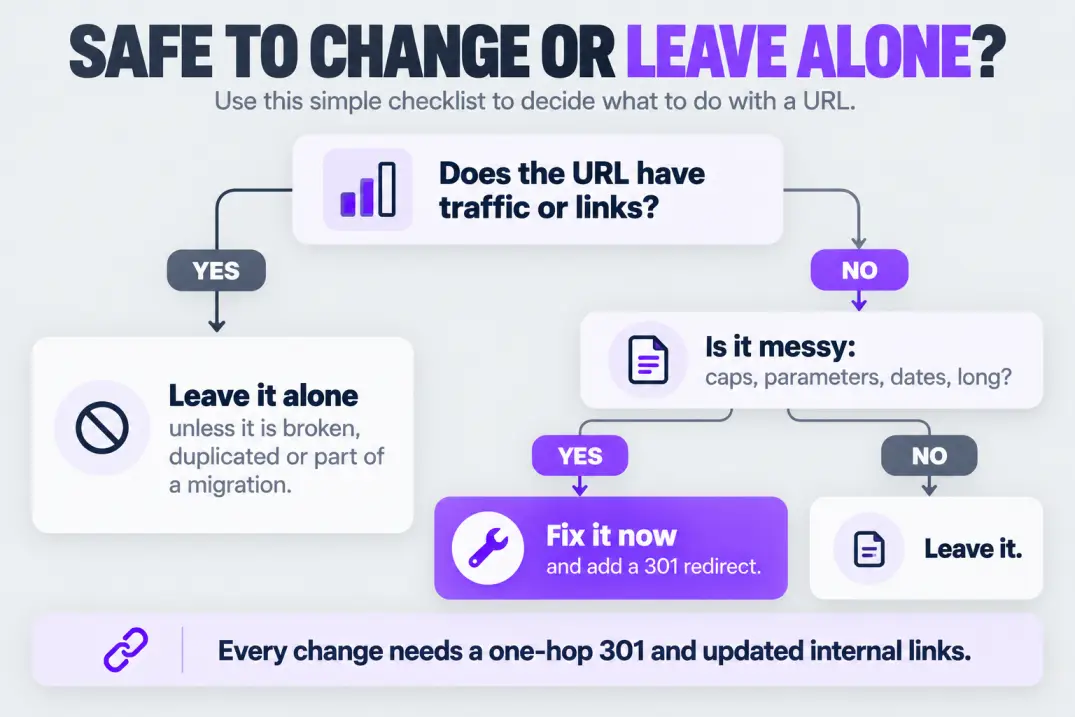
If the page ranks and drives traffic, the default answer is no. The risk usually outweighs the benefit of a slightly cleaner slug. Change a URL when it is broken, misleading, duplicated or part of a planned restructure.
A safe process
- List every URL you plan to change. Export from your CMS, crawler or Search Console, with the pages that link to each.
- Map old to new. Build a two-column spreadsheet with one row per URL.
- Publish the new URL and confirm it returns a 200 status.
- Add a 301 redirect from the old URL to the new one, as described in Google's guide to redirects and Google Search.
- Update internal links so they point straight to the new URL, rather than relying on the redirect.
- Update canonicals, sitemaps and structured data to use the new address.
- Monitor. Watch Search Console for crawl errors, indexing changes and traffic shifts over several weeks.
Keep redirects one hop only. Chains slow crawling and dilute signals, which is why redirect chains are such a common technical problem after restructures.
Keep your old-to-new redirect map in a permanent file. Redirects should stay in place for as long as the old URLs have links or traffic, which can be years.
Measuring the Impact After a Change
Don't assume a URL change worked because the new page loads. Check the signals that matter, and give them time.
In Search Console, inspect the new URL to confirm it can be indexed and that Google has picked the version you intended. Watch the Pages report for new "not indexed" reasons, and the Performance report to compare clicks and impressions for the affected section against the weeks before. A small dip right after a change is normal while the new URLs are being picked up. A sustained drop is a signal to check for redirect loops, wrong canonicals or missing internal links.
Also crawl your own site after the change. Look for internal links that still point at the old URLs, redirects that chain, and pages that return 404 because a rule was missed. These are the failures that usually cost the most, and they're completely avoidable.
Getting Every Version of a URL to Agree
A single page can be reachable at several addresses without anyone intending it. Check each of these and make them all land on one preferred version.
| Variation | Example | Resolve by |
|---|---|---|
| Protocol | http:// vs https:// | Redirect HTTP to HTTPS |
| Subdomain | www. vs none | Pick one and redirect the other |
| Trailing slash | /guide vs /guide/ | Choose a convention and redirect |
| Case | /Guide vs /guide | Redirect to lowercase |
| Index files | /index.html | Redirect to the folder URL |
| Parameters | ?ref=home | Canonicalize to the clean URL |
Test each by typing the variation into a browser and confirming that it redirects to the preferred URL in a single step, with a 301 status. Then confirm that your canonical tags, internal links and sitemap all use that same preferred version. When all four agree, you have removed an entire class of duplicate-content problems.
Platform Settings That Control Your URLs
Most of the work is a one-time setting. Here's where to look.
| Platform | Where to set it | What to choose |
|---|---|---|
| WordPress | Settings > Permalinks | "Post name," then edit each slug before publishing |
| Shopify | Page, product or collection URL handle | Keep handles short; use the option to create a redirect when you change one |
| Static or headless sites | Routing or build config | Enforce lowercase and hyphens with a build check |
| Other website builders | Page settings > URL or slug field | Edit the default slug and avoid auto-generated IDs |
Whatever the platform, check three things after setup. First, that the default format produces readable slugs. Second, that old addresses redirect automatically when you edit a slug, if the platform supports it. Third, that the sitemap lists only the preferred URLs.
How to Audit Your Existing URLs
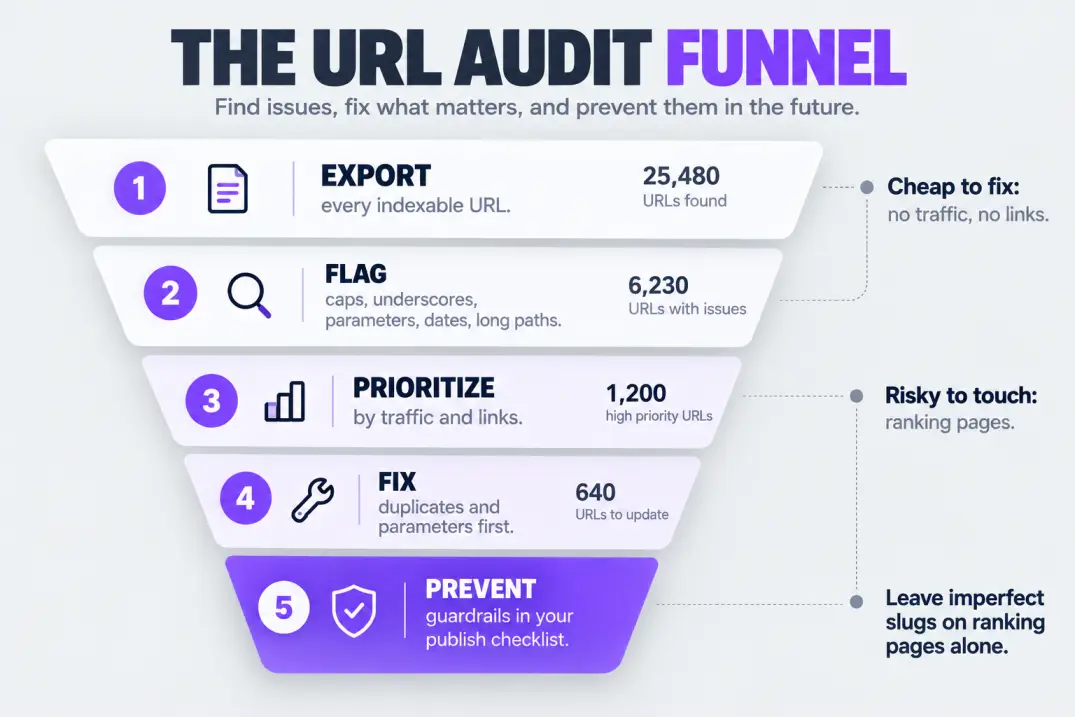
You don't need to fix every messy URL, but you should know which ones exist. A short audit finds the real problems.
Step 1: Export a list
Crawl the site, or export from your CMS and Search Console, so you have every indexable URL in one file.
Step 2: Flag the problems
Scan for the patterns that cause trouble: uppercase letters, underscores, spaces, very long paths, parameters on indexed pages, dates in evergreen content and duplicates that differ only by case or trailing slash.
This small script flags the basics from a text file of URLs, one per line. Save it as check_urls.py and run python3 check_urls.py urls.txt.
import sys, re
from urllib.parse import urlparse

for line in open(sys.argv[1], encoding="utf-8"):
    url = line.strip()
    if not url:
        continue
    p = urlparse(url)
    issues = []
    if re.search(r"[A-Z]", p.path):
        issues.append("uppercase")
    if "_" in p.path:
        issues.append("underscore")
    if p.query:
        issues.append("parameters")
    if len(p.path) > 75:
        issues.append("long")
    if re.search(r"/(19|20)\d{2}/", p.path):
        issues.append("date")
    if "%20" in p.path or " " in p.path:
        issues.append("space")
    if issues:
        print(url, "->", ", ".join(issues))
Step 3: Prioritize
Sort the flagged URLs by value. Pages with traffic or links are risky to touch. Pages with neither are cheap to fix. Duplicates and parameters that waste crawl effort are usually the best first targets.
Step 4: Fix what matters
Fix duplicate versions first with redirects and canonicals. Then fix parameters that create indexable duplicates. Leave ranking pages with slightly imperfect slugs alone.
Step 5: Prevent regressions
Add the rules to your publishing checklist and, if you can, to a build or upload check. A small guardrail saves you from repeating the audit next year.
If URLs are one part of a wider health check, they belong inside a full website audit, where redirects, canonicals and indexing are reviewed together.
How URL Choices Affect Crawling
Crawlers discover pages by following links, and every distinct URL is a separate thing to fetch, evaluate and store. That makes URL hygiene a crawling issue as much as a naming one.
When a site generates many addresses for the same content, such as parameter variations, case variants and session IDs, crawlers can spend their time on near-duplicates instead of your important pages. On a small site this barely matters. On a large one, it can delay how quickly new pages are found and how often key pages are refreshed.
Three habits keep crawling efficient. Link internally only to the preferred version of every URL. Keep parameter URLs out of navigation and sitemaps. And fix redirect chains so a crawler reaches the destination in one hop.
If you want evidence instead of theory, your server logs show exactly which URLs bots request and how often. Reading them is the fastest way to spot wasted crawling, and the method is walked through in log file analysis for SEO.
The so-what: a tidy URL system doesn't just look better. It reduces the number of pages a crawler has to sort through to find the ones that matter.
URLs and Sitemaps
Your sitemap should list the preferred version of every indexable URL, and nothing else. No redirected URLs, no parameter variants, no pages blocked by noindex. A sitemap full of non-preferred URLs sends a mixed message about which version you want indexed.
After any URL change, regenerate the sitemap and check it. The mechanics of how crawlers use these files are explained in how search engines use sitemaps.
Common URL Mistakes to Avoid
- Changing URLs for tiny gains. A slightly nicer slug is rarely worth the risk on a ranking page.
- Skipping redirects. Every old URL with links or traffic needs a 301 to its replacement.
- Letting the CMS pick slugs. Auto-generated slugs often include stop words, dates or whole sentences.
- Using different versions in different places. Linking to
http,wwwand non-wwwvariants splits signals. - Indexing parameter pages by accident. Filters, sorts and tracking codes can multiply pages.
- Stuffing keywords. Repeating the phrase doesn't help and looks spammy.
- Putting dates in evergreen slugs. You'll face a URL change the moment you update the content.
Fixing Them: A Quick Reference
| Mistake | Fix |
|---|---|
| Duplicate versions | Redirect to one preferred version and set canonicals |
| Missing redirects | Add one-hop 301s from old to new |
| CMS-generated slugs | Edit the slug manually before publishing |
| Parameter duplicates | Canonicalize, noindex or block low-value combinations |
| Keyword stuffing | Rewrite to a short, natural slug (only if not ranking) |
| Dated slugs | Use dateless slugs for new content |
Your URL Checklist
Paste this into your publishing notes and run it before every post goes live.
URL CHECKLIST

[ ] Readable by a human - the page is guessable from the URL
[ ] Hyphens between words, no underscores or spaces
[ ] All lowercase
[ ] 3-5 meaningful words in the slug
[ ] Primary keyword once, in natural form
[ ] No dates, IDs, session codes or tracking parameters
[ ] Shallow folders that match the breadcrumb
[ ] One preferred version (https, www choice, trailing slash)
[ ] Listed in the sitemap, with a self-referencing canonical
[ ] Treated as permanent - redirect plan in place if it must change
Final Thoughts
SEO friendly URLs are one of the few SEO decisions that are cheap to get right and expensive to fix. Ten rules cover nearly everything: keep them readable, hyphenated, lowercase, short, keyword-aware but not stuffed, free of dates and IDs, shallow, consistent and permanent.
Apply the rules to every page you publish from today. Leave ranking pages alone unless something is truly broken, and when you do change a URL, redirect it once, update your links and watch the results for a few weeks.
If you only do one thing this week, run the audit script on your URL list and look at the first twenty flagged addresses. The patterns will tell you whether you have a quick cleanup or a deeper structural problem.
- Use short, lowercase, hyphenated slugs that describe the page in plain words.
- A keyword in the URL is a light signal, so don't change ranking URLs just to add one.
- Keep folders shallow, and keep parameters and tracking codes out of indexable URLs.
- Choose one preferred version of every URL and redirect or canonicalize the rest.
- Treat URLs as permanent, and use one-hop 301 redirects whenever you must change one.
Artificial Intelligence
Intelligence without limits.
We believe great content deserves honest authorship—even when it's AI.
Frequently Asked Questions
They're web addresses that are short, readable, consistent and permanent. A friendly URL uses lowercase words separated by hyphens, describes the page in plain language and avoids dates, IDs, session codes and unnecessary parameters.
Only slightly and mostly indirectly. Words in a URL are a lightweight signal, but readable URLs help click-through, make links more descriptive and keep your site cleaner and easier to manage. They won't compensate for weak content or links.
There's no official limit, but shorter is better. A slug of three to five meaningful words and a total path under roughly 75 characters is a practical target that stays readable and easy to share.
Use hyphens. Google's guidance recommends hyphens as word separators because underscores can join words together. Hyphens also look cleaner and are easier to read.
Yes. Paths are case-sensitive on many servers, so mixed case can create duplicate pages and broken links. Use lowercase everywhere and redirect uppercase variants to the lowercase version.
Usually not. A year makes evergreen content look outdated and forces a URL change when you update the page. Show the date on the page itself, and use a dateless slug unless the content is truly tied to one year.
Not always. Dropping words like 'a,' 'the' and 'of' can shorten a slug, but clarity matters more. Remove them only when the slug still reads naturally.
Rarely. If a page already ranks or has links, changing the URL carries risk with little upside. Change URLs that are broken, duplicated or part of a planned restructure, and always add a 301 redirect.
A shallow structure such as /blog/post-slug works best for most blogs. Skip date folders and deep category paths, since categories change over time and posts shouldn't need new URLs.
Two or three levels are enough for most sites. Go deeper only when the content is naturally nested, such as documentation, and keep the path aligned with your breadcrumbs.
Search engines can treat a path with and without a trailing slash as different URLs, so pick one convention, redirect the other and use it consistently in links, canonicals and your sitemap.
Keep indexable pages parameter-free where possible. Canonicalize tracking and sorting versions to the clean URL, keep session IDs out of URLs and index filter pages only when they match real search demand.
Yes, once and in natural form, if it describes the page. Don't repeat it or add variants, and don't change a ranking page's slug just to add the keyword.
You can, but they get percent-encoded, which makes links harder to read and handle. Many sites use plain ASCII slugs and keep native spelling in the title and content. If you use native characters, use UTF-8 and test all redirects.
Export your indexable URLs and scan them for uppercase letters, underscores, spaces, parameters, dates and long paths using a crawler or a short script. Then prioritize by traffic and links and fix duplicates first.
Keep it for as long as the old URL has links or traffic, which can mean years. Removing redirects too early sends visitors and crawlers to a 404, so store your redirect map permanently.