Why 301 Redirect Chains Quietly Destroy SEO Rankings

Artificial Intelligence
September 7, 2026
You migrate an old section of your website, configure what you believe are standard redirects, and watch organic search traffic slowly bleed out over the next three months. Server logs show Googlebot hitting your pages, but rankings slip and new URLs take weeks to get indexed. When you finally inspect the network waterfall, a single legacy link is bouncing through four intermediary URLs before reaching its live destination.

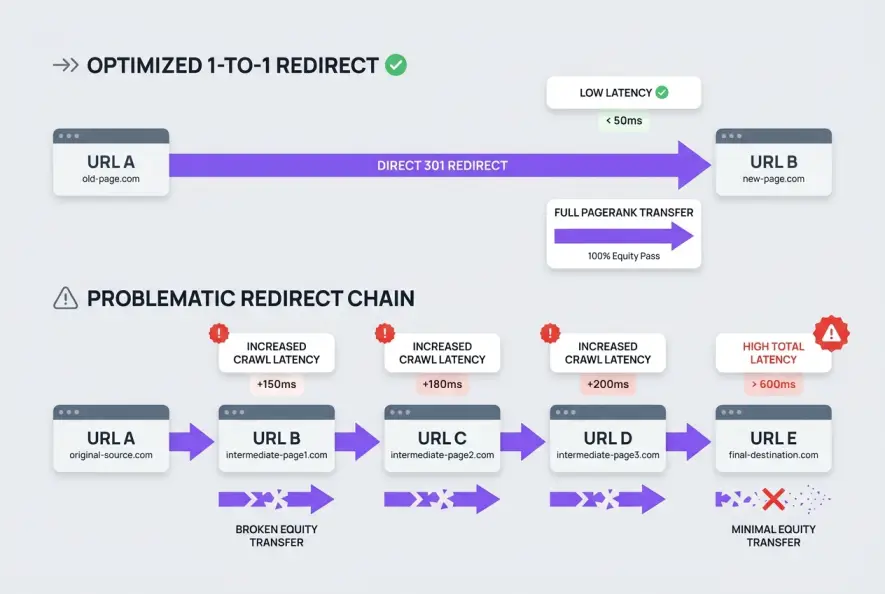
Redirect chains occur when a requested URL passes through multiple 301 or 302 hops before landing on the final destination page. In search engine optimization, redirect chains SEO performance degrades because multi-hop redirects dilute link equity, exhaust crawl budgets, and introduce cumulative network latency that degrades Core Web Vitals. Resolving these chains into direct 1-to-1 redirects restores lost PageRank and ensures search engine bots index your target URLs efficiently.
A redirect chain is a sequence of two or more redirects connecting the initial requested URL to the final destination (e.g., URL A → URL B → URL C → URL D). In contrast, a redirect loop occurs when URLs redirect back into each other infinitely (e.g., URL A → URL B → URL A), resulting in a browser error.
Understanding how search engines process chained URLs reveals why even well-maintained enterprise domains suffer silent traffic loss after site migrations and redesigns.
How Redirect Chains Damage Search Engine Visibility
Search engine crawlers operate under strict resource constraints. When Googlebot encounters a URL, it allocates a specific amount of processing time and network bandwidth to fetch and render that resource. Every intermediary hop in a redirect sequence introduces latency and friction.
1. Cumulative PageRank Decay and Link Equity Loss
While Google representatives have stated that modern 301 redirects pass 100% of PageRank without historic 15% dampening penalties, this principle applies cleanly to direct, single-hop redirects. When a link passes through multiple hops, the risk of signal dilution multiplies.
Each intermediary URL in a chain may carry conflicting canonical tags, distinct HTTP status codes, or outdated robots directives. If an intermediary hop temporarily serves a 302 temporary redirect instead of a 301 permanent redirect, search engines may stop passing equity forward entirely. Over time, search engines treat the intermediary steps as canonical dead ends, dampening the historical authority passed from referring domains.
2. Crawl Budget Exhaustion on Large Websites
Every HTTP redirect is an independent server request. If Googlebot allocates a budget of 10,000 daily requests to your domain, a page that redirects four times consumes five requests (the initial URL, three intermediate hops, and the final URL) just to discover a single piece of content.
This is why your internal links quietly stop passing authority and leave deep product pages undiscovered. For enterprise ecommerce catalogs and large content publishers, thousands of cascading redirects can burn through more than half of your daily crawl allocation on dead routing paths.
Relying on server-level .htaccess or NGINX rewrite cascades to patch legacy URLs over several site migrations creates deep, invisible redirect chains that search bots eventually abandon.
3. Googlebot Abort Thresholds
Googlebot does not follow redirect chains indefinitely. According to official Google Search Central documentation on redirects, Googlebot follows up to 5 redirect hops in a single crawl attempt before aborting the request and flagging the URL as an indexing error.
Request initiated: http://example.com/old-page
  ↳ Hop 1 (301): https://example.com/old-page        [HTTP to HTTPS]
  ↳ Hop 2 (301): https://www.example.com/old-page    [Non-WWW to WWW]
  ↳ Hop 3 (301): https://www.example.com/old-page/   [Trailing Slash Added]
  ↳ Hop 4 (301): https://www.example.com/category/new-page [Legacy Migration]
  ↳ Hop 5 (301): https://www.example.com/blog/final-target  [Recent URL Restructure]
Result: Crawl aborted / PageRank transmission dropped.
When mobile users on high-latency cellular connections encounter these 5-hop chains, time-to-first-byte (TTFB) spikes by several hundred milliseconds, damaging Core Web Vitals and user engagement metrics.
The 4 Most Common Causes of Cascading Redirects
Redirect chains rarely happen by design. They accumulate incrementally over years of platform updates, security patches, and structural re-architectures.
| Root Cause | Mechanism | Impact on SEO |
|---|---|---|
| Protocol & Subdomain Stacking | HTTP → HTTPS → Non-WWW → WWW | Adds 2–3 hops to every legacy URL on the site. |
| Trailing Slash Inconsistencies | URL without slash → URL with slash → Target slug | Creates duplicate hops during routine internal linking. |
| Layered CMS Migrations | WordPress 2021 slug → Shopify 2023 slug → Custom 2026 slug | Passes legacy external backlinks through obsolete paths. |
| Unresolved Internal Links | Old internal links pointing to redirected URLs | Continuous crawl waste on every page render. |
Protocol and Canonical Stacking
When websites implement SSL certificates or switch canonical domain formats (such as moving from http://example.com to https://www.example.com), developers often write discrete rewrite rules that execute in sequential order rather than resolving in a single pass.
If the server processes the SSL upgrade rule before the www canonicalization rule, incoming traffic hits http://example.com, redirects to https://example.com, and then redirects again to https://www.example.com. Combining these rules at the web server layer ensures the initial request resolves to the secure canonical destination in a single step.
Trailing Slash Conflicts
Web servers treat /product and /product/ as two distinct URI paths according to W3C HTTP URL specifications. If your content management system enforces trailing slashes but marketing teams publish links without them, every click and crawl executes an unnecessary redirect hop before processing downstream rules.
Incremental Content Updates and Slug Adjustments
When editors optimize an article title or update a year-based URL slug (e.g., changing /best-tools-2024/ to /best-tools/), CMS plugins automatically create a 301 redirect. If that post was already redirected during a prior migration, a new link hop is born.
Modern publishing systems prevent this debt by maintaining clean internal databases. For example, Qoreta automatically checks and updates destination targets across content drafts to guarantee internal links always point directly to canonical URLs rather than legacy redirect hops.
Step-by-Step Workflow to Audit and Eliminate Redirect Chains
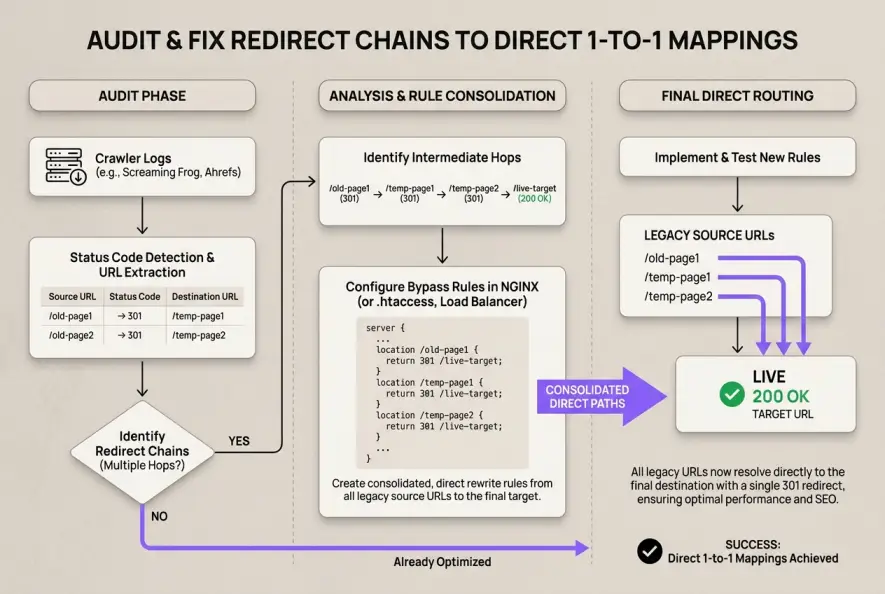
Fixing redirect chains requires a systematic audit of your external backlink profile, internal link architecture, and server configuration files.
Step 1: Discover All Existing Multi-Hop URLs
Run a comprehensive crawl of your website using tools like Screaming Frog SEO Spider, Sitebulb, or enterprise log analyzers. Configure the crawler to follow redirects and extract the Redirect Chain Report.
Filter the output by Redirect Count > 1. This isolates every URL on your domain that requires more than a single hop to resolve.
Export your top 500 most-linked pages from Google Search Console and run them through a bulk HTTP header checker. Backlinks pointing to multi-hop chains represent high-value link equity that is actively being dampened.
Step 2: Collapse Server Rewrite Rules into Direct Mappings
Review your .htaccess, NGINX configuration, or Cloudflare Page Rules to ensure domain-level redirects execute simultaneously.
In NGINX, combine protocol and canonical hostname updates into a single rewrite block:
# Correct: Resolves HTTP and Non-WWW directly to HTTPS WWW in one hop
server {
    listen 80;
    listen [::]:80;
    server_name example.com www.example.com;
    return 301 https://www.example.com$request_uri;
}

server {
    listen 443 ssl http2;
    listen [::]:443 ssl http2;
    server_name example.com;
    return 301 https://www.example.com$request_uri;
}
Step 3: Update Internal Links in Your Database
Eliminating redirect chains on your server does not solve internal linking debt. If your navigation menu or body copy contains links to URL A, visitors and search bots still trigger redirects.
Perform a direct database search-and-replace or run automated script routines across your CMS tables. Update all href targets from the legacy source URLs directly to the canonical destination URL C (200 OK status code).
Step 4: Reclaim External Backlink Value
For external backlinks from top-tier publications that point to legacy URLs with multiple hops, reach out to site owners where feasible to update the link target. Where outreach is impractical, ensure your server immediately 301 redirects that historic backlink directly to the most relevant current asset without intermediary stops.
An enterprise SaaS company reduced crawl latency by 38% across 45,000 URLs by flattening 3-hop redirect chains into direct 1-to-1 rules. Within six weeks, crawl frequency on priority product pages rose by 22%, leading to a measurable ranking recovery for competitive commercial terms.
Long-Term Maintenance: Preventing Redirect Debt
Technical hygiene is not a one-time project. As websites scale, teams add marketing landing pages, deprecate outdated features, and revise taxonomies.
Establish a quarterly redirect audit schedule. Maintain an authoritative Master Redirect Table in your engineering documentation that maps every historic URL change. Whenever a URL undergoes a second migration, update the original entry in your mapping table so legacy URLs always route directly to the final live endpoint.
Artificial Intelligence
Intelligence without limits.
We believe great content deserves honest authorship—even when it's AI.
Frequently Asked Questions
Googlebot typically follows up to 5 redirect hops in a single crawl session before terminating the request. If the chain exceeds 5 hops, Google flags the page as a redirect error in Search Console and drops the destination from the index.
While individual 301 redirects pass full PageRank, multi-hop chains risk signal degradation due to conflicting canonicals, temporary 302 hops mixed in the chain, or crawler timeouts that prevent bots from reaching the final destination.
A redirect chain eventually resolves to a working 200 OK destination page after multiple intermediate hops (A → B → C). A redirect loop points back to an earlier URL in the sequence (A → B → A), causing an infinite loop that crashes the browser request.
In WordPress, use an SEO redirection plugin or database script to edit legacy redirects so they point straight to the active slug rather than chained intermediaries. In Shopify, navigate to Online Store > Navigation > URL Redirects, search for intermediate slugs, and update their destination field directly.
Yes. Each redirect hop adds round-trip network time (RTT) between the client and the server. This cumulative delay directly inflates Time to First Byte (TTFB) and First Contentful Paint (FCP), harming mobile user experience and Core Web Vitals scores.
Both 301 and 308 indicate permanent redirects to search engines. A 301 is the industry standard and guarantees HTTP method changes (e.g., POST to GET), while a 308 preserves the original HTTP request method. For standard website URLs, 301 redirects remain the safest and most compatible choice.