Internal Linking Strategy: Why Yours Is Killing SEO

Artificial Intelligence
September 4, 2026
You spent three days researching, writing, and editing a comprehensive guide for your site. You published it, submitted the URL to Search Console, and waited for organic traffic. Three weeks later, the post is stuck on page four, while a competitor's brief 800-word overview holds the top spot.

The culprit usually isn't content quality or domain authority—it is page architecture. Without a deliberate internal linking strategy, search engine crawlers treat your best articles as isolated islands, starving them of authority and contextual signals.
Fixing this issue does not require buying external backlinks or rewriting your articles. It requires building structured topic hubs, eliminating orphan pages, and using descriptive anchor text so search bots instantly recognize which pages deserve to rank.
How Search Engines Process Internal Links
Googlebot relies on links to discover new pages, establish relationships between topics, and calculate relative page importance. When a search crawler visits a web page, it evaluates the links on that page to determine where to go next.
According to Google Search Central documentation, search bots require standard HTML <a> tags with valid href attributes to crawl effectively. If your links rely on JavaScript click events or unlinked text, crawlers cannot follow them.
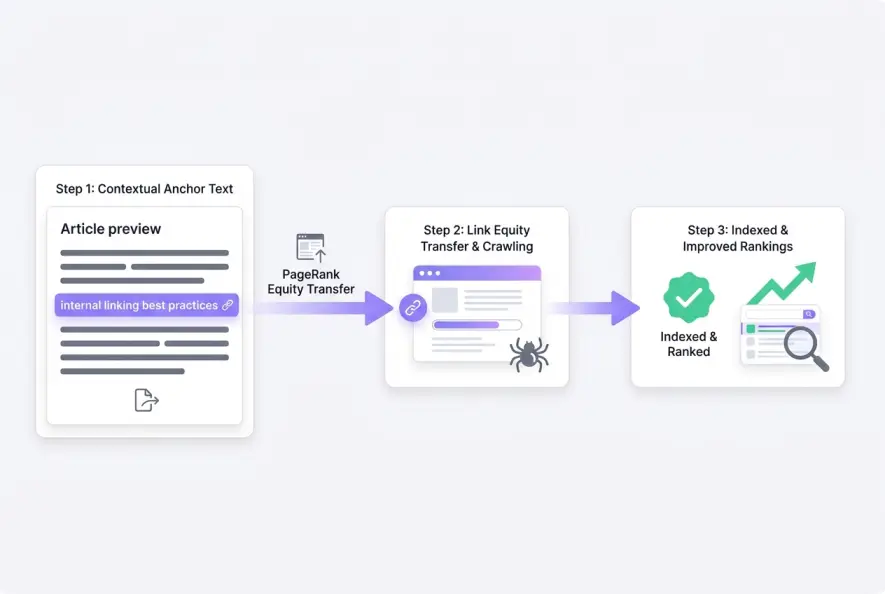
Beyond discovery, links distribute PageRank equity across your site domain. Every incoming link acts as a vote of confidence. When a high-authority page on your site links to another internal page, it passes a fraction of its link equity downward.
Relying solely on navigation menus or automated sidebar widgets for internal links dilutes PageRank distribution. In-body contextual links pass significantly stronger relevance signals to search engines.
PageRank Flow and Crawl Depth
Crawl depth measures how many clicks it takes for a search engine or user to reach a specific page from the homepage.
If a page sits four or five clicks deep in your site architecture, crawlers visit it far less frequently. Pages placed closer to the homepage receive more crawl budget and retain higher link equity.
- 0–2 Clicks: High priority pages, core category hubs, and key landing pages.
- 3 Clicks: Standard blog posts and supporting sub-topics.
- 4+ Clicks: Deeply nested content at risk of becoming under-indexed or orphaned.
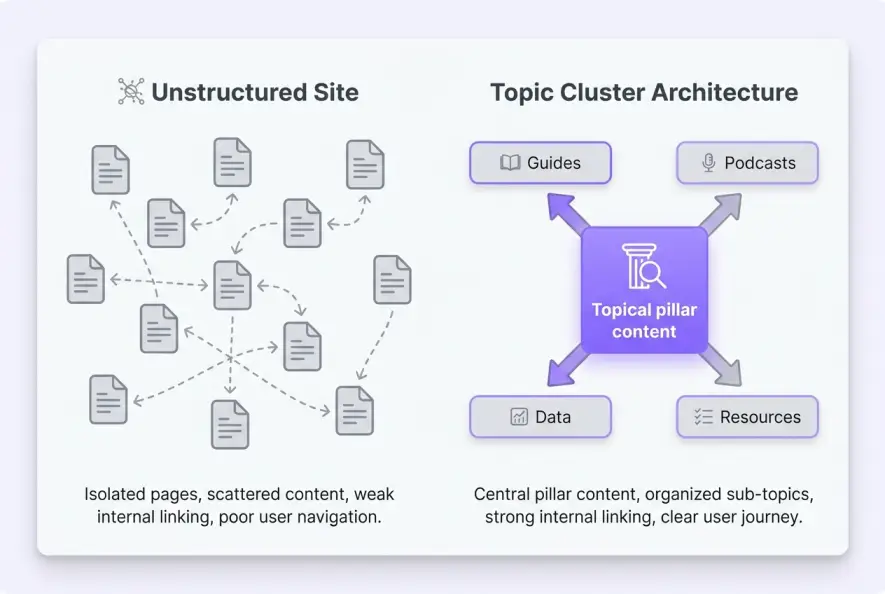
The Topic Cluster Architecture Model
Randomly scattering links throughout your articles creates a chaotic network that confuses search engines. To build durable authority, adopt the topic cluster model.
In a topic cluster model, a broad, comprehensive page acts as the central hub (or pillar). Around this hub, you publish specific supporting articles that deep-dive into sub-topics.
Each supporting post links directly to the main pillar page using relevant anchor text, and the pillar page links back out to each supporting post.
An extensive Ahrefs study on internal links demonstrated that grouping related content through strategic internal links significantly increases topical relevance and keyword rankings for both the main hub and supporting spokes.
| Linking Approach | PageRank Distribution | Topical Signals | Crawl Efficiency |
|---|---|---|---|
| Flat / Random | Uneven and leaked equity | Fragmented and noisy | Low (crawlers hit dead ends) |
| Topic Clusters | Concentrated on priority pages | Strong contextual grouping | High (logical paths for bots) |
| Deep Hierarchy | Diluted past 3 clicks | Rigid and isolated | Moderate (slow discovery) |
Anchor Text Optimization Rules
Anchor text is the clickable text snippet holding a hyperlink. It tells both users and search bots what the destination page is about before they click.
To maximize search visibility, keep anchor text contextual, varied, and natural.
- Be Specific: Instead of linking the word 'here', highlight descriptive phrases like 'technical SEO audit checklist'.
- Avoid Exact-Match Overuse: Repeating identical anchor text across hundreds of internal links looks unnatural.
- Keep It Concise: Limit anchor text to 2–5 words rather than linking entire sentences.
Map out your top 10 revenue-generating or conversion-focused posts. Audit your site to ensure every new article in that niche points back to at least one of those core assets using descriptive anchor text.
Common Internal Linking Pitfalls to Fix
Even experienced site owners make technical errors that undermine their link equity. Auditing your site every quarter helps identify and resolve these hidden issues before they impact search rankings.
1. Orphan Pages
An orphan page is an indexed URL that receives zero internal links from other pages on the same domain. Crawlers can usually only discover orphan pages through XML sitemaps or external backlinks.
Because no internal links pass authority to an orphan page, search engines treat it as low importance, resulting in poor rankings and delayed re-indexing.
2. Broken Internal Links (404 Errors)
When you delete or move a post without setting up a 301 redirect, any internal link pointing to that old URL breaks. Broken links waste crawl budget, create a frustrating user experience, and trap PageRank equity in dead-end pages. Always verify that target URLs comply with standard W3C specifications.
3. Redirect Chains and Loops
Linking to a URL that redirects to another page—or worse, loops back to the original URL—slows down page load speeds and dilutes the link equity passed to the destination page. Always update internal links to point directly to the final canonical URL.
Step-by-Step Internal Link Audit Workflow
When you refine your internal linking strategy, you ensure search crawlers can easily discover, crawl, and rank your entire content library. Follow this straightforward 4-step workflow:
- Export Crawl Data: Use a site auditing tool to generate a full list of internal URLs, incoming inlinks, and status codes.
- Identify Orphaned Content: Filter your list for live articles that have zero or only one internal inlink.
- Map Content Clusters: Group orphan posts by topic and add 2–3 contextual links from existing, high-authority articles in the same cluster.
- Fix Broken Links and Redirects: Update outdated URLs so all internal links point directly to active 200 OK canonical pages.
- Internal links pass PageRank equity and establish topical relationships across your site.
- Topic cluster models group related content around core pillar pages for maximum authority.
- Use natural, descriptive anchor text instead of generic phrases like 'click here'.
- Regularly audit for orphan pages and broken internal redirects.
By building a structured, deliberate network of internal links, you turn isolated blog posts into an interconnected authority engine that search engines favor and recommend.
Artificial Intelligence
Intelligence without limits.
We believe great content deserves honest authorship—even when it's AI.
Frequently Asked Questions
Internal links should open in the same tab so visitors maintain a consistent browser history and seamless navigation across your domain. Opening internal links in new tabs creates unnecessary tab clutter.
There is no hard limit, but 3 to 6 relevant contextual internal links per 1,500 words is typically effective. Focus on linking to highly related sub-topics rather than arbitrary pages.
No. Search engines place greater weight on contextual links located within the main body content, as they provide richer topic signals compared to site-wide footer or sidebar links.
Yes. Every link on a page shares a portion of that page's total PageRank equity. Adding dozens of unnecessary links dilutes the authority passed to each individual destination.
A quarterly internal link audit is ideal for growing sites. Auditing every 3 months allows you to fix broken links, reconnect orphan pages, and integrate recently published articles.
No. Using exact-match anchor text repeatedly across hundreds of pages can look automated or spammy. Vary your anchor text naturally while keeping it descriptive and relevant.