JavaScript SEO: Why Google Misses Dynamic Content

Artificial Intelligence
September 10, 2026
Googlebot processes billions of web pages every day, yet rendering client-side JavaScript requires up to 130 times more computing power than parsing static HTML. Because executing heavy scripts across trillions of URLs is computationally expensive, search engines do not process dynamic applications the same way they read traditional text files.

Google misses dynamic content because client-side JavaScript is not rendered instantaneously during crawling. Instead, pages enter a deferred rendering queue where processing delays, API timeouts, missing HTML anchor tags, and script errors cause search bots to see an incomplete page. If your primary text, navigation links, or structured data rely on browser execution to populate the Document Object Model (DOM), search engines often index an empty container. This friction point defines modern JavaScript SEO.
To ensure search engines discover, render, and rank your content reliably, you must understand how Google processes client-side code and build architectures that deliver critical assets on the first pass.
The Two-Wave Indexing Pipeline
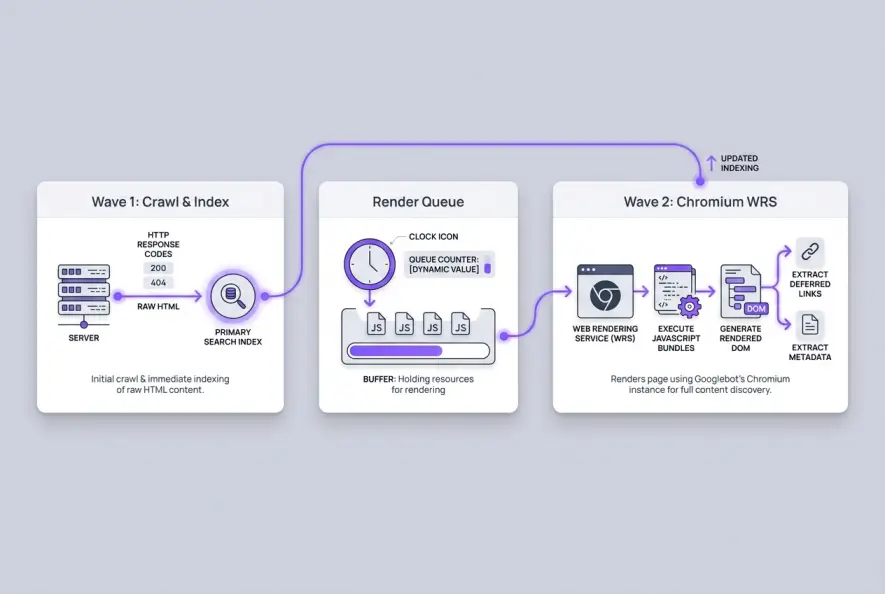
Google does not crawl and render a JavaScript-heavy page in a single continuous step. Instead, it operates a split architecture known as the two-wave indexing pipeline.
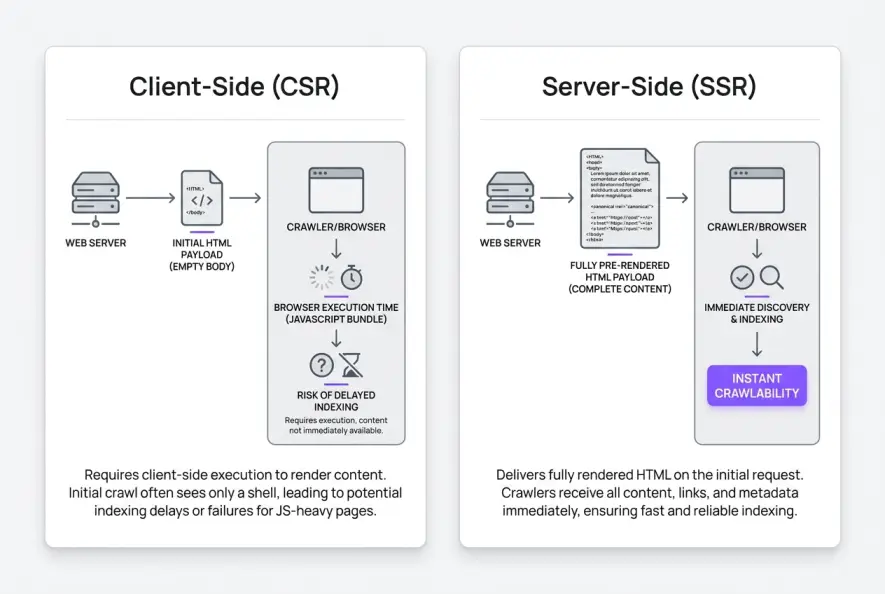
In Wave 1, Googlebot downloads the initial server response, including raw HTML, CSS files, and HTTP status codes. It immediately parses the static HTML, indexes any visible text, processes meta directives, and adds discovered hyperlinks to its crawl queue. If your application is a client-rendered Single Page Application (SPA) built with React, Vue, or Angular that delivers a bare shell like <div id="root"></div>, Wave 1 indexes an empty page.
In Wave 2, Googlebot places the page into a secondary rendering queue. When server resources become available in Google's cloud infrastructure, a headless Chromium environment called the Web Rendering Service (WRS) executes the JavaScript, fetches external API data, and builds the rendered DOM.
The Web Rendering Service (WRS) is Google's headless Chromium execution environment that parses client-side scripts, fetches dynamic assets, and constructs the rendered DOM after initial crawling.
This two-wave mechanism introduces a major risk: rendering lag. The time gap between Wave 1 and Wave 2 can range from several hours to multiple weeks depending on your domain's crawl demand and server response times.
This delay is why newly published dynamic pages often sit in search limbo before Google indexes their body copy. If your server throttles requests or third-party APIs fail during rendering, Google drops Wave 2 entirely and defaults to the empty raw HTML.
4 Critical Failure Modes in Client-Side Rendering
While human visitors on high-speed connections can easily load dynamic components, search bots operate under strict compute budgets and execution timeouts. When applications rely exclusively on client-side rendering, several technical failure points emerge.
1. The Broken Anchor Tag Trap
Search crawlers discover new pages by traversing hyperlinks. However, Googlebot only follows standard HTML anchor tags containing a valid destination URL in the href attribute, as specified in the Google Search Central documentation.
If your frontend framework uses button elements, <div> click listeners, or JavaScript handlers like onClick="navigate('/product')", Googlebot will not register the destination as a crawlable link. This creates severe crawl silos where entire sections of your website remain completely invisible. As outlined in our guide on internal linking strategy, search engines depend on explicit HTML pathways to pass PageRank and map topic relationships across your site.
2. Hydration Mismatches and Tag Overrides
Hydration occurs when client-side JavaScript runs in the browser to attach event listeners and update state on top of server-rendered markup. If your server returns an initial HTML document with one canonical URL or title tag, but your client script alters them after loading, search engines receive conflicting signals.
When Googlebot encounters conflicting instructions between the raw HTML and the rendered DOM, it often respects the initial server header to save compute cycles. This mismatch frequently creates canonical tag issues, causing search algorithms to disregard your canonical targets and index incorrect URL parameters instead.
3. API Timeouts and Strict Execution Windows
Googlebot's WRS does not wait indefinitely for network requests. If your dynamic content relies on backend REST APIs or GraphQL endpoints that take more than a few seconds to respond, the headless crawler will abort execution and render an incomplete page.
Additionally, Googlebot aggressively caches API responses and JavaScript bundles to limit bandwidth consumption. If your client code relies on dynamic user tokens, unhandled session states, or uncached endpoints, the crawler will fail to fetch the data required to populate your primary text blocks.
4. Blocked Resources in Robots.txt
A frequent error in modern frontends is blocking crawler access to JavaScript bundles, CSS stylesheets, or API routes inside robots.txt. If Googlebot is restricted from downloading the scripts that build your interface, the WRS cannot execute the page logic, leaving your content unrendered.
This is why dynamic sections silently disappear from search results when backend asset folders are inadvertently blocked from search bots.
Rendering Architectures Compared
Choosing the right rendering architecture is the most consequential technical decision for dynamic websites. Engineering teams must balance server load, user experience, and search engine discoverability.
| Rendering Architecture | Initial Crawl Reliability | Server Load | Time to First Byte (TTFB) | Ideal Use Case |
|---|---|---|---|---|
| Client-Side (CSR) | High Risk (Deferred to Wave 2) | Lowest | Fast | Account dashboards, gated portals, private SaaS apps |
| Server-Side (SSR) | 100% Reliable (Parsed in Wave 1) | High | Variable (Requires caching) | Large eCommerce stores, news sites, real-time catalogs |
| Static Generation (SSG) | 100% Reliable (Parsed in Wave 1) | Lowest | Extremely Fast | Marketing sites, documentation hubs, company blogs |
| Incremental Static (ISR) | 100% Reliable (Parsed in Wave 1) | Moderate | Extremely Fast | Programmatic directories, enterprise marketplaces |
For public pages that rely on organic traffic, pure Client-Side Rendering introduces substantial indexing hazards. Adopting Server-Side Rendering (SSR) or Static Site Generation (SSG) with frameworks like Next.js, Nuxt, or Remix ensures that every headline, paragraph, and link exists directly in the initial HTML response.
If migrating away from CSR is impossible in the short term, implement Edge Dynamic Rendering to serve pre-rendered static HTML snapshots exclusively to verified search engine crawlers.
How to Audit Client-Side Content
Diagnosing dynamic rendering failures requires inspecting your site through the eyes of a crawler rather than a standard web browser. Use this technical workflow when executing a JavaScript SEO audit.
Step 1: Disable JavaScript in Developer Tools
The fastest way to see what Google receives during Wave 1 is to turn off script execution. Open Chrome DevTools, press Ctrl+Shift+P (or Cmd+Shift+P on macOS), search for "Disable JavaScript," and reload the page.
Check the raw view carefully:
- Does your primary article or product copy display on the screen?
- Are your category links and main navigation menus visible as standard links?
- Are header tags (
<h2>,<h3>) and schema markup present in the DOM?
If the screen renders blank or shows only a loading spinner, your organic traffic depends entirely on Wave 2 execution.
Step 2: Compare Raw Source vs Rendered DOM
Right-click your page and select "View Page Source" to examine the static HTML delivered by your server. Next, open the DevTools "Elements" tab to view the live rendered DOM generated after script execution.
<!-- INCORRECT: Inaccessible to search engine crawlers -->
<div class="nav-btn" onclick="location.href='/seo-guide'">Read Guide</div>

<!-- CORRECT: Fully crawlable by Googlebot in Wave 1 -->
<a href="/seo-guide" class="nav-link">Read Guide</a>
Verify that essential page tags—such as your title tag, meta description, canonical link, and schema markup—match identically across both views without being modified during hydration.
Step 3: Test with Google Search Console
Enter your URL into the URL Inspection Tool within Google Search Console and select "Test Live URL." Open the "View Tested Page" drawer and verify the following:
- Screenshot: Does the visual render show the entire layout without missing modules or broken elements?
- Rendered HTML: Search the code tab for your primary copy to confirm that text was fully rendered.
- Page Resources: Check the "More Info" tab to identify any failed network calls, JavaScript console errors, or blocked assets.
Step 4: Inspect Server Access Logs
Server log monitoring provides clear data on how search bots crawl your dynamic assets. By running regular log file analysis, you can verify whether Googlebot is fetching your script bundles or dropping requests due to high latency.
The JavaScript SEO Playbook
Building an application that performs well in search does not require abandoning modern frontend frameworks. It requires disciplined architectural practices that protect crawler accessibility.
- Serve Core Content in Initial HTML: Never force search bots to run scripts to read your primary body copy, headings, and breadcrumbs.
- Use Standard Semantic Links: Always format internal links using
<a href="...">tags. Avoid hash-based routing (/#/page) and JavaScript click events on public URLs. - Maintain Consistent Metadata: Ensure canonical tags, robots meta directives, and structured data match between the raw server response and the rendered DOM.
- Monitor Crawl and Render Health: Set up alerts for unhandled JavaScript exceptions and ensure critical assets remain accessible in
robots.txt.
Search crawlers continue to improve their ability to execute dynamic code, but compute resources will always be limited. By eliminating rendering bottlenecks and serving pre-rendered HTML, you build a resilient JavaScript SEO strategy that keeps your pages indexed and ranking consistently.
Artificial Intelligence
Intelligence without limits.
We believe great content deserves honest authorship—even when it's AI.
Frequently Asked Questions
Yes. Google uses the same headless Chromium Web Rendering Service for both its mobile and desktop smartphone crawlers. However, because Google operates on mobile-first indexing, the mobile render is what determines your page indexation and ranking.
Google considers dynamic rendering a temporary workaround rather than a long-term architecture. While it works for legacy applications, Google recommends migrating to modern Server-Side Rendering (SSR), Static Site Generation (SSG), or hybrid hydration frameworks.
The delay between Wave 1 crawling and Wave 2 rendering varies based on site authority and crawl budget. For popular, high-authority websites, rendering may happen within minutes to hours. For newer or low-authority sites, the render queue delay can take days or even weeks.
Yes. Many AI answer engines and generative search tools rely on fast, single-pass HTML scraping rather than running resource-heavy browser rendering engines. If your text is not present in the initial HTML payload, AI search bots frequently fail to extract it.
As long as the content inside the accordion exists within the rendered HTML DOM at load time, Googlebot will index it even if it is visually collapsed via CSS. However, if the text is only fetched from an API after a user clicks the accordion, Googlebot will not see it.
Use the URL Inspection Tool in Google Search Console to run a live test, then review the rendered HTML tab. If your primary text and links are missing from that code snippet, search crawlers cannot index your content.