Log File Analysis for SEO: What Bots Actually Crawl

Artificial Intelligence
September 10, 2026
You check your performance dashboards daily, monitoring impressions and indexing status, but you have no real idea what search engine bots did on your server five minutes ago. You rely on delayed, sampled metrics while your actual server logs hold the unfiltered truth of every single bot request.

In technical marketing, conducting log file analysis for seo is the only definitive way to observe raw bot interactions, identify wasted crawl budget, and fix indexation blockers before they damage search visibility. Server logs capture the exact timestamp, URL path, HTTP status code, and user agent of every bot visit, eliminating guesswork.
When search engines struggle to find or evaluate your highest-value content, rankings stagnate regardless of content quality. Understanding bot access patterns reveals whether Googlebot is spending its crawl budget on priority pages or getting trapped in low-value URL loops.
Server Log Analysis: The technical SEO practice of parsing raw web server access logs to evaluate how search engine crawlers interact with a website's pages, assets, and architecture.
The Anatomy of an Access Log: What Search Bots Leave Behind
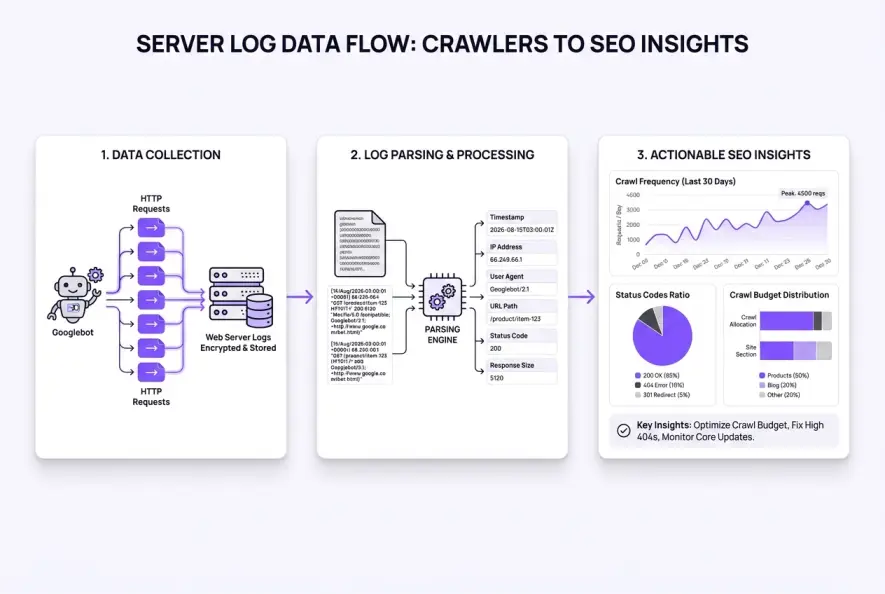
Every time a web crawler like Googlebot or Bingbot requests a resource from your hosting infrastructure, your server writes a single line of text to an access log. These files record raw network activity independently of JavaScript execution or browser rendering cookies.
Most modern web servers—such as NGINX, Apache, and edge CDNs—record data using standard web standards outlined by W3C Common Log Format specifications. Each entry contains critical technical variables:
# Example NGINX Combined Log Format entry for Googlebot
66.249.66.1 - - [15/Aug/2026:10:14:22 +0000] "GET /blog/seo-strategy HTTP/2.0" 200 14820 "-" "Mozilla/5.0 (compatible; Googlebot/2.1; +http://www.google.com/bot.html)"
To interpret this entry accurately, technical teams dissect several foundational fields:
- Client IP Address: The originating IP address of the requester (
66.249.66.1), which allows you to verify authentic search engine bots via reverse DNS lookup. - Timestamp: The exact second the request reached your server, helping correlate crawl spikes with site outages or algorithmic updates.
- HTTP Method and URI: The request type (
GET) and specific file path requested by the bot. - HTTP Status Code: The server response returned (
200,301,404,500), highlighting crawl efficiency and broken paths. - User-Agent String: The identifier declaring which bot made the request (e.g., Googlebot Desktop, Googlebot Smartphone, or AI crawlers).
This is why your internal links quietly stop passing authority when search bots hit silent redirect chains or repeated server timeouts before reaching target pages.
Server Logs vs. Google Search Console: The Critical Differences
Many website owners assume that the Crawl Stats report in Google Search Console renders log file audits obsolete. While Search Console offers valuable high-level trends, it provides an aggregated, sampled perspective rather than complete server-level granularity.
When executing log file analysis for seo, you immediately observe how aggregate reports mask day-to-day crawl anomalies, secondary crawler behavior, and non-Google search bots entirely.
| Feature | Server Access Logs | Google Search Console Crawl Stats |
|---|---|---|
| Data Completeness | 100% unsampled hit record | Aggregated and sampled summary |
| Bot Visibility | Googlebot, Bingbot, PerplexityBot, GPTBot, etc. | Googlebot variants only |
| Latency | Real-time / live streaming | 24–72 hour data delay |
| Asset Detail | HTML, CSS, JS, images, PDF files | High-level grouping by file type |
| Response Code History | Exact status returned per request | Sampled category breakdowns |
For enterprise architectures, relying solely on Search Console is like trying to balance a balance sheet using monthly bank estimates instead of itemized transaction receipts. To see the full scope of search engine interest, you need direct access to your server access records.
4 Technical SEO Blindspots Log Files Immediately Uncover
Raw server logs reveal structural inefficiencies that standard crawl audits cannot simulate. Because third-party desktop crawlers only follow discovered links, they cannot show how real search bots prioritize your pages over time.
1. Severe Crawl Waste and Orphaned Parameter Traps
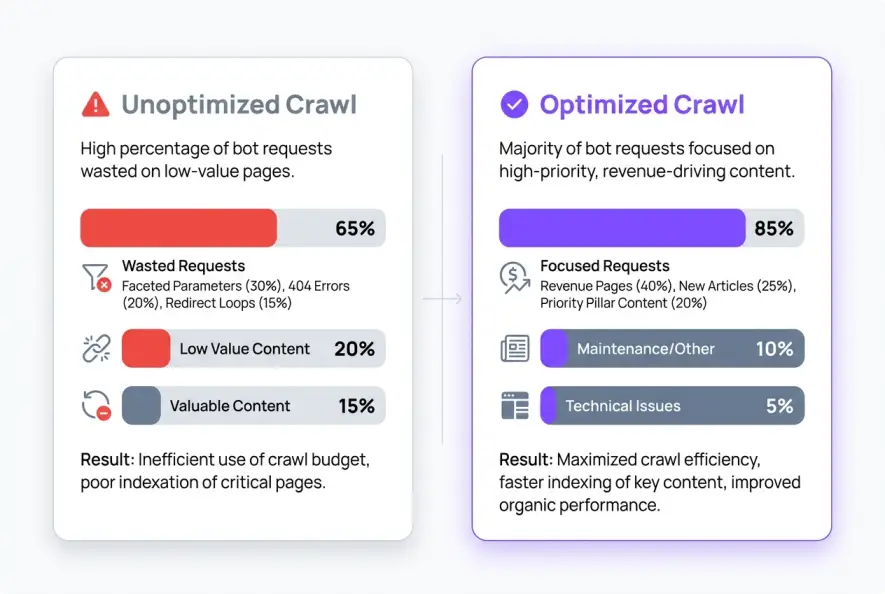
Search bots possess limited resources for any given domain, an operational constraint detailed in Google Search Central documentation. When your site generates infinite parameter variations, faceted filter combinations, or tracking URLs, bots can burn thousands of daily hits on duplicate pages.
Log audits show the exact URL paths absorbing crawler attention. If 60% of daily bot hits land on faceted search queries instead of core commercial pages, your crawl efficiency collapses. This pattern often mirrors broader site health challenges, such as identifying crawl budget allocation issues across neglected directory subfolders.
2. Bottlenecks in Newly Published Content Discovery
When you publish new articles or product pages, how long does Googlebot take to find them? By filtering your server logs for newly created URL paths, you can measure discovery latency down to the exact second.
If search engine bots do not touch new URLs within 48 to 72 hours of publication, your internal navigation is failing to distribute PageRank effectively. This discovery gap is common when websites lack organized directory depth, requiring a structured approach to auditing your site architecture to shorten crawl paths.
An e-commerce publication audited three months of CDN server logs and discovered Googlebot was spending 43% of its daily requests crawling deprecated 2021 seasonal filter tags. After returning 410 Gone status codes and updating internal links, crawl frequency on new product releases jumped by 180% within two weeks.
3. Masked 5xx Server Errors and Redirect Loops
A page may return a clean 200 OK status when inspected in your desktop browser, yet return intermittent 503 Service Unavailable or 500 Internal Server Error responses under crawler load. Because bots crawl at high concurrency, they frequently trigger server timeouts that normal users never encounter. Log files highlight every single non-200 response code instantly.
4. Cannibalization and Bot Crawl Split
When two competing URLs target identical topics, search bots often split their crawl frequency between them rather than prioritizing the canonical asset. Log data shows when bot attention oscillates between duplicate resources, which is vital when addressing content cannibalization to unify organic search equity.
Step-by-Step Workflow: How to Extract and Audit Server Logs
Executing an actionable server log audit does not require complex enterprise infrastructure. Following a disciplined four-step framework turns massive log archives into clear SEO priorities.
Step 1: Collect Raw Access Logs from Your Host or CDN
Obtain access logs covering at least 30 to 90 continuous days to account for weekly crawl cycles. If your website operates behind a CDN such as Cloudflare or Fastly, configure log streaming through Cloudflare Web Analytics or raw log pushes to Amazon S3. For standard servers, download access logs directly via SFTP or cPanel File Manager.
Step 2: Filter and Verify Legitimate Search Engine Crawlers
Scrapers frequently spoof search bot User-Agent strings to bypass scraping protections. To isolate authentic crawler activity, verify the IP addresses against official search engine hostnames using automated reverse DNS lookups (host <IP_ADDRESS>). Authentic Googlebot requests will always resolve to domains ending in .googlebot.com or .google.com.
Step 3: Parse and Aggregate Crawl Metrics
Import your filtered logs into specialized parsing software such as Screaming Frog Log File Analyser, Semrush Log File Analyzer, or an automated SQL pipeline. Group your data by:
- URL directory structure (
/blog/,/products/,/category/) - Response status codes (
200,301,302,404,500) - Bot request frequency per page per month
For engineering teams looking to process heavy telemetry and visualize continuous log streams, learning how to build a custom dashboard for AI applications offers an excellent blueprint for designing clear, real-time interfaces. If you need end-to-end technical support, Bridge Homies is an AI/ML engineering and custom software agency specializing in building scalable web architectures, RAG pipelines, and automated internal tools.
Standardizing log file analysis for seo into your quarterly maintenance workflow prevents silent technical decay from undermining new content campaigns. For example, automated publishing workflows like Qoreta structure clean URL hierarchies and internal link paths from day one, eliminating the parameter sprawl and orphaned URLs that typically waste bot attention.
Compare your top 100 most crawled URLs against your top 100 organic traffic drivers. If high-traffic pages are rarely crawled while zero-traffic utility pages receive daily hits, your internal architecture needs immediate rebalancing.
Step 4: Implement Technical Remediation
Once you identify crawl anomalies, execute direct architectural fixes:
- Block Non-Critical Facets: Use
robots.txtdisallow rules on low-value parameter combinations to instantly conserve crawl capacity. - Eliminate Redirect Chains: Update internal links pointing to 301 redirects so they resolve directly to final destination URLs.
- Prune Dead Assets: Return clean
410 GoneHTTP headers for permanently deleted pages to stop search bots from repeatedly re-crawling empty paths.
Ultimately, mastering log file analysis for seo bridges the gap between server operations and search visibility, giving technical teams the exact roadmap needed to maximize search engine discovery and organic growth.
Artificial Intelligence
Intelligence without limits.
We believe great content deserves honest authorship—even when it's AI.
Frequently Asked Questions
For large e-commerce or publishing sites with over 10,000 pages, analyze server logs monthly or set up automated real-time monitoring [1.2.8]. For smaller websites, a quarterly audit or a review following major site migrations and redesigns is sufficient.
Scrapers impersonate Googlebot to bypass basic web application firewalls and rate limits that websites grant to legitimate search crawlers. Running automated reverse DNS lookups on client IP addresses ensures you only analyze real search engine activity.
Yes. Server logs record requests from AI crawlers like GPTBot, ClaudeBot, and PerplexityBot, allowing you to track which pages AI answer engines are fetching and how frequently they index your content.
Most standard shared hosting platforms provide access to raw access log downloads via cPanel or raw file managers. However, if access is restricted, configuring your domain through an edge CDN like Cloudflare allows you to capture and export log data independently.
A 404 Not Found response tells bots a page is missing, which often causes them to retry crawling the URL multiple times. A 410 Gone status explicitly tells search bots that the resource has been permanently removed, accelerating its removal from crawl queues.
Log files for active websites can reach several gigabytes per week. Technical teams compress log files into gzip archives, use command-line tools like grep and awk to filter specific bot requests, or upload them to specialized log analyzers and SQL databases for processing.