Canonical Tag Issues: Why Google Ignores Your Selection

Artificial Intelligence
September 10, 2026
You spend days auditing your site architecture, adding rel="canonical" tags across hundreds of duplicate filter URLs, and testing your code in staging. You deploy the changes, request indexing in Google Search Console, and wait for your link equity to consolidate into your primary URLs. Then the indexing report updates, and Search Console delivers a frustrating verdict: "Duplicate, Google chose different canonical than user."

Google treats canonical tags as advisory hints rather than binding directives. When search algorithms detect conflicting site signals—such as internal links pointing to parameter URLs, mismatching XML sitemaps, or divergent content—Google overrides your tag and selects whichever URL its scoring model calculates as the primary authority. Resolving canonical tag issues requires aligning your entire technical ecosystem so search bots receive an unambiguous signal for every page group.
A canonical tag (rel="canonical") is an HTML link element placed in the <head> of a webpage that signals to search engine crawlers which specific URL represents the master, primary version among duplicate or near-duplicate pages.
The Canonical Hierarchy: Why Google Overrides Your Tag
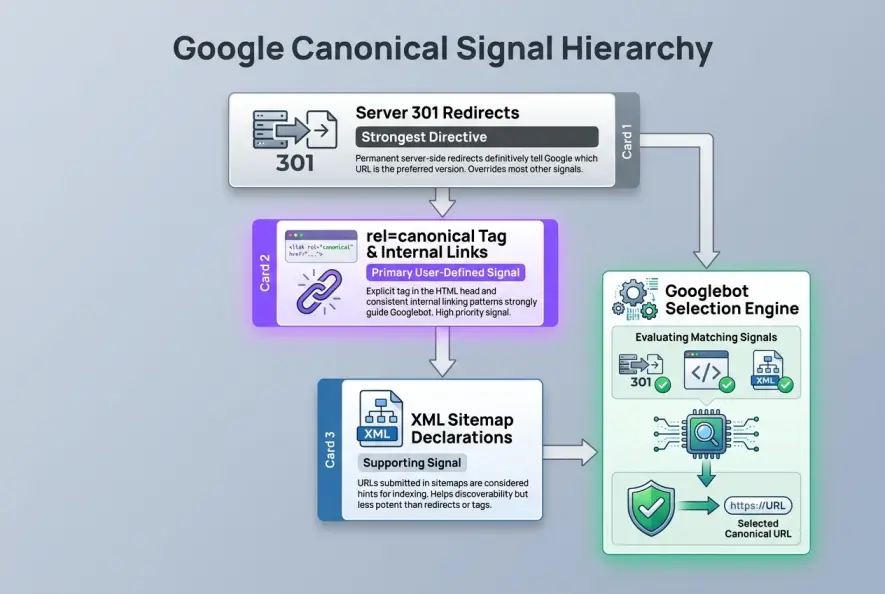
When Googlebot encounters duplicate or near-duplicate pages, it clusters them into a single logical group. According to Google Search Central's canonicalization documentation, the search engine analyzes multiple signals to determine which URL best represents the group in search results.
The rel="canonical" link relation, formalized in RFC 6596, was never designed as an absolute command like a 301 redirect or a noindex directive. It is an editorial recommendation. If your site architecture sends mixed messages, Google's automated systems weigh your declared canonical against every other contextual clue on your domain.
| Mechanism | Signal Type | Bot Compliance | Primary Use Case |
|---|---|---|---|
301 Redirect | Directive | ~100% (Hard reroute) | Permanently moved or retired URLs |
Noindex Tag | Directive | ~100% (Index exclusion) | Private staging, admin, or search filter pages |
rel="canonical" | Advisory Hint | Algorithmic (~80–90%) | Duplicate product variants, tracking URLs, syndicated copy |
XML Sitemap | Discovery Hint | Low-to-Medium | Crawl discovery and URL prioritization |
When your on-page tag points to Page A, but your site's broader architecture treats Page B as the important page, Google trusts its own algorithmic calculation over your tag.
5 Technical Conflicts That Trigger Canonical Overrides
To fix canonicalization failures, you must understand the specific structural contradictions that cause Google to discard your tag.
1. Contradictory Internal Linking Patterns
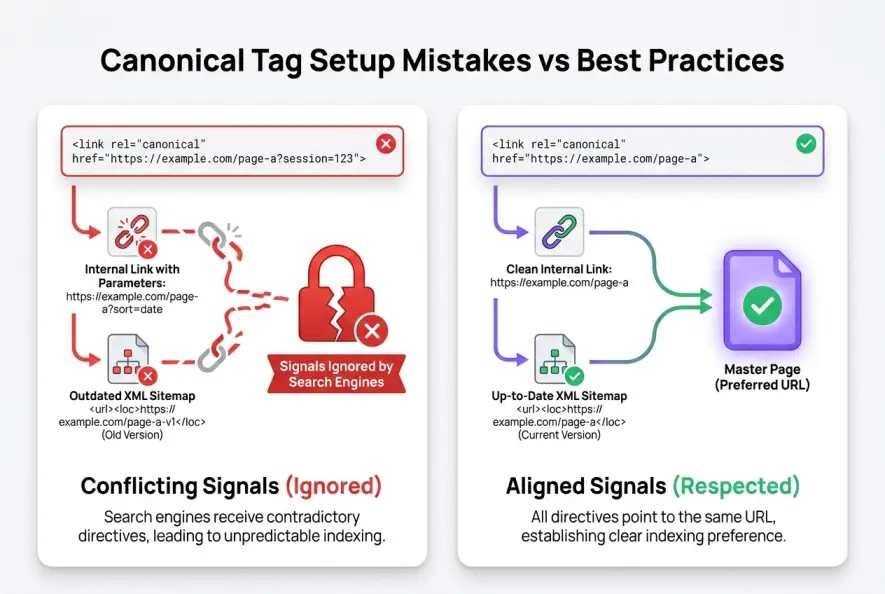
Your internal linking structure is the most potent organic signal you control. If you place a canonical tag on example.com/shoes/running-shoes?color=blue pointing to example.com/shoes/running-shoes, but your main navigation menu, breadcrumbs, and blog articles link directly to the ?color=blue variant, Google receives mixed instructions.
The algorithm prioritizes link equity and crawl frequency. Because search bots encounter the parameter URL repeatedly across your site, Google concludes that the parameter URL holds more functional value for visitors than the stripped canonical version. Building a cohesive internal link architecture ensures your bots and tags point to the exact same destinations.
2. Sitemaps Submitting Non-Canonical URLs
An XML sitemap is essentially a clean list of URLs you explicitly ask Google to index. If your sitemap contains parameterized URLs, deprecated paths, or redirected links that specify different canonical targets in their HTML heads, Google detects a direct conflict. The sitemap suggests the URL should be indexed, while the HTML tag states it should be ignored.
3. URL Parameter Explosions in Faceted Navigation
E-commerce platforms frequently generate thousands of URL combinations through faceted filtering (sizes, colors, price sorting). While canonicalizing these filters back to the main category seems logical, parameter bloat can overwhelm the crawler. When thousands of near-identical URLs hit the index queue simultaneously, Google often defaults to indexing whichever parameter variant has the highest click-through rate or the freshest crawl timestamp. This is why managing faceted navigation filters requires combining canonicals with strict parameter handling.
4. Protocol and Trailing Slash Inconsistencies
Search engines treat http://example.com/page, https://example.com/page, and https://example.com/page/ as three distinct documents. If your canonical tag specifies the non-trailing slash version, but your server automatically enforces a trailing slash redirect, or if your internal links use relative paths that bounce between protocols, Google flags the canonical chain as unstable and chooses its own target.
5. Excessive Content Dissimilarity
A common mistake is attempting to consolidate thin, semi-related pages by pointing their canonical tags to a single broad guide. Canonicalization is designed for identical or substantially identical content. If Page A and Page B share less than roughly 60–70% of the same core text and search intent, Google rejects the canonical association and indexes both pages independently.
Placing rel="canonical" inside the <body> tag instead of the <head>, or injecting it solely via client-side JavaScript after initial HTML parsing. Google processes initial raw HTML before scheduling secondary JavaScript rendering; any canonical tag absent from the static <head> risks being ignored during discovery.
Diagnosing Canonical Errors in Google Search Console
Identifying the root cause of canonical discrepancies starts in Search Console's URL Inspection Tool and Page Indexing reports.
When inspecting a problematic URL, navigate to the Indexing section and compare two specific fields:
- User-declared canonical: The URL explicitly defined in your HTML tag.
- Google-selected canonical: The URL Google chose to index and pass ranking equity to.
If these two fields do not match, you are diagnosing underlying canonical tag issues across your site. Cross-reference this finding with your server crawl logs to determine if Googlebot is spending disproportionate resources crawling the non-canonical variant. If the crawler hits the duplicate URL significantly more often than your declared master page, your internal link signals are actively undermining your tags.
Step-by-Step Framework to Fix Canonical Overrides
Restoring canonical authority requires eliminating contradictions across your entire technical stack. Follow this five-step remediation process:
Step 1: Align CMS Templates and Automated Publishing Rules
Ensure your CMS dynamically generates absolute URLs (including https:// and exact trailing slashes) rather than relative paths. For instance, modern publishing workflows like Qoreta automatically synchronize canonical tags, sitemap entries, and internal link destinations during content generation, ensuring search crawlers never encounter contradictory indexing signals.
Verify that staging domains and staging subdomains automatically output self-referential canonicals or noindex headers to avoid leaking duplicate environments into search indexes.
Step 2: Clean Up Internal Anchor Links
Run a comprehensive site crawl using tools like Screaming Frog or Sitebulb to extract all internal hyperlinks. Filter your internal links for destinations that return a non-canonical status. Update hardcoded navigation bars, footer menus, and in-body links so they target the exact canonical URL directly, bypassing redirects and parameter variations.
Step 3: Purge XML Sitemaps of Secondary URLs
Audit your sitemap files to ensure every single listed URL meets three criteria: it returns an HTTP 200 OK status, it has a self-referential canonical tag, and it is the exact URL you want appearing in search snippets. Remove all filtered, paginated, or tracking URLs from your sitemaps.
Step 4: Eliminate Index Bloat on Near-Duplicate Pages
If you have thousands of low-value duplicate pages generated by search queries or internal tags that Google insists on indexing despite your canonical tags, switch from canonical hints to hard directives. Applying a noindex, follow robots meta tag prevents the duplicate page from entering the index while allowing link equity to flow back to your site. This stops rampant index bloat from draining your search visibility.
Step 5: Differentiate Competing Pages to Stop Cannibalization
If Google overrides canonicals between two blog posts or product pages because it believes they serve different search queries, you are dealing with keyword cannibalization. When two pages target overlapping keywords but feature unique copy, search engines struggle to consolidate them under a single canonical. Review your topical hierarchy to resolve keyword cannibalization by either merging the two pages into one comprehensive article or rewriting one to target a distinct search intent.
If Google repeatedly overrides your canonical tag on two competing URLs, calculate their text similarity ratio. If they differ by more than 35%, Google treats them as distinct resources rather than duplicates. Either merge the content entirely or rewrite one URL to target a separate long-tail query.
When to Use 301 Redirects vs Canonical Tags
A frequent architectural error is using canonical tags when a server-side redirect is actually required. Consult Moz's canonicalization best practices when deciding between the two methods.
Use a 301 redirect when:
- An old URL has been permanently replaced or deprecated.
- Users have no legitimate reason to access the alternate URL.
- You are migrating domains, updating permalink structures, or merging two outdated articles.
Use a rel="canonical" tag when:
- You need duplicate URLs accessible to human users (such as specific tracking campaigns, currency selectors, or sorted e-commerce views).
- You are cross-posting syndicated articles across partner publications while preserving original attribution.
- You want to consolidate ranking signals without disrupting user navigation.
Search engines thrive on consistency. When your HTML header tags, sitemaps, internal links, and server headers all point toward the exact same URL, Google's algorithms respect your preference, eliminating persistent canonical tag issues across your domain.
Artificial Intelligence
Intelligence without limits.
We believe great content deserves honest authorship—even when it's AI.
Frequently Asked Questions
When Google respects a canonical tag, it consolidates link equity similarly to a 301 redirect. However, because canonical tags are advisory hints rather than server-level directives, any signal ambiguity can cause Google to split or discount the transferred authority.
If a page contains multiple canonical tags in its HTML (often caused by conflicting SEO plugins or theme settings), Google treats all declared canonical tags on that page as invalid and completely ignores them.
Yes. Cross-domain canonical tags are fully supported by search engines to signal that a republished article on a third-party domain belongs to the original publisher, passing indexing priority back to the source URL.
This status means Google identified duplicate versions of a page on your site, but found no rel="canonical" tag in the HTML head. Google automatically selected one version to index based on its own internal algorithms.
Google typically requires anywhere from several days to two weeks to recrawl duplicate clusters and update canonical designations in Search Console, depending on crawl frequency and the clarity of the updated signals.
No. Paginated pages should have self-referential canonical tags (e.g., /page/2 pointing to /page/2). Canonicalizing paginated pages to page 1 prevents search engines from indexing the distinct articles listed on deeper pages.