Subdomains vs Subdirectories: Which Moves SEO Rankings?

Artificial Intelligence
September 2, 2026
You launch a resource library or engineering blog on blog.example.com. Over the next six months, you publish dozens of articles, secure top-tier backlinks, and drive meaningful organic traffic to those URLs, yet your primary product pages on the root domain see virtually zero improvement in rankings.

The short answer is that search engines treat subdomains as distinct hostnames with separate authority profiles and isolated crawl queues, whereas subdirectories directly inherit and reinforce the accumulated trust of the root domain. When deciding between subdomains vs subdirectories, consolidating your content inside subdirectories (example.com/blog) almost always yields faster indexing, stronger PageRank distribution, and higher organic rankings than isolating it on a subdomain (blog.example.com).
- Subdomains function as independent hostnames requiring their own backlink equity, trust metrics, and crawl budget.
- Subdirectories pool domain authority, allowing newly published URLs to rank faster by leveraging existing sitewide trust.
- Search engines maintain separate entity profiles for subdomains unless strong algorithmic signals explicitly group them.
- Reverse proxies provide an engineering workaround to host external platforms inside subdirectories without managing complex multi-CMS codebases.
The Technical Difference: Hostnames vs URL Paths
From a networking standpoint, subdomains and subdirectories operate on entirely different layers of the web stack.
A subdomain creates a distinct hostname within the Domain Name System (DNS). As defined by the IETF RFC 3986 specification, a subdomain requires separate DNS resolution records, its own Transport Layer Security (TLS) certificate negotiation, and unique server routing rules. Browsers treat subdomains as separate origins under the MDN Web Docs on Same-Origin Policy, which partitions local storage, session cookies, and cross-site scripting security context.
A subdirectory (or subfolder) is merely a structural path on the existing host (example.com/folder/). It resolves through the same DNS entry, uses the same SSL certificate, and resides within the exact same security origin.
This fundamental architectural separation explains why search algorithms cannot simply assume that two subdomains belong to the same topical entity or share the same editorial standards.
How Google Actually Treats Subdomains Under the Hood
Google representatives have repeatedly stated over the years that their systems are capable of recognizing subdomains and treating them equivalently to subdirectories.
While search engines can identify that blog.example.com and example.com are owned by the same organization, treating them "equivalently" means the crawling algorithm supports both setups without throwing technical indexing errors. It does not mean they transfer ranking signals with identical efficiency.
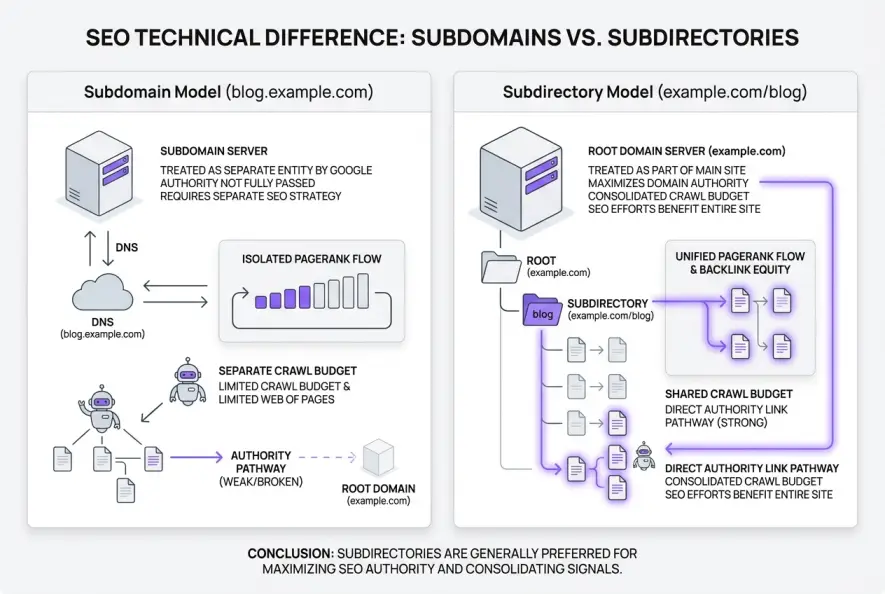
Google evaluates quality, spam, and historical trust primarily at the hostname level. When you establish a new subdomain, search engine algorithms initialize that hostname with a clean slate. The authority, brand history, and historical crawl patterns of your root domain do not automatically flow across the DNS boundary.
Authority Consolidation and PageRank Partitioning
PageRank is fundamentally a graph calculation that flows through hyperlinks. The way that graph is partitioned dramatically changes how authority accumulates across your website.
When external websites link to an article on example.com/blog/seo-guide, that incoming link equity sits directly on your root domain. Through a standard internal linking strategy, that equity redistributes immediately to your core product pages, category hubs, and navigation anchors.
If that same article lives on blog.example.com/seo-guide, the incoming backlink builds authority on the subdomain. Internal links pointing from the subdomain back to the root domain (example.com) are evaluated across host boundaries. Google frequently dampens the equity transferred through cross-host links compared to intra-domain links to prevent webmasters from artificially inflating ranking metrics using subsidiary domains.
| Technical Dimension | Subdomain (blog.example.com) | Subdirectory (example.com/blog) |
|---|---|---|
| Authority Inheritance | Isolated; builds authority independently | Direct; inherits root domain authority instantly |
| Crawl Budget Allocation | Split across separate hostname queues | Consolidated within single host crawl limits |
| Search Console Setup | Requires separate property verification | Tracked automatically in domain properties |
| Cookie & Session Scope | Requires explicit cross-domain configuration | Native shared session and analytics cookies |
| CMS Flexibility | Can host on separate servers natively | Requires reverse proxy for separate servers |
| Risk of Cannibalization | High; search engines view as competing hosts | Low; managed via canonical tag hierarchy |
This structural difference explains why testing teams routinely see double-digit organic traffic surges simply by migrating an existing blog from a subdomain into a subdirectory without changing a single line of copy.
Crawl Budget and Indexing Velocity on Large Websites
For large websites containing tens of thousands of pages, crawl allocation becomes a decisive ranking factor. When evaluating subdomains vs subdirectories from a crawling perspective, host-level rate limiting creates clear winners and losers.
Googlebot establishes crawl rate limits per hostname based on server response latency and discovered URL depth. When your content is split across multiple subdomains, Google allocates independent crawl budgets to each host. If a subdomain lacks strong external backlink signals, Googlebot reduces its crawl frequency on that host.
Through server log file analysis, engineering teams frequently discover that newly published pages on subdomains sit in search engine crawl queues for weeks before rendering. Conversely, pages deployed within an active root subdirectory are crawled within minutes because Googlebot is already actively polling the root domain for updates.
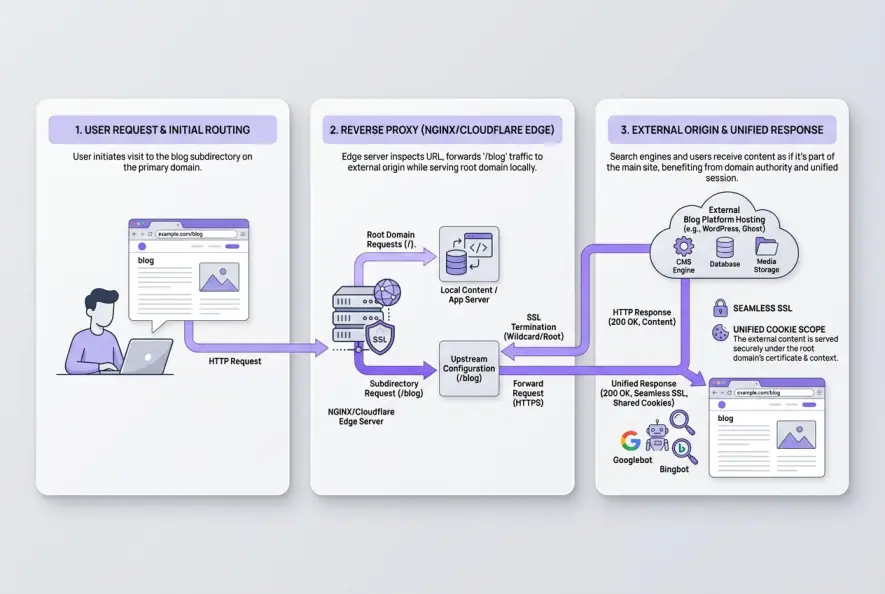
Placing your content hub on a subdomain because your marketing team wants to use an external CMS that cannot share a database with your core application. A simple reverse proxy solves this without sacrificing root domain authority.
When Subdomains Actually Make Strategic Sense
Despite the clear SEO advantages of subdirectories, subdomains remain the technically correct choice in several specific enterprise architectures:
1. Authenticated SaaS Applications
Your user portal or dashboard (app.example.com) should almost always reside on a subdomain. These pages sit behind login authentication, require strict session isolation, and should never be indexed by search engines. Keeping them off the root directory prevents accidental index bloat and isolates application cookies.
2. Radical Topical Divergence
If a corporation operates two distinct business lines under one brand name—such as an enterprise cloud platform and a consumer hardware store—splitting them into subdomains prevents topical dilution. When entity semantics do not overlap, separating hostnames helps search engines categorize each property accurately according to Google Search Central guidelines.
3. Isolated Sandbox and Staging Environments
Developer staging environments (staging.example.com) and API documentation playgrounds must remain isolated from production search indexes to prevent unintended canonical tag issues.
How to Route External Platforms to Subdirectories via Reverse Proxy
The most common reason teams compromise on a subdomain is engineering convenience: the marketing team wants WordPress, Webflow, or Ghost, while the core engineering product is built in Next.js, Rails, or Laravel.
A reverse proxy eliminates this tradeoff. By configuring your edge server or Content Delivery Network (CDN) to forward requests from example.com/blog to an external hosting server, users and search engine crawlers interact exclusively with the root domain path.
# Example NGINX Reverse Proxy Configuration
location /blog {
    proxy_pass https://hosting-cluster.external-cms.com;
    proxy_set_header Host $host;
    proxy_set_header X-Real-IP $remote_addr;
    proxy_set_header X-Forwarded-For $proxy_add_x_forwarded_for;
    proxy_set_header X-Forwarded-Proto $scheme;
    proxy_redirect off;
}
Modern automated publishing architectures handle this integration seamlessly. For example, platforms like Qoreta publish directly to root domain subdirectories via standard REST endpoints and reverse-proxy setups, giving organizations full content automation without sacrificing domain authority.
How to Migrate from a Subdomain to a Subdirectory Without Losing Traffic
If your high-value content currently lives on a subdomain, moving it to a subdirectory is one of the highest-ROI technical migrations available. Execute the transition using this verified checklist:
- Map URL Paths 1:1: Ensure every legacy URL on
blog.example.com/slugmaps to an identical path onexample.com/blog/slugto avoid complex rewrite regex errors. - Implement Server-Level 301 Redirects: Apply permanent 301 redirects at the edge server. Avoid intermediate redirect hops, as unresolved 301 redirect chains slow crawl rate and leak equity.
- Update Internal Links and Canonical Tags: Update all self-referencing canonical tags, internal menu links, and footer references to point directly to the new subdirectory URLs.
- Publish Separate XML Sitemaps: Keep the old subdomain sitemap live with 301 redirects and submit the new subdirectory sitemap in Google Search Console to accelerate crawl discovery.
- Monitor Google Search Console: Watch index coverage reports across both the legacy subdomain property and the primary domain property until all URLs migrate completely.
Final Verdict
When evaluating the architectural debate of subdomains vs subdirectories, technical convenience should never compromise search visibility. Unless you are isolating a private SaaS application or separating fundamentally incompatible business entities, always host your content within a subdirectory. The compounding benefits of shared authority, rapid indexing, and consolidated link equity will consistently outperform an isolated hostname.
Artificial Intelligence
Intelligence without limits.
We believe great content deserves honest authorship—even when it's AI.
Frequently Asked Questions
No, Google does not issue manual actions or algorithmic penalties for using subdomains. However, because subdomains are treated as separate hostnames, they must build authority, trust, and backlink equity independently, which often results in lower organic rankings compared to subdirectories.
Most well-executed migrations see full recovery and positive organic growth within 4 to 8 weeks. Googlebot must re-crawl the old subdomain URLs, process the 301 redirects, update the PageRank graph, and index the new subdirectory paths.
Subdirectories (like example.com/fr/ or example.com/de/) are generally superior for international SEO because all language variations pool authority on a single domain. Subdomains (like fr.example.com) should only be used if regional server hosting or distinct technical architectures are strictly required.
Cross-domain canonical tags are treated as suggestions, not directives. Google frequently ignores cross-domain canonicals if the content on the subdomain receives its own traffic and backlinks. Migrating with 301 redirects is the only reliable way to transfer ranking signals.
No. When configured with a reverse proxy or edge CDN routing (such as Cloudflare Workers or NGINX), incoming requests to the subdirectory are routed directly to the dedicated content server without consuming database or compute resources from your core application.
Subdirectories share the same cookie scope automatically, simplifying session tracking and attribution across user journeys. Subdomains require explicit cross-domain cookie configuration in Google Analytics 4 and Tag Manager to prevent visits from splitting into separate sessions.