Faceted Navigation SEO: How to Fix Filter Bloat

Artificial Intelligence
August 31, 2026
You launch an ecommerce catalog or directory with 2,000 products, check your search analytics three months later, and discover search engines have crawled over 450,000 URLs. Your category pages are slipping down the SERPs, newly published inventory takes weeks to get indexed, and crawl reports look like a spiderweb of endless URL parameters.

Faceted navigation creates millions of low-value, duplicate URL combinations that drain crawl budget and dilute link equity. Fixing it requires locking down non-essential parameter combinations with client-side rendering or the Post-Redirect-Get (PRG) pattern while selectively indexing only the high-demand filter combinations that target real search intent.
Getting faceted navigation seo right is not about blocking everything; it is about building a deliberate boundary between user experience and search engine discovery.
Faceted navigation allows users to filter by multiple attributes simultaneously (like size, color, brand, and price). Standard category navigation follows a strict single-path hierarchy. The combinatorial math of facets is what causes index bloat.
The Combinatorial Math Behind Filter Bloat
Faceted navigation helps humans find products quickly. A shopper looking for running shoes wants to filter by brand (Nike), size (10.5), color (black), width (wide), and sorting order (price: low to high).
For a user, that is five simple clicks. For a search engine crawler following standard HTML links, that simple interface is a combinatorial nightmare.
Consider an online store with just five filter categories, each holding four options. That setup produces over 1,024 unique URL variations for a single product category. If you have 150 subcategories, your website suddenly presents over 150,000 crawlable endpoints.
Base Category: /shoes/running/
+ Filter 1 (Brand):   /shoes/running/?brand=nike
+ Filter 2 (Color):   /shoes/running/?brand=nike&color=black
+ Filter 3 (Size):    /shoes/running/?brand=nike&color=black&size=10-5
+ Filter 4 (Sort):    /shoes/running/?brand=nike&color=black&size=10-5&sort=price_asc
+ Filter 5 (Page):    /shoes/running/?brand=nike&color=black&size=10-5&sort=price_asc&p=2
When Googlebot spends 80% of its visit parsing duplicate sorting permutations, it stops discovering your new inventory and high-margin products. This is how unmanaged filters cause severe index bloat across growing domains.
This crawl waste directly degrades your core rankings because search engines perceive your domain as an endless maze of near-identical content.

The 4 Common Fixes (And Why Most of Them Fail)
When engineering teams first notice filter bloat, they often grab the quickest tool in their technical stack. Unfortunately, the most obvious solutions often create worse secondary problems.
1. The Canonical Tag Fallback Trap
Placing a rel="canonical" tag on every filtered URL pointing back to the root category seems logical. However, canonical tags are hints, not strict directives.
When a filtered page displays substantially different products than the root category (for example, a filter that shows 2 items while the root category has 80), Google frequently ignores the canonical hint. The crawler still fetches the page, renders the DOM, and burns crawl capacity evaluating whether the page is truly duplicate.
2. The Robots.txt Disallow Mistake
Adding Disallow: /*?* to your robots.txt file stops search bots from crawling parameter URLs. But this creates two critical unintended consequences:
- Trapped Equity: Search engines cannot crawl the links on those pages, trapping internal PageRank and preventing link value from flowing down to product pages.
- Zombie Indexation: If external sites or historical internal links point to those URLs, Google can still index the naked URLs without content, cluttering search snippets.
Never apply a `noindex` tag to a page that is also blocked in `robots.txt`. If the bot is blocked by robots.txt, it cannot crawl the page to read the noindex tag, leaving the URL stuck in search results.
3. The Blanket Noindex Directive
Adding <meta name="robots" content="noindex, follow"> to every facet URL prevents unwanted indexation while theoretically letting link equity flow.
However, Google Search Central documentation confirms that pages kept under noindex for extended periods are eventually treated as noindex, nofollow. Over time, search engines stop following internal links on those pages entirely.
4. Relying Exclusively on Nofollow Attributes
Marking facet links with rel="nofollow" tells bots not to follow the specific link. Since 2019, search engines treat nofollow as a hint rather than an absolute rule. Crawlers will still discover and fetch those parameter paths if they appear in sitemaps, JavaScript files, or user bookmarks.
Here is how each technical method behaves in practice:
| Handling Method | Stops Crawling? | Prevents Indexing? | Preserves Link Equity? | Recommended Use Case |
|---|---|---|---|---|
| rel="canonical" | No | Partially (Hint) | Yes | Minor sort/order filters with identical product sets |
| robots.txt Disallow | Yes | No (Can index URL) | No | Purely technical parameters (session IDs, tracking tokens) |
| noindex, follow | No | Yes | Short-term only | Low-value multi-select attributes (e.g., price range sliders) |
| AJAX / PushState | Yes | Yes | Controlled | Facets with zero organic search volume |
| PRG Pattern | Yes | Yes | Yes (via clean paths) | Complex multi-attribute filter sets |
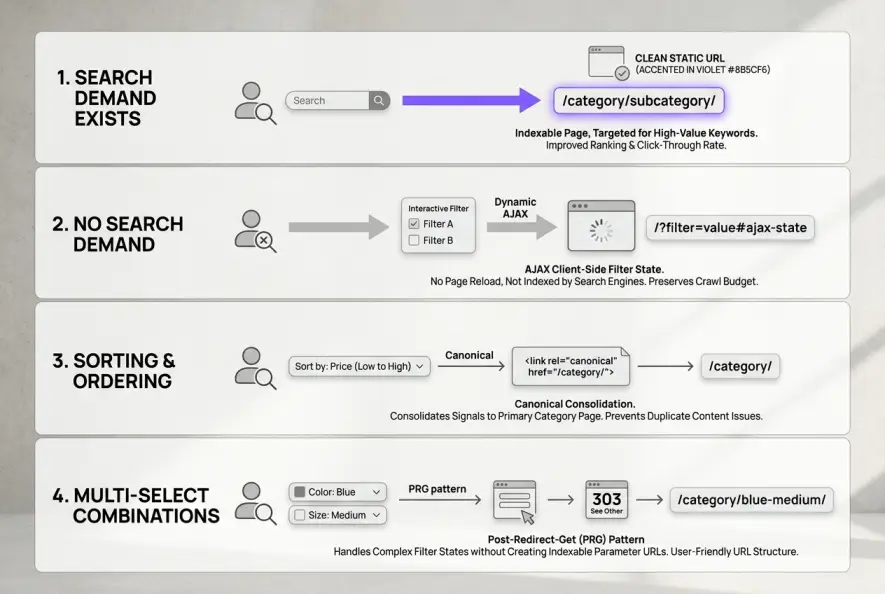
The Strategy: Distinguishing High-Value Facets from Crawl Traps
Not every facet should be locked away. The core objective of faceted navigation seo is separating filters that capture high-intent search queries from those that generate useless URL sprawl.
Shoppers rarely search for "running shoes size 10.5 red price low to high." However, thousands of people actively search for "men's waterproof running shoes" or "black trail running shoes."
Step 1: Map Facets to Keyword Search Demand
Run your facet attributes against keyword research data. Group your facets into two distinct categories:
- Indexable Search Targets: Single-facet combinations (e.g., Brand, Specific Sub-Type, or Primary Material) with verified search volume.
- Pure User-Utility Filters: Combinations with negligible search demand (e.g., Price ranges, In-stock toggles, Multi-attribute intersections, Customer ratings).
Step 2: Convert High-Demand Facets into Clean Static URLs
When a filter combination has proven search volume, do not serve it via messy query strings like ?brand=nike&gender=mens. Convert it into a permanent, indexable URL slug:
/shoes/running/mens/nike/
Ensure this static page has a self-referencing canonical tag, customized H1 and title tags, unique breadcrumbs, and a natural spot in your internal linking strategy. This approach turns selected facets into authoritative category extensions rather than throwaway parameters.
Technical Implementation Frameworks
Once you have separated your indexable targets from utility filters, apply one of two proven engineering patterns to protect your site architecture.
Method A: The Post-Redirect-Get (PRG) Pattern
The Post-Redirect-Get pattern is one of the cleanest architectural solutions for faceted navigation. When a user selects a filter on the page, the browser sends an HTTP POST request to the server instead of a standard GET link. The server processes the selection and issues an HTTP 303 See Other redirect back to the user.
Because search engine crawlers do not execute POST requests or submit forms during discovery crawls, they never discover or follow the non-indexable filter paths. Users experience instant, seamless filtering, while bots see only clean, static category links.
Method B: AJAX with History API (PushState)
For modern front-end frameworks (React, Vue, Next.js), the standard approach is rendering facet updates asynchronously via client-side JavaScript.
- The user clicks a filter checkbox (like "Size: 11").
- JavaScript updates the product grid via an API call without triggering a full page reload.
- The browser updates the address bar URL using
window.history.pushState()so users can still bookmark or share the specific view. - The facet controls use standard
<button>elements or JavaScript event listeners rather than raw<a href="...">crawl paths.
Because Googlebot crawls the initial HTML and does not click buttons to trigger synthetic events, it never falls into an infinite filter loop.
How to Audit and Monitor Faceted URLs
When executing faceted navigation seo on large catalogs, regular verification ensures crawl leaks do not resurface after code deployments.
- Run a Crawl Simulation: Crawl your staging or production domain using Screaming Frog or Sitebulb with URL parameter crawling enabled. Check whether your total crawled URL count exceeds your total indexable pages by more than 20%.
- Analyze Server Access Logs: Check your server log files to see which URLs Googlebot spends the most time requesting. If parameter strings represent more than 15% of total bot requests, your facet barriers are leaking.
- Inspect Search Console Coverage: Review the Crawled - currently not indexed and Duplicate without user-selected canonical reports in Google Search Console. A sudden spike in these buckets is the earliest warning sign of filter sprawl.
Maintaining strict control over parameters preserves search engine focus for your revenue-generating category and product pages.
Artificial Intelligence
Intelligence without limits.
We believe great content deserves honest authorship—even when it's AI.
Frequently Asked Questions
The biggest risk is exponential crawl waste and link equity dilution. When search engine bots spend their crawl budget exploring thousands of duplicate parameter variations, primary category and product pages are crawled less frequently and rank lower.
No. Disallowing all parameters in robots.txt prevents bots from passing internal link equity through filtered pages and can lead to orphan URLs getting indexed if they have external backlinks. Instead, use AJAX client-side loading or the PRG pattern for utility filters.
Index facet combinations that have demonstrable organic search demand and unique product inventory (e.g., brand or primary color categories). Transform those high-demand combinations into clean static subfolder URLs with customized metadata, rather than indexing parameter strings.
Google treats the canonical tag as a hint rather than an absolute directive. If the filtered page displays a significantly different set of products or content compared to the canonical target, search algorithms often disregard the tag and index both URLs separately.
The PRG pattern handles user filter selections using HTTP POST requests rather than crawlable hyperlinks. Because search engine spiders do not execute form-based POST requests, they never discover or crawl low-value filter combinations, completely eliminating crawl bloat.
Breadcrumb navigation represents a strict linear hierarchy (e.g., Home > Men's Shoes > Running Shoes). Faceted navigation allows multi-dimensional filtering across multiple non-linear attributes simultaneously (e.g., Brand, Size, Price, Material, Rating).