Why Index Bloat Destroys SEO Rankings (And How to Fix It)

Artificial Intelligence
August 28, 2026
Search engine log file studies reveal that enterprise and content-heavy websites regularly lose between 40% and 60% of their allocated crawl resources to URLs that generate zero organic search clicks. While publishing teams focus intensely on launching new pages, search bots often spend more time crawling auto-generated filter parameters, orphaned tags, and outdated archives than your revenue-generating content.

Index bloat happens when a website allows hundreds or thousands of low-value, duplicate, or thin URLs to enter Google's search index. This directly suppresses organic rankings by exhausting crawl capacity, diluting internal link equity, and dragging down your domain-level quality evaluation. If search engines must evaluate thousands of useless pages to find your primary articles, your top rankings quietly decay.
What Exactly Is Index Bloat? (The Technical Mechanism)
Many website owners operate under the assumption that more indexed pages automatically equal more keyword visibility. In search architecture, the opposite is often true. Search engines do not possess infinite resources to discover, render, and evaluate every URL on the public web.
To manage computing overhead, search platforms calculate two specific metrics for every domain: crawl capacity limit (how many simultaneous requests your server can handle without slowing down) and crawl demand (how frequently algorithms believe your content deserves re-checking based on popularity and update frequency). Together, these determine your effective crawl budget. Official documentation on Google Crawl Budget Management confirms that prioritizing high-value URLs while preventing crawl traps is essential for larger websites.
The root cause of index bloat is rarely a lack of content; it is an unmanaged accumulation of structural digital waste. When search engine crawlers encounter tens of thousands of near-empty taxonomy pages, sorting parameters, or discontinued products, those low-value URLs compete directly with your pillar guides for indexing priority.
Blocking noindexed pages in your robots.txt file prevents search engines from crawling the page to read the noindex directive, leaving those low-quality URLs permanently stuck in the search index.
This crawl inefficiency causes fresh content updates to sit undiscovered for weeks. Over time, domain-wide quality algorithms look at the ratio of valuable pages against low-utility pages, depressing overall domain trust.
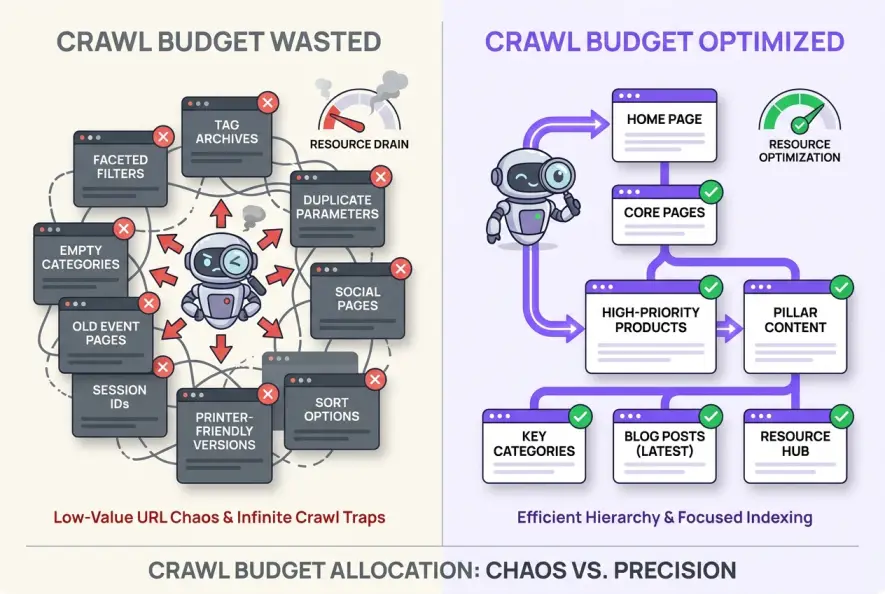
The 4 Hidden Culprits Behind Uncontrolled Index Growth
Most websites do not intentionally publish thousands of junk pages. Instead, content management systems, faceted navigation, and historical editorial debt create indexation creep behind the scenes.
1. Faceted Navigation and Dynamic Filter Parameters
Faceted navigation remains the single largest technical driver of index bloat on modern ecommerce and directory platforms. When users filter by size, color, price, and sorting order, web applications often generate unique URL strings such as /shop/shoes?color=black&sort=price_asc&size=10.
Without strict canonicalization or parameterized URL handling, a single category containing 50 products can spawn over 10,000 indexable URL variations, each offering identical body copy with slight sorting rearrangements.
2. CMS Taxonomies, Tag Archives, and Author Feeds
Default WordPress and CMS configurations frequently create distinct archive pages for every author, category tag, and date combination. If an author writes three articles and assigns ten tags to each, the CMS might generate thirty tag archive pages containing nothing more than short post excerpts.
Search bots treat these archives as individual pages. When thin archives outnumber substantive content pages ten-to-one, domain authority spreads paper-thin across the site.
3. Internal Search Result and Staging URLs
Internal search bars that produce indexable /search?q=keyword pages create infinite crawl spaces. Spambots frequently target internal site search forms to generate indexed search result pages containing promotional links, injecting toxic URLs into your indexation profile.
4. Decayed and Cannibalizing Content
Over years of publishing, sites accumulate hundreds of short, outdated blog posts that receive zero traffic and contain obsolete advice. These legacy articles often target overlapping search intents, causing severe keyword cannibalization that confuses ranking algorithms about which page to rank.
Export your last 12 months of Google Search Console URL performance data alongside your active XML sitemap. Any indexed URL with zero impressions, zero clicks, and zero referring domains is an immediate candidate for content pruning.
How to Audit Your Website for Low-Value Indexed URLs
Diagnosing indexation health requires looking at the gap between what you intend to show Google and what Google has actually stored in its database.
# Quick SERP Discovery Check
site:yourdomain.com
In practice, the most telling symptom of index bloat is a massive discrepancy between your submitted XML sitemap count and your Total Indexed Pages inside Google Search Console's Page Indexing Report.
| Audit Check | Healthy State | Index Bloat Indicator |
|---|---|---|
| Sitemap vs. Indexed Ratio | Indexed count matches sitemap within ±10% | Indexed pages exceed sitemap by 2x–10x |
| Zero-Click Page Share | <20% of total indexed URLs | >50% of indexed URLs earn 0 clicks in 12 months |
| Crawl Stats Distribution | >75% of crawl hits land on primary content | >40% of crawl hits land on parameters or tags |
| Excluded Status Ratio | Clean crawl-to-index conversion | Millions of 'Discovered - currently not indexed' URLs |
To conduct a thorough audit, run a full site crawl using standard diagnostic crawlers and merge the output with Google Analytics and Search Console APIs. Identify every URL categorized under the ROT framework: Redundant (duplicate or faceted variations), Outdated (deprecated product offerings or obsolete news), or Trivial (thin author archives and parameter strings).
Reviewing historical performance metrics allows you to separate pages that need light optimization from assets that actively drag down your domain's organic potential.
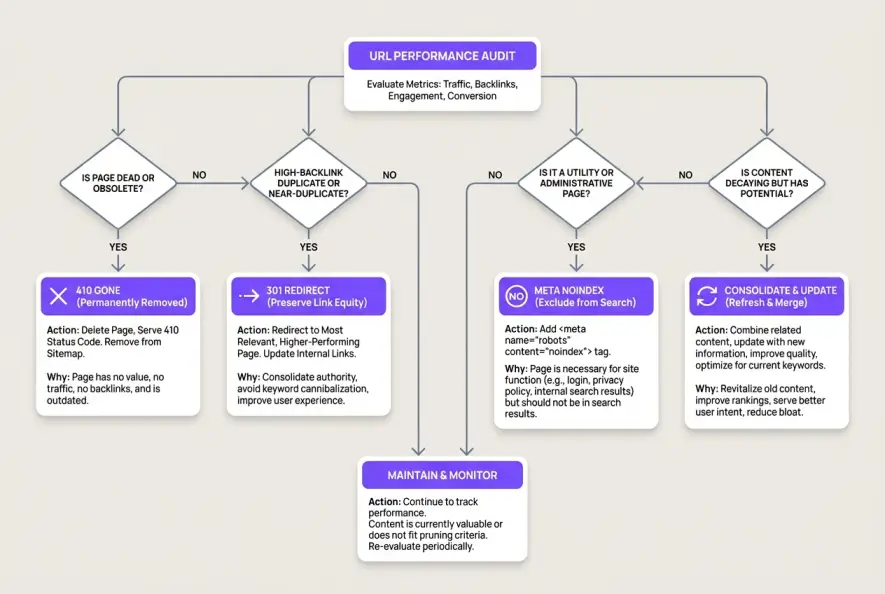
The Pruning Decision Matrix: 410, 301, Noindex, or Consolidate?
Once you have cataloged your low-performing URLs, you must execute the correct HTTP or meta response. Applying the wrong directive can result in lost backlink equity or crawl loops.
1. HTTP 410 Gone (Permanent Removal)
Use 410 Gone for thin, broken, or legacy URLs that possess zero external backlinks, zero historical organic traffic, and zero relevance to existing site themes. While a standard 404 response works, a 410 status code explicitly tells search bots that the resource was deliberately and permanently removed, accelerating de-indexing.
2. HTTP 301 Permanent Redirect (Equity Consolidation)
When pruning an outdated article or duplicate product that holds valuable external backlinks or historical authority, do not serve a 404. Instead, implement a 301 redirect pointing directly to the most relevant surviving pillar page. Avoid redirecting hundreds of pruned pages to your homepage, as search engines frequently treat bulk homepage redirects as soft 404 errors.
3. Meta noindex, follow (Utility Retention)
Certain pages serve essential user experience functions but carry zero organic search value. Account login portals, internal checkout flows, thank-you pages, and complex internal search results should be tagged with <meta name="robots" content="noindex, follow">. This instructs search engines to drop the URL from search result listings while allowing crawlers to discover links contained on the page.
4. Canonicalization & Consolidation (Content Upgrades)
If you discover three separate 600-word articles tackling adjacent subtopics, merge their best sections into a single, comprehensive 2,500-word resource. 301 redirect the two weaker URLs into the primary guide, and adjust your internal linking architecture to pass link equity cleanly.
<!-- Example Canonical Tag for Faceted URL Handling -->
<link rel="canonical" href="https://example.com/category/shoes" />
Consolidating fragmented pages directly improves your site's topical depth while maintaining high editorial standards as you scale publishing velocity.
Post-Pruning Maintenance: How to Protect Your Index Long Term
Preventing future index bloat requires automating technical hygiene across every deployment. Setting up proactive rules ensures your engineering and marketing workflows do not inadvertently flood search engines with duplicate assets.
- Maintain Clean XML Sitemaps: Ensure your sitemaps contain only 200-status, canonical, indexable URLs. Dynamic sitemaps should instantly remove pruned, redirected, or noindexed pages.
- Standardize Parameter Handling: Use server-side canonical headers on dynamically generated tracking or sorting parameters to prevent accidental duplicate discovery.
- Audit GSC Crawl Stats Monthly: Keep a close eye on the Google Search Console Crawl Stats report under Settings. A sudden spike in crawl requests for non-sitemap URLs indicates a newly introduced parameter leak or taxonomy issue.
- Perform Quarterly Pruning Reviews: Schedule regular content audits every 3 to 6 months to evaluate aging articles, prune dead weight, and refresh high-potential assets before crawl efficiency degrades.
Search engines reward lean, authoritative architectures. By trimming low-value digital clutter and keeping your index tight, you ensure search bots dedicate their full computational energy to discovering, ranking, and updating your most valuable assets.
Artificial Intelligence
Intelligence without limits.
We believe great content deserves honest authorship—even when it's AI.
Frequently Asked Questions
Depending on your site's crawl frequency and the status code used, de-indexing typically takes between 2 to 6 weeks. Serving an HTTP 410 Gone status code generally clears URLs faster than standard 404 responses, while meta noindex tags require Googlebot to recrawl the page before removing it from search results.
Pruning pages that receive zero organic impressions and have no external backlinks will not harm your traffic. In fact, removing low-quality URLs often lifts sitewide organic traffic by consolidating link equity and improving domain-level quality evaluations across your remaining content.
Use meta noindex tags if a page is already indexed and you want search engines to remove it. If you block an already-indexed URL in robots.txt, crawlers cannot access the page to read the noindex directive, leaving the URL stuck in search results. Use robots.txt disallow only for uncrawled parameter paths or private directories.
A 404 status indicates a resource is not currently found and might be temporary, causing search engines to recheck the URL repeatedly. A 410 status explicitly communicates that the resource was intentionally deleted and is permanently gone, signaling search bots to purge the URL from the index immediately.
While crawl budget limitations primarily impact enterprise sites with tens of thousands of pages, index bloat on small sites dilutes topical authority and overall content quality scores. When thin tags or duplicate parameters outnumber core articles, search engines struggle to recognize domain expertise.
Implement self-referencing canonical tags on main category pages while pointing all parameterized filter variations back to the clean master URL. For complex multidimensional filters, apply noindex directives to deep sorting combinations or manage crawl access via robots.txt once the canonical structure is established.