Soft 404 Errors: Why Google Drops Your Live Pages

Artificial Intelligence
August 30, 2026
According to web crawler telemetry audits, roughly 15% of URLs excluded from search engine indexes return a successful HTTP 200 OK header while being quietly discarded as non-existent. You check your server logs, run a quick browser check, and everything appears completely functional. Yet inside Google Search Console, your critical pages are marked as excluded, classifying your live URL under soft 404 errors in Search Console.
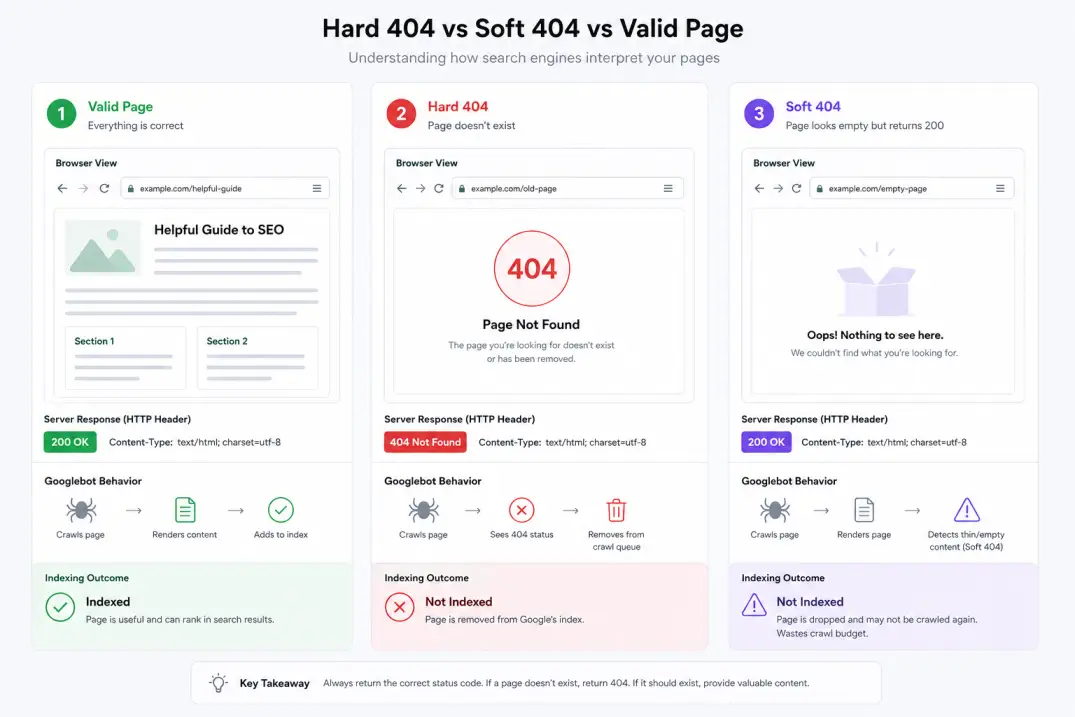
A soft 404 occurs when your web server responds with an HTTP 200 OK status code for a page that search engine algorithms deem empty, missing, or functionally irrelevant. Because search engine crawlers evaluate both server response headers and the fully rendered Document Object Model (DOM), a mismatch between what your server promises and what your page actually delivers causes Google to override the status code. The crawler treats the page as a missing resource, stripping it from search results and halting crawl equity.
Understanding why this disconnect happens—and how search engine classifiers evaluate rendered pages—is essential for preserving crawl budget and protecting organic revenue.
What Makes a Page a Soft 404?
In standard web architecture, HTTP response codes create a clear contract between your server and client agents. As defined in the RFC 9110 HTTP semantics specification, a 200 OK header signals that the request succeeded and the requested entity payload is enclosed. A 404 Not Found or 410 Gone tells the client that the target resource does not exist.
A soft 404 is not an official HTTP status code; it is an algorithmic judgment made by search engines during the rendering and indexing pipeline. When Googlebot fetches a URL, it passes the raw HTML and rendered output through a machine-learning classifier trained to detect error states and empty templates.
If that classifier determines that the page provides zero functional value—or explicitly mimics a missing page—Google disregards the server's 200 OK claim.
| Status Type | Server Response Code | Googlebot Interpretation | Indexation Result |
|---|---|---|---|
| Hard 404 | 404 Not Found | Resource confirmed missing | Dropped from index immediately |
| Hard 410 | 410 Gone | Resource permanently removed | Purged faster than 404 |
| Valid Page | 200 OK | Resource exists with unique content | Evaluated for search ranking |
| Soft 404 | 200 OK (Mismatched) | Content behaves as missing or thin | Excluded from search index |
This classification discrepancy creates a severe technical debt loop. Your server spends compute power rendering empty templates, while Googlebot treats those pages as dead ends, diluting the crawl priority of your revenue-generating URLs.
Redirecting deleted product pages or missing blog posts directly to your homepage might seem like a clever way to preserve link equity, but search engines classify homepages with mismatched intent as soft 404s, completely wiping out any transferred authority.
The Four Root Causes of Soft 404 Classification
Search engines do not guess randomly when flagging pages. Examining how search engine classifiers identify soft 404 errors across large sites reveals four primary structural, linguistic, and technical triggers during automated crawling.
1. Thin Content and Empty Database Queries
E-commerce catalogs, job boards, and programmatic directories frequently generate dynamic URLs based on database queries. When a category has zero active inventory, a user filter returns no results, or an author tag contains no published posts, the CMS still generates a valid template.
Because the page wrapper (header, navigation, footer, sidebar) contains more code than the actual main body, Googlebot's layout parser flags the URL as an empty shell. This dynamic is a leading cause of index bloat across large databases, where millions of query strings drain crawl capacity without offering search value.
2. Error-Mimicking Phrases in the Body Copy
Google's natural language processing models scan rendered text for common termination strings. If your page template contains phrases such as:
- 'Sorry, no items match your search criteria'
- 'Product currently unavailable'
- 'Article has been removed'
- '0 results found'
The crawler assumes the page is an error notification, regardless of whether the HTTP response returned 200 OK. Even if you intentionally kept the URL live to display related products, phrasing that closely mirrors a server error page can trigger an automatic soft 404 flag.
3. Blanket Redirects to Non-Equivalent URLs
When deleting outdated content or consolidating retired products, site owners often set up bulk 301 redirects pointing to the site homepage or a broad top-level category.
According to the official Google Search Central HTTP status guide, redirecting an expired URL to a page that does not satisfy the original search intent is treated as a soft 404. If a user searched for a specific discontinued software tool and lands on your generic homepage, Google recognizes the semantic mismatch and ignores the redirect signal.
4. JavaScript Hydration and API Latency Traps
Modern single-page applications built on React, Vue, or Angular often fetch content client-side via asynchronous API calls. When Googlebot crawls a JavaScript-heavy page, it performs an initial crawl pass, queues the page for rendering, and executes the script bundle.
If your backend API takes longer than Googlebot's rendering timeout, or if a critical script fails to execute, the renderer captures a blank container or a fallback loader. The crawler sees an empty screen and flags the page. Understanding the nuances of dynamic rendering and client-side JavaScript is critical for preventing client-side rendering race conditions from destroying your index coverage.
How to Diagnose Soft 404s in Google Search Console
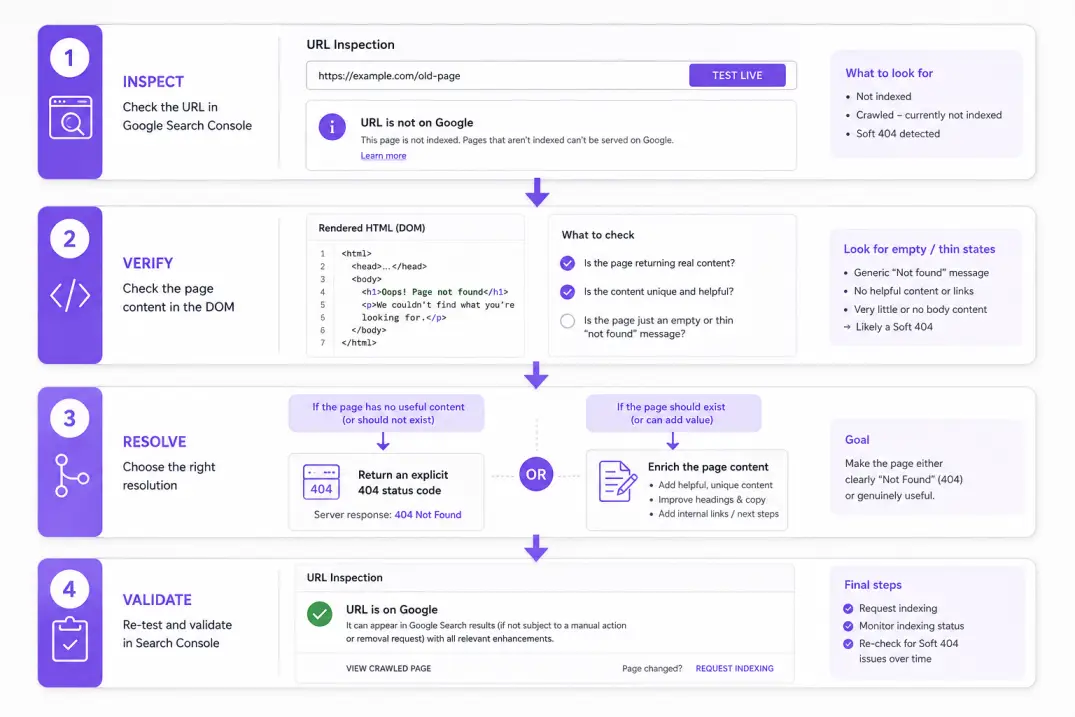
Detecting these issues requires separating what your server delivers from how Google's headless Chromium browser renders the page, especially when debugging recurring soft 404 errors on dynamic architectures.
# Verify true server response headers via terminal
curl -I -L -A "Mozilla/5.0 (compatible; Googlebot/2.1; +http://www.google.com/bot.html)" https://example.com/target-page
Step 1: Inspect the Page Indexing Report
Open Google Search Console and navigate to Pages > Why pages aren’t indexed. Review the count under Soft 404. Export the affected URL table and group them by URL path pattern (e.g., /category/, /product/, /search/, /author/). Pattern clustering reveals whether the issue stems from a global template error or isolated expired URLs.
Step 2: Run the Live URL Test
Paste an affected URL into the Search Console URL Inspection bar and click Test Live URL. Compare the Indexed Page tab with the Live Test tab:
- View Rendered HTML: Check whether the main content container (
<main>or<article>) contains complete text or empty div tags. - Review the Screenshot: Verify that images, headlines, and body copy load cleanly without stuck loading spinners.
- Inspect the HTTP Response: Confirm whether the live response matches your expected status code.
If the live test renders full content but the indexed version shows a soft 404, the issue is almost always a rendering timeout or historical crawler evaluation based on temporary server latency.
When auditing dynamic single-page applications, use curl -I in your terminal alongside Search Console's Live URL Test to verify that server response headers match the final rendered DOM state after client hydration.
Engineering Fixes: Restoring Indexation and Crawl Health
Fixing soft 404 issues requires selecting the appropriate architectural response based on whether the page should exist.
Strategy A: Serve an Explicit 404 or 410 Status Code
If a page is deleted, discontinued, or has no direct 1:1 replacement, configure your server to return a genuine HTTP 404 or 410 status code. Review the MDN Web Docs resource on 404 Not Found for proper client-server error boundaries.
# Nginx snippet: Return explicit 410 for retired product directories
location ^~ /discontinued-products/ {
    return 410 "Resource Permanently Removed";
}
Returning a hard 404 or 410 tells Googlebot immediately to purge the URL from its crawl queue, saving server bandwidth and crawl budget.
Strategy B: Enrich Thin Content with Substantive Entity Data
If the URL represents a legitimate page that you want indexed—such as a specialized filter or newly published category—you must increase its information density. Add explanatory editorial copy, customer reviews, related taxonomy links, and structured breadcrumb data.
To eliminate this risk during automated publishing, modern content architectures use pre-render checks. For example, Qoreta verifies complete DOM rendering, word count thresholds, and HTTP status codes before pushing live articles, ensuring pages never trip search engine soft-error filters.
Strategy C: Enforce Canonical Alignment
Ensure your self-referencing canonical tags match the final served URL. If a thin page points its canonical to a parent category or homepage while returning a 200 OK code, Google interprets this conflict as an ambiguous signal. Managing conflicting canonical tags ensures search engines receive consistent indexing instructions across your entire site hierarchy.
Systematic monitoring and server alignment remain the foundation for preventing soft 404 errors before they harm your organic visibility.
Artificial Intelligence
Intelligence without limits.
We believe great content deserves honest authorship—even when it's AI.
Frequently Asked Questions
Soft 404s do not trigger direct site-wide ranking penalties, but they waste valuable crawl budget and dilute site quality scores. When Googlebot spends crawl cycles repeatedly processing empty 200 OK pages, newly published and high-value articles take significantly longer to get discovered and indexed.
A 404 Not Found signals that a resource is missing but might return in the future, causing Googlebot to recheck the URL periodically before removing it from the index. A 410 Gone indicates that the resource has been permanently deleted, prompting search crawlers to remove the URL from index records much faster.
Adding a noindex tag instructs search engines not to index the page, which resolves the soft 404 flag in Search Console. However, if the page does not exist or has no utility, serving an explicit HTTP 404 or 410 response code at the server level is technically cleaner because it eliminates rendering overhead.
When a product goes out of stock, many CMS platforms automatically remove product descriptions, pricing details, and purchase buttons, replacing them with a simple 'Out of stock' notice. Googlebot detects the dramatic drop in primary content and phrases indicating unavailability, classifying the live URL as a soft 404.
After deploying server or template fixes and submitting a 'Validate Fix' request in Search Console, validation typically takes between a few days to several weeks. The exact timeline depends on your site's crawl frequency and how deep the affected URLs sit within your internal linking architecture.
A 301 redirect only resolves a soft 404 if the destination URL provides equivalent content that satisfies the original search query intent. If you redirect a deleted specific page to a generic homepage or broad category page, Google's algorithms will still classify the destination as a soft 404.