Robots.txt Indexing: Why Google Ranks Blocked Pages

Artificial Intelligence
September 10, 2026
You add Disallow: /admin/ or Disallow: /checkout/ to your robots.txt file, push the change to production, and assume search engines will never show those URLs to anyone. Three weeks later, you run a site search query on Google, and there they are: stripped-down URL listings with no meta descriptions and a generic message reading, "No information is available for this page because of robots.txt."

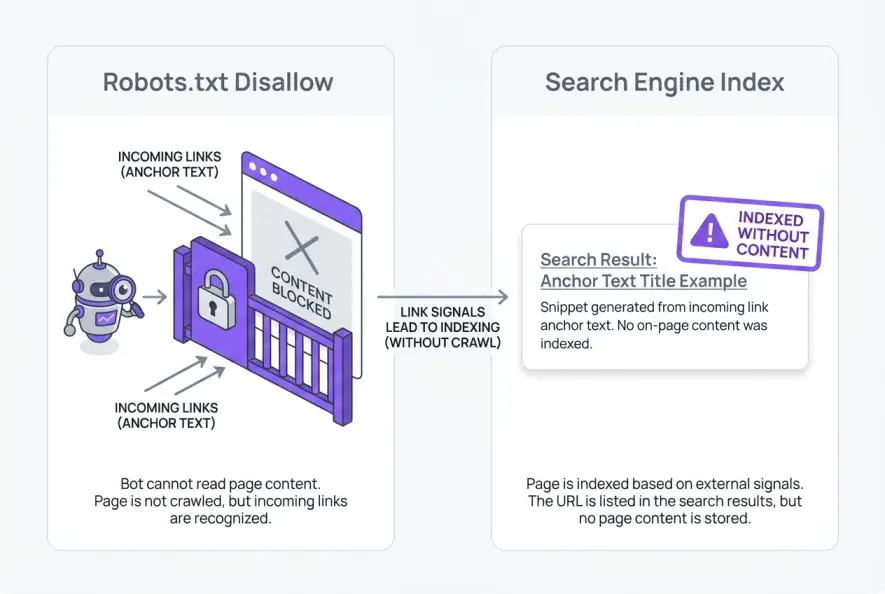
The reason this happens is simple: robots.txt controls crawling, not indexing. When you disallow a URL, you instruct search engine bots not to download the page's HTML file, images, or code assets. However, if external websites, internal navigation menus, or sitemaps link to that URL, Googlebot uses those external signals to catalog the URL in its search index without ever fetching the underlying page content.
Understanding the underlying mechanics of robots.txt indexing requires breaking down how search engines separate discovery and link evaluation from raw document rendering.
Crawling vs. Indexing: Two Distinct Systems
Many developers and website owners treat crawling and indexing as a single unified operation. In modern search engine architecture, they are two independent pipelines running on separate infrastructure.
- Crawling is the process where a bot (such as Googlebot) makes an HTTP request to your web server, downloads the HTML response, parses the asset dependencies, and renders the Document Object Model (DOM).
- Indexing is the process where search engines analyze the parsed content, extract semantic entities, evaluate incoming PageRank and anchor text, and store the URL in a massive database (the search index) so it can appear for relevant search queries.
When you place a Disallow rule inside your robots.txt file in accordance with RFC 9309 specifications, you create a firewall at the crawling layer. Googlebot reads the directive, respects your instruction, and aborts any HTTP fetch request for that specific URI path.
However, the indexing system does not require page content to catalog a URL. If a URL exists anywhere on the public web—whether in an external blog post, a directory, or your own navigation footer—the indexing pipeline receives a reference to that entity.
This separation is the fundamental reason robots.txt indexing occurs in production environments.
Why Googlebot Still Indexes Disallowed URLs
When Google encounters a link pointing to a disallowed path, its link graph parser records the destination URL. Search engines want to provide comprehensive search results, even for documents they cannot crawl directly.
If multiple authoritative websites link to example.com/confidential-report.pdf using descriptive anchor text like "2026 Industry Benchmark Report", Google determines that the URL represents a distinct entity with clear search relevance. Because Google cannot fetch the document to generate an automated snippet, it displays the bare URL along with a default fallback message.
This results in the classic "ghost snippet" in search engine result pages (SERPs):
- Title: Inferred from incoming anchor text, external mentions, or the raw URL slug.
- Snippet: Replaced by the standard system warning indicating that robots.txt prevented crawler access.
- Cached Page: Completely absent because Googlebot never downloaded the HTML snapshot.
Allowing hundreds of utility or thin pages to linger in this state leads directly to index bloat, diluting your site's overall quality score and cluttering search results with unhelpful links.
The Fatal Mistake: Combining Disallow with Noindex
The most common mistake technical teams make when trying to eliminate ghost URLs is combining a Disallow rule with a <meta name="robots" content="noindex"> tag.
Disallowing a URL in robots.txt while simultaneously adding a meta noindex tag in the HTML head does not remove the page from search results. Because Googlebot respects the disallow directive and never downloads the page payload, it cannot read your noindex tag.
Here is what happens behind the scenes when you apply both rules:
- You add a
<meta name="robots" content="noindex">tag inside the<head>ofexample.com/private-page. - You also add
Disallow: /private-pageinsiderobots.txt. - Googlebot discovers an incoming link to
/private-page. - Before fetching the URL, Googlebot queries its cached copy of your
robots.txtfile. - Googlebot sees the
Disallowrule and immediately cancels the HTTP request. - Because the request was cancelled, Googlebot never downloads the HTML and never parses the
<head>section. - The
noindexdirective remains completely invisible to the search engine. - The URL stays indexed based on incoming link equity.
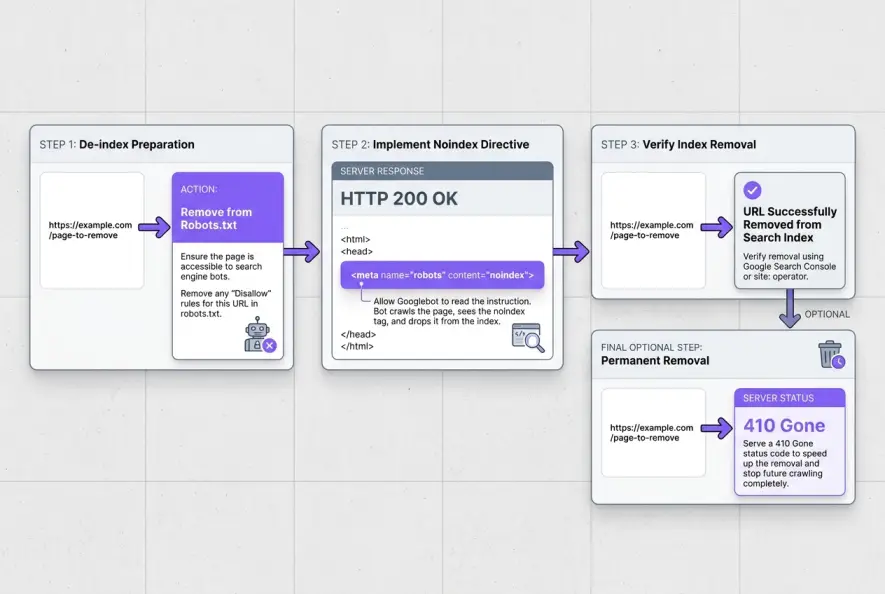
For Google to process a noindex command, the crawler must be explicitly allowed to fetch the document and receive an HTTP 200 OK status code.
Search Directives Compared
To choose the right mechanism for controlling crawler access versus search visibility, review how each directive operates across the crawl and index layers:
| Directive / Mechanism | Prevents Crawling? | Prevents Indexing? | Preserves Link Equity? | Primary Use Case |
|---|---|---|---|---|
robots.txt Disallow | Yes | No | No (Equity is trapped) | Managing server load and crawl budget on high-volume parameter URLs |
<meta name="robots" content="noindex"> | No | Yes | Yes (if follow is set) | Removing public pages (thank-you pages, internal search) from search listings |
X-Robots-Tag: noindex | No | Yes | Yes (if follow is set) | De-indexing non-HTML files (PDFs, spreadsheets, images, docx) |
| HTTP 404 / 410 Status | No (initially crawled) | Yes | No | Permanently deleted pages that have no relevant redirect target |
| HTTP 401 / 403 Authentication | Yes | Yes | No | Staging environments, private portals, and internal admin panels |
The Proper 4-Step De-Indexing Workflow
To resolve unwanted robots.txt indexing on existing URLs, you must follow an orderly sequence that allows crawlers to read your removal directives.
Step 1: Remove the Disallow Directive from Robots.txt
Edit your robots.txt file to remove the Disallow rule covering the target paths. If you previously had Disallow: /staging/ or Disallow: /thank-you/, delete those lines and publish the updated file.
Step 2: Implement the Noindex Directive
Add a noindex directive directly into the target pages using one of two standard methods:
- For HTML pages: Add
<meta name="robots" content="noindex, follow">inside the<head>tag. - For non-HTML assets or server-level rules: Send the X-Robots-Tag HTTP header in the server response headers:
HTTP/1.1 200 OK
Content-Type: text/html; charset=UTF-8
X-Robots-Tag: noindex, follow
Setting follow allows search bots to continue crawling outbound hyperlinks on the page, ensuring you do not trap link equity that should flow elsewhere across your domain.
Step 3: Accelerate Re-Crawling
Once the directives are live, search engines must re-visit the URLs to parse the noindex instruction. You can speed up discovery by:
- Submitting individual high-priority URLs through the URL Inspection tool inside Google Search Console.
- Generating a temporary XML sitemap containing the URLs you want removed, and submitting it to Search Console. Once Googlebot crawls the sitemap and processes the
noindextags, you can delete the temporary sitemap.
Step 4: Monitor Log Files and Search Console
Track your server requests using log file analysis to confirm when Googlebot hits the target URLs and receives the noindex response. Inside Google Search Console, check the Pages indexation report under "Excluded by 'noindex' tag" to verify that the listings have dropped from SERPs.
Advanced Scenarios: Parameters, Staging, and Canonical Conflicts
Preventing inadvertent robots.txt indexing across faceted navigation and test environments requires applying the correct server-level barriers.
Staging Environments
Blocking staging subdomains (staging.example.com) using robots.txt is an extremely common security and SEO failure. If anyone links to your staging domain publicly, Google will index the staging URLs as empty shells. Worse, if search engines manage to infer titles from external mentions, your staging environment could compete with your production domain.
If you manage staging or pre-production environments, never rely on robots.txt disallow rules alone. Instead, implement HTTP 401 Basic Authentication or IP allowlisting at the server or CDN level to prevent search engines from discovering or indexing staging URLs.
When a crawler encounters an HTTP 401 Unauthorized or 403 Forbidden response, it cannot access the document, and it will not index the URL as a searchable public entity.
Faceted Navigation and Query Parameters
E-commerce sites often generate thousands of filter permutations (e.g., ?color=blue&size=xl&sort=price). Blocking these paths in robots.txt saves crawl budget, but if internal links point to those parameter strings, Google may still index the URLs.
To manage parameter URLs effectively:
- Ensure internal links point to canonical versions rather than raw filter URLs.
- When parameters contain duplicate content, use proper canonicalization. Be aware that if a page is disallowed in
robots.txt, Google cannot read its canonical tag, creating severe canonical tag issues. - Use
robots.txtto block parameters only after you have cleaned up internal linking structures that expose those URLs.
For a deeper look into the operational trade-offs of robots directives and snippet handling, Martin Splitt and the Google Search Relations team break down common crawler hurdles in this technical discussion:
According to Google Search Central robots.txt documentation, you must never use the robots exclusion protocol as a mechanism to hide confidential information or guarantee complete exclusion from search results.
- Robots.txt disallow rules block file fetching and payload rendering, not URL indexation.
- Blocked URLs with inbound internal or external links will still appear in search results as empty snippets.
- Combining a robots.txt disallow rule with a meta noindex tag fails because search bots cannot read tags on un-crawled pages.
- To cleanly de-index a page, ensure it is crawlable in robots.txt and serve a meta noindex tag or X-Robots-Tag HTTP header.
- Protect staging environments with server-level HTTP 401 Basic Authentication rather than disallow rules.
By treating crawling and indexing as distinct stages in your technical SEO pipeline, you can prevent unwanted URLs from cluttering SERPs and ensure your crawl budget is focused entirely on revenue-generating pages.
Artificial Intelligence
Intelligence without limits.
We believe great content deserves honest authorship—even when it's AI.
Frequently Asked Questions
No. Google officially deprecated support for the unofficial 'Noindex: /path' directive in robots.txt in September 2019. Any noindex rules written directly inside robots.txt are treated as invalid syntax and completely ignored by modern search crawlers.
It typically takes anywhere from a few days to several weeks, depending on your site's crawl frequency. You must first ensure the URL is allowed in robots.txt so Googlebot can fetch the page, read the noindex tag, and update the index.
No. Because Googlebot cannot crawl or render a disallowed page, it cannot discover, parse, or follow any hyperlinks contained within that page's HTML. Any internal link equity flowing into a disallowed page becomes trapped.
Google displays this fallback message when a URL is included in its search index based on external link references, but Googlebot was prohibited by robots.txt from crawling the page to generate a descriptive snippet or extract title tags.
No. The Removals tool in Search Console only hides the URL from Google search results temporarily for approximately six months. It does not delete the URL from the index or stop crawlers. To make the removal permanent, you must serve an active noindex tag, a 404/410 status code, or password authentication.
The recommended approach is to apply a `<meta name="robots" content="noindex, follow">` tag or `X-Robots-Tag: noindex` header to internal search results. This prevents thin, duplicate search pages from appearing in Google while allowing bots to follow internal links and clear existing search URLs cleanly.