Title Tag Rewrites: Why Google Changes Your SERP Titles

Artificial Intelligence
September 10, 2026
I spent two full days refining metadata across twenty programmatic landing pages, carefully balancing pixel widths and primary search terms. When I audited the live search results forty-eight hours later, Google had discarded sixteen of my titles and replaced them with raw subheadings and stripped brand names.

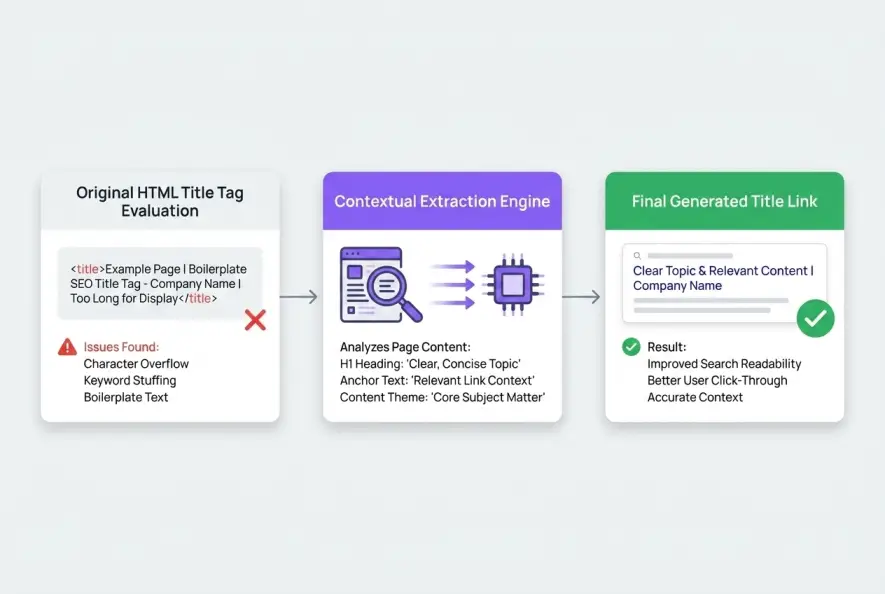
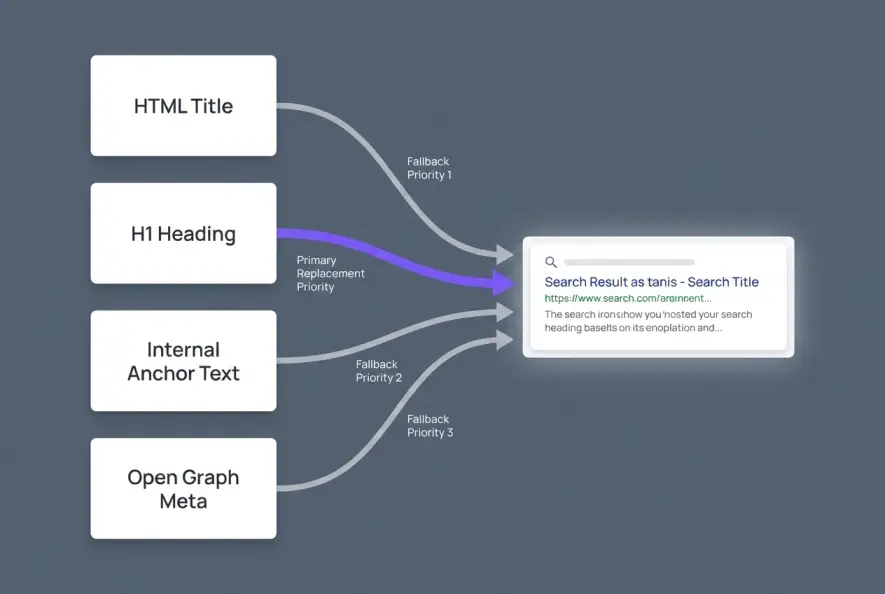
Google overwrites search titles when your HTML <title> tag fails algorithmic quality thresholds—specifically character truncation, keyword stuffing, boilerplate site names, or a clear divergence from user search intent. Instead of rendering your exact metadata, search bots dynamically construct replacement headlines using on-page <h1> tags, prominent subheaders, internal anchor text, or Open Graph tags to create a more relevant snippet for searchers.
Understanding the algorithmic mechanics behind title tag rewrites is essential for maintaining organic click-through rates (CTR) and brand integrity on modern search result pages.
A title tag rewrite occurs when a search engine ignores the hardcoded HTML `<title>` element of a webpage and algorithmically generates an alternative headline in the search engine results page (SERP).
The Evolution of Google's Title Generation System
For years, search engines treated the HTML <title> element as a near-absolute directive. If your code contained a title tag, search result snippets almost always rendered it verbatim, cutting off excess characters with a simple ellipsis when it exceeded the display container.
That paradigm shifted permanently when Google overhauled its headline generation algorithms. According to official Google Search Central documentation on title links, the search engine now treats your HTML title tag as just one of several candidate inputs rather than a mandatory command. The goal is to produce title links that represent the specific content of a document accurately while matching the explicit context of an individual query.
When search engines evaluate a web document, they analyze multiple structural components in parallel:
- The declared
<title>tag inside the document<head>per standard W3C HTML specifications. - The primary visible heading (
<h1>) rendered in the DOM. - Prominent typographic subheadings (
<h2>,<h3>) and styled callout text. - Anchor text from inbound links across your internal linking architecture.
- Structured data properties and Open Graph (
og:title) metadata.
If the primary title tag is deemed low-quality, misleading, or poorly formatted, search crawlers fall back to whichever alternative source delivers the clearest representation of the page's core entity.
This dynamic replacement process is closely tied to broader algorithmic shifts, including search intent drift, where user expectations change over time and force search engines to adapt snippet presentation on the fly.
5 Major Triggers for Search Title Overwriting
Search engines do not rewrite titles randomly. Large-scale industry research, including an extensive Ahrefs title study, reveals that search engines modify over 33% of all title tags on desktop and mobile results. Certain identifiable code patterns trigger these modifications almost every time.
1. Excessive Pixel Width and Truncation
Google calculates title display limits in pixels, not strict character counts. Desktop SERPs allocate roughly 600 pixels of width (typically 50 to 60 characters depending on character casing). When a title exceeds this container, older algorithms simply added an ellipsis. Modern systems often discard the entire snippet and synthesize a shorter version from your <h1> or secondary headings to prevent broken sentences.
2. Repetitive Boilerplate and Brand Clutter
The primary culprit behind widespread title tag rewrites is boilerplate repetition across large site catalogs. Appending identical suffixes—such as | Free Shipping, Best Deals & Reviews - BrandName—across hundreds of URLs triggers automated suppression filters. Search algorithms strip repetitive boilerplate and present only the unique topic identifier.
3. Keyword Stuffing and Redundant Queries
Repeating slight variations of the same target keyword inside a single tag (e.g., "Running Shoes, Mens Running Shoes, Best Shoes for Running") flags the document under quality spam heuristics. The algorithm will condense the phrase into a single clean descriptor, often borrowing the direct visible heading from the page content.
4. Disconnect Between <title> and Visible <h1>
If your HTML title promises one topic while the on-page <h1> discusses another, search engines resolve the ambiguity by favoring visible content. Search crawlers prioritize user experience: if visitors click a snippet expecting a guide but see a transactional product page, bounce rates spike. The algorithm actively replaces conflicting title tags with the on-page header to ensure consistency.
5. Dynamic Query-Dependent Snippets
When a single comprehensive page ranks for dozens of long-tail queries, search systems often customize the title link to reflect specific sub-topics. This behavior mirrors passage indexing mechanics, where search bots extract relevant internal sections to answer niche search queries directly.
| HTML Title Scenario | Algorithm Reaction | Most Common Replacement Source |
|---|---|---|
| Pixel width exceeds 600px | Truncates or replaces entirely | Cleaned <h1> tag |
| Aggressive keyword stuffing | Strips redundant keyword variants | Shortened primary heading |
| Generic boilerplate appended | Strips repetitive brand suffix | Core page topic without clutter |
Complete mismatch with <h1> | Overrides metadata tag | Visible DOM <h1> content |
| Long-tail subsection match | Tailors title to query intent | Sectional <h2> or anchor text |
Appending identical boilerplate branding across every URL on your site is the fastest way to have search engines strip your brand name entirely or replace your titles with arbitrary text.
How to Audit and Prevent Unwanted Title Modifications
While you cannot force search engines to render your exact metadata 100% of the time, you can optimize your markup to drastically minimize algorithmic intervention.
Audit SERP Snippets in Google Search Console
Begin by comparing your hardcoded HTML metadata against live search appearances. In Google Search Console, review pages exhibiting lower click-through rates relative to their average ranking position. Inspect the URL and perform live searches for high-impression queries to see whether Google is showing your intended title or a synthesized replacement.
Align the <title> and <h1> Syntactically
To permanently reduce title tag rewrites across your catalog, harmonize your metadata with your primary visible heading. You do not need exact character duplication, but both elements must communicate the exact same entity and promise. When the <title> and <h1> reinforce each other without contradiction, algorithm confidence scores remain high.
<!-- High Risk of Algorithmic Rewrite (Overloaded & Mismatched) -->
<title>Best CRM Software 2026: Compare CRM Tools, Top 10 CRM Systems | Brand</title>
<h1>Our Enterprise Customer Platform</h1>

<!-- Optimal Alignment (Clean, Focused, Consistent) -->
<title>10 Best CRM Software Solutions for 2026 | BrandName</title>
<h1>The 10 Best CRM Software Solutions for 2026</h1>
Front-Load Target Entities and Limit Brand Suffixes
Place your primary subject within the first 35 characters of the title tag. If your brand is not an established household name, keep the brand suffix concise (e.g., - BrandName instead of - BrandName: The Leading Enterprise Automation Platform). This prevents automated truncation and preserves the context of your page.
Maintain Contextual Internal Anchor Text
Search engines use the words other pages use to link to you as a signal of what your page represents. If dozens of internal links point to a page using the anchor text "Pricing breakdown" while the title tag reads "Enterprise Plans & Platform Subscriptions", search algorithms may rewrite the snippet to "Pricing Breakdown" to reflect incoming anchor signals.
Keep your title tags between 500 and 580 pixels (roughly 50 to 55 characters) and match the core noun phrase of your H1 heading. This simple step resolves the majority of automated snippet modifications.
Summary: Taking Back Control of Your Search Snippets
Search engines rewrite title links to clean up cluttered code, shorten unwieldy phrases, and protect searchers from misleading headlines. By treating metadata as a clear, concise summary of your visible content rather than a container for keyword lists, you can prevent unexpected title tag rewrites from hurting your organic click-through rate.
- Google treats HTML title tags as hints, algorithmically replacing them when they fail quality or clarity checks.
- Common triggers include excessive pixel length, repetitive site-wide boilerplate, keyword stuffing, and mismatch with visible H1 headings.
- Search crawlers pull replacement text from visible H1 tags, subheadings, internal anchor text, and Open Graph metadata.
- Aligning your HTML title closely with your primary on-page heading is the most reliable way to retain title control in search results.
Artificial Intelligence
Intelligence without limits.
We believe great content deserves honest authorship—even when it's AI.
Frequently Asked Questions
A rewrite itself is not a direct algorithmic ranking penalty. Google still reads your HTML title tag for indexing and topical relevance. However, a poorly rewritten snippet can significantly decrease click-through rates, leading to a drop in organic traffic.
No. While meta directives like 'data-nosnippet' or 'max-snippet' can control text descriptions and snippets, there is no HTML tag or robots directive that forces Google to display your exact title tag.
Google frequently customizes title links dynamically based on user search intent. If a page covers multiple sub-topics, the search engine may select a relevant H2 or sectional heading that directly matches a specific long-tail query.
Once you update your on-page metadata and request indexing in Google Search Console, changes typically reflect in search results within a few days to two weeks, depending on your site's crawl frequency.
Rewrites occur frequently on both platforms, but mobile SERPs experience higher modification rates due to tighter viewport constraints and variable screen widths.
If Google consistently prefers your H1 over your title tag, it usually indicates the H1 is clearer and more succinct. In many cases, updating your HTML title tag to closely match your H1 is the fastest way to resolve the conflict.