Pagination SEO: Why Googlebot Misses Your Deep Pages

Artificial Intelligence
September 10, 2026
You just migrated your blog archive or e-commerce catalog to a sleek infinite scroll interface. Engagement metrics look great on paper, bounce rates dropped slightly, and your development team is thrilled with the modern user experience. Yet two months later, organic traffic to your older articles and deep category products falls off a cliff.

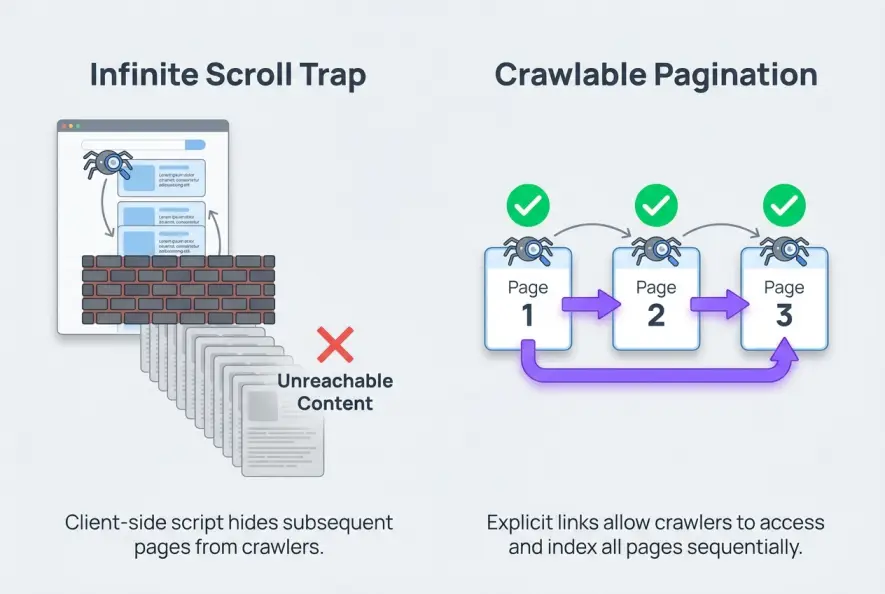
Search engines do not scroll like human visitors, tap virtual buttons, or trigger client-side JavaScript listeners. Googlebot discovers and evaluates web pages by following crawlable HTML anchor links across a deterministic URL structure. When your archive relies purely on dynamic scrolling without discrete, crawlable component URLs, search crawlers hit a dead end, stranding your older content in an unindexed void. Mastering pagination SEO ensures that search bots can systematically discover, crawl, and distribute link authority to every single URL in your catalog.
Understanding how crawlers process multi-page series prevents your valuable historical content from disappearing from the search index.
The Technical Blindspot of Infinite Scroll
Many engineering teams treat web crawlers like headless browsers that interact with pages just like users. While Google's Web Rendering Service (WRS) can render modern JavaScript, it operates under strict compute constraints and crawl budgets.
Googlebot does not mimic human gestures. It does not scroll down 5,000 pixels to see what loads next, nor does it fire custom browser events like touchstart or scroll listeners. If your deep content only loads when an Intersection Observer triggers an AJAX fetch, Googlebot will only ever see the initial batch of 10 or 12 items present in the initial server response.
This is why your deep archive pages quietly stop receiving organic impressions. If search bots cannot parse a physical hyperlink leading to the next batch of items, those deep pages become crawl orphans. As detailed in our breakdown of JavaScript SEO rendering challenges, relying on client-side execution for content discovery introduces unnecessary indexation lag and risks leaving deep URLs completely uncrawled.
The Deprecation of rel="next" and rel="prev"
For years, SEO professionals relied on rel="next" and rel="prev" link tags placed in the HTML <head>. The prevailing theory was that these tags signaled a consolidated series to search engines, treating pages two through twenty as a single combined entity.
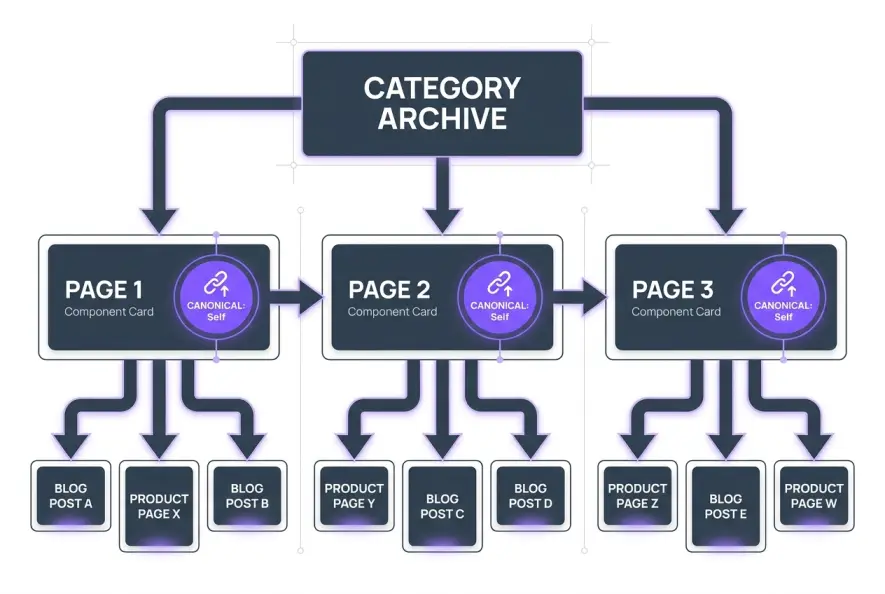
In 2019, Google officially confirmed that it had not used rel="next" and rel="prev" as indexing signals for several years. Today, search engines treat every single page in a paginated sequence as an independent, standalone URL. The modern reality of pagination SEO requires each component page to carry its own distinct technical signals, self-referential canonical tags, and accessible navigation links.
According to Google Search Central documentation, pagination must be linked sequentially with standard HTML anchor tags (<a href="...">) to allow search bots to traverse the full depth of a collection.
The Three Fatal Pagination Mistakes Tanking Your Rankings
When sites attempt to optimize paginated archives, well-intentioned technical decisions often backfire. Here are the three most damaging mistakes seen across enterprise publishing platforms and e-commerce stores.
1. Canonicalizing Component Pages to Page 1
This is arguably the most common architectural disaster on content sites. A developer or SEO decides that because /blog/page/2/ and /blog/page/3/ look somewhat similar to /blog/, all subsequent pages should point their canonical tag to /blog/.
When you set a canonical tag pointing back to Page 1, you explicitly instruct search engines to treat all subsequent pages as duplicate copies. Google responds by dropping pages two, three, and beyond from its index. Consequently, Googlebot stops crawling the links contained on those deeper pages, severing the link equity flowing to hundreds of articles or products.
Canonicalizing /page/2/ or /page/3/ to /page/1/ tells search engines that all subsequent pages are duplicate copies. As a result, Google will ignore the internal links on those pages, leaving your older articles completely orphaned. Always use self-referential canonical tags on each component page.
If you want to understand how search engines evaluate competing canonical directives, review our guide on resolving canonical tag conflicts.
2. Relying on Script-Only Triggers Without Crawlable Links
Many modern front-end frameworks (like React, Vue, or Next.js) render pagination controls using button elements with client-side event handlers:
<!-- Bad for SEO: Invisible to Search Crawlers -->
<button onclick="loadPage(2)">Load More</button>
<span class="page-link" data-page="2">Next</span>

<!-- Good for SEO: Crawlable Standard Anchor Tag -->
<a href="/blog/page/2/">Next Page</a>
Search crawlers prioritize standard <a href> links. If a link does not possess a valid href attribute containing a crawlable URL, Googlebot will not click it or extract the target URL.
3. Applying noindex to Paginated Component Pages
Another outdated practice involves adding <meta name="robots" content="noindex, follow"> to pages two and beyond, assuming it conserves crawl budget while still letting bots follow internal links. Google's webmaster team has clarified that when a URL remains noindex over a prolonged period, search crawlers eventually stop visiting it altogether and treat the outbound links on that page as nofollow. This completely cuts off the flow of PageRank to older content.
How to Build Search-Friendly Infinite Scroll
Can you offer an infinite scroll experience to human readers while providing structured, crawlable pages for search bots? Yes, by leveraging a hybrid approach using the HTML5 History API.
When a user scrolls down, JavaScript dynamically fetches the next set of items and updates the browser's address bar using history.pushState() or history.replaceState(). When a user or search engine loads that specific URL directly, the server returns that exact chunk of content as standalone HTML.
| Architecture Type | User Experience | Googlebot Crawlability | Implementation Complexity |
|---|---|---|---|
| Pure Infinite Scroll | Seamless, high engagement | Very Poor (Crawlers miss deep items) | Low |
| Load-More Button | Moderate friction | Poor (Buttons ignored without fallback links) | Low |
| Standard Numbered Links | Traditional, predictable | Excellent (Deterministic URL crawl paths) | Low |
| Hybrid History API | Seamless scrolling + URL sync | Excellent (Full crawl parity) | Medium-High |
When executing pagination SEO on modern web apps, pairing the History API with clean server-side rendering delivers the ideal balance between front-end responsiveness and search engine accessibility.
Optimizing Crawl Depth and Internal Link Distribution
On large websites with hundreds of archive pages, simple linear pagination (1, 2, 3... 50) introduces severe crawl depth latency. If an article only appears on Page 40, a search engine must traverse 40 sequential page hops to find it from your homepage.
To resolve this bottleneck, implement clustered or logarithmic pagination navigation. Instead of linking only to immediate neighbors, include broader leaps across your collection:
[Page 1] [Page 2] [Page 3] ... [Page 10] [Page 25] [Page 50] [Next >]
This simple architectural tweak compresses a 50-hop crawl chain down to 3 or 4 hops. This ensures PageRank distributes evenly across deep archives without creating search quality dilution and index bloat.
Maintaining clean internal link pathways is vital as a publishing library expands. For example, autonomous publishing workflows in Qoreta dynamically weave contextual internal links and manage archive structures automatically, ensuring new and historical articles remain discoverable without manual technical maintenance.
Use clustered pagination links (such as Pages 1, 2, 3, 5, 10, 25) on large archives. This cuts maximum crawl depth from dozens of clicks down to under 4 hops, distributing PageRank efficiently to your oldest content.
Auditing Your Paginated Series: A Step-by-Step Checklist
A comprehensive audit of your pagination SEO setup takes less than thirty minutes and prevents silent traffic decay across your deep archives:
- Inspect Unique URLs: Verify that every component page lives on a clean, persistent URL parameter or directory path (e.g.,
/blog/page/2/or/shop?p=2). Avoid hash fragments (#page=2), which crawlers ignore. - Check Self-Referential Canonicals: Inspect the raw HTML of page two and page three. Ensure
<link rel="canonical">points directly to itself, not to/blog/or the homepage. - Test HTML Source: Disable JavaScript in your browser developer tools and reload a paginated page. Confirm that item cards and pagination links are visible directly in the raw DOM.
- Monitor Google Search Console: Review the Page Indexing report. Filter for paginated URL patterns. If you see high counts of Discovered – currently not indexed or Crawled – currently not indexed, examine your crawl depth and server response latency.
Artificial Intelligence
Intelligence without limits.
We believe great content deserves honest authorship—even when it's AI.
Frequently Asked Questions
Yes. While titles can share the same core format, append the page position (e.g., 'SEO Guides – Page 2') to prevent duplicate title warnings in site audit tools and provide clear context to search engines.
If a 'View All' page loads quickly (under 2 to 3 seconds) and contains a manageable number of items (under 100), Google can consolidate signals to it effectively. However, for large collections with hundreds of items, 'View All' pages degrade Core Web Vitals and load times, making optimized pagination the superior choice.
Generally, no. XML sitemaps should be reserved for your primary canonical content pages, individual articles, and main landing pages. Search bots will naturally discover paginated component pages by crawling your site's HTML navigation links.
Clean path structures (like /page/2/) or standardized query parameters (?page=2) are easily understood by crawlers. However, combining pagination with sorting and filtering parameters (like ?sort=price&filter=blue&page=2) can cause exponential URL multiplication. Use robots.txt disallow rules or canonical tags to prevent filtering traps.
No. Google does not penalize websites for the natural boilerplate and listing duplication found across paginated archives. However, improper canonicalization will prevent search engines from indexing the distinct items linked from those pages.
Never block paginated paths in your robots.txt file. Doing so prevents crawlers from accessing the links on those pages, completely severing the link equity pipeline to your historical content and product inventory.