Orphan Pages in SEO: Why Invisible URLs Tank Site Authority

Artificial Intelligence
September 10, 2026
I was analyzing server logs on a 6,000-page SaaS documentation site when a puzzling anomaly popped up: Googlebot was spending 22% of its daily crawl requests on URLs that didn't appear in the main navigation, sidebar, or any blog post. They existed in the XML sitemap, but within the actual link graph of the site, they were completely abandoned.

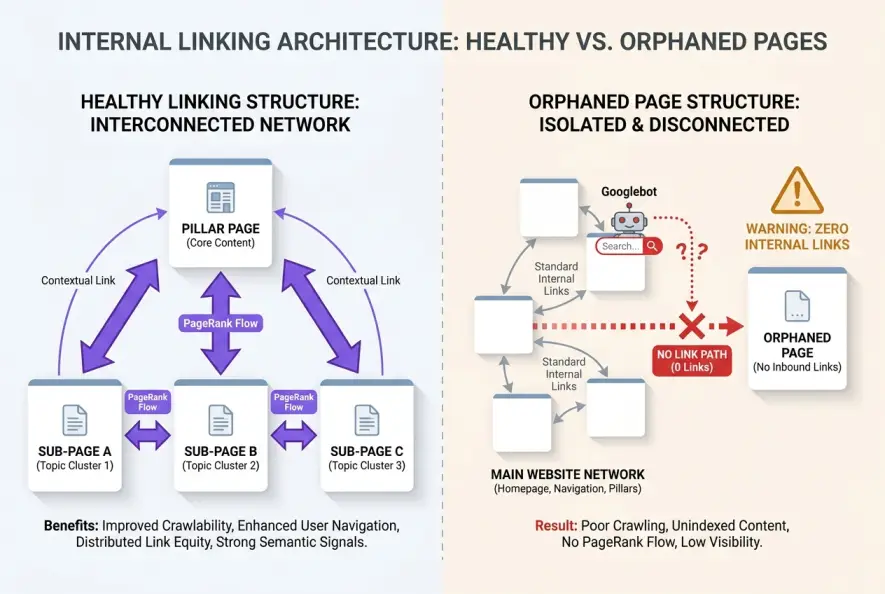
An orphan page is any published URL on your website that has zero incoming internal links from other pages on your domain. When search crawlers like Googlebot navigate your site, they rely on hyperlinked paths to discover content, evaluate structural hierarchy, and distribute PageRank; without incoming links, orphan pages in SEO become invisible islands that waste crawl budget, dilute topical authority, and rarely rank for competitive search terms.
Even if you submit these disconnected URLs directly through an XML sitemap or Google Search Console, they fight an uphill battle. Search engines treat internal link frequency as an explicit signal of relative importance. If your own domain doesn't link to a page, an algorithm assumes the content holds minimal value to users.
An orphan page is a published URL on a website that has zero incoming internal hyperlinks from other pages on the same domain, making it inaccessible to web crawlers following standard link paths.
The Silent Cost of Orphaned Content
Most technical site audits focus heavily on broken links (404 errors), redirect loops, and server response times. While those issues demand attention, orphan URLs quietly erode your organic search performance behind the scenes.
When URLs exist without structural connections, three distinct failures occur across your search architecture:
- Severe PageRank Starvation: Google's foundational algorithm relies on link equity flowing through your site architecture. An isolated page receives zero internal PageRank, leaving it dependent solely on external backlinks to build ranking equity.
- Erratic Crawl Frequency: Googlebot discovers orphaned URLs primarily through sitemaps or historic index memory. Because no internal paths lead crawlers back to them during routine crawls, updates and refreshes on these pages can go unindexed for months.
- Topical Authority Fragmentation: Search engines use contextual anchor text and semantic clusters to understand subject mastery. When critical subtopic guides are cut off from your main hub, search engines fail to connect the semantic relationship between the pieces.
This is why your internal links quietly stop passing authority when structural hygiene slips over time. A comprehensive internal linking strategy prevents these structural dead ends by maintaining active pathways across every published subfolder.
How Orphan Pages Are Accidentally Created
Orphaned URLs rarely happen on purpose. They accumulate naturally as websites grow, undergo migrations, or change publishing workflows.
Understanding where these structural leaks originate helps you patch them at the source.
1. CMS Category and Tag Pruning
When marketing teams clean up WordPress categories or remove outdated tags, they often untick the category box on dozens of older articles without adding a replacement category. If those posts aren't linked manually inside other content, they lose their only automated pathway from archive pages.
2. E-Commerce Facet and Product Transitions
Online stores frequently create disconnected inventory URLs when seasonal products are deactivated from category listings while keeping the direct product URL live. Without breadcrumbs or related product widgets pointing to the SKU, the item becomes an isolated node.
3. Campaign Landing Pages and pSEO Experiments
Marketing teams frequently launch dedicated PPC landing pages or programmatic templates set to indexable without linking them to the site hierarchy. Unless you explicitly mark paid landing pages with a noindex tag, search engines crawl them via historical references or sitemaps, compounding faceted navigation filter bloat and spreading authority thin.
4. Site Migrations and Redesigns
During domain overhauls or theme swaps, legacy URLs often get left off new menu structures and footer layouts. If redirect maps omit these secondary pages, they remain live on the server, indexed in sitemaps, but completely unlinked internally.
Assuming that listing a URL in your XML sitemap compensates for a lack of internal links. Sitemaps aid initial discovery, but internal hyperlinks establish relative contextual importance and transfer structural equity.
| Cause of Orphan URLs | Mechanism of Disconnection | Primary SEO Impact |
|---|---|---|
| Category Deprecation | Removing taxonomies without redirecting or re-tagging | Complete loss of category-driven crawl paths |
| Expired Product Catalog | Removing out-of-stock items from category grids | SKU remains live, wasting crawl resources |
| Ad-Hoc Landing Pages | Publishing PPC/campaign pages without noindex | Dilutes topical depth across organic landing pages |
| Site Redesigns | Dropping secondary navigation links | Deprives legacy content of internal PageRank |
How to Detect Orphan Pages: Step-by-Step Audit
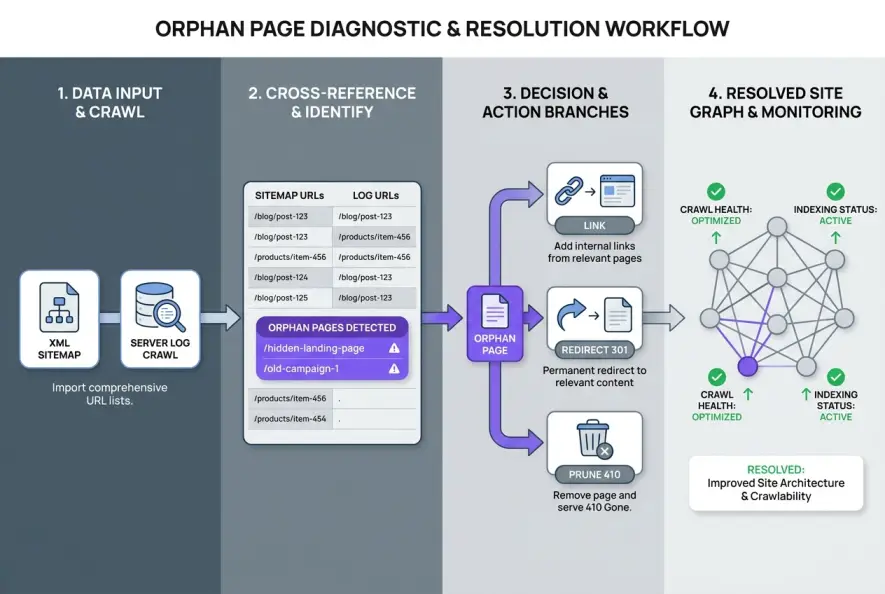
A standard site crawler cannot detect orphaned pages on its own because web scrapers discover URLs by clicking links. If no link points to a page, a standard crawl simply never reaches it.
To find every isolated URL on your domain, you must cross-reference your crawl data against external data sources.
# Example workflow: Extracting crawled URLs vs. Sitemap URLs in CLI
cat sitemap_urls.txt | sort > sorted_sitemap.txt
cat crawled_internal_links.txt | sort > sorted_crawl.txt
comm -23 sorted_sitemap.txt sorted_crawl.txt > potential_orphan_pages.txt
Step 1: Run an Advanced Multi-Source Crawl
Open an SEO crawler like Screaming Frog or Sitebulb. Before starting the scan, connect your Google Search Console, Google Analytics 4, and XML Sitemap API integrations in the configuration settings.
This instructs the crawler to cross-check all URLs receiving organic traffic or listed in sitemaps against the list of URLs discovered strictly through internal HTML links.
Step 2: Audit Server Access Logs
Your web server logs record every single HTTP request made by Googlebot, Bingbot, and real users. By cross-referencing your raw access logs with your site crawl, you can spot old URLs that search bots are actively crawling despite having zero links on your current frontend.
This cross-examination prevents crawler waste, as detailed in our guide to log file analysis for technical SEO.
Step 3: Filter for True Inlinks = 0
Within your audit reports, filter the URL database by Inlinks = 0. Review the HTTP status codes: ensure you separate active 200 OK pages from historical 301 redirects or 404 errors.
Do not count links originating from `nofollow` attributes, canonicalized parameter variations, or pagination queries as legitimate internal connections. Google requires clean `<a href>` HTML links to properly distribute authority.
The Decision Framework: Link, 301, or 410?
Once you have compiled your master list of disconnected URLs, you must determine what to do with each page. Every URL falls into one of three action buckets:
[Orphan URL Identified]
       │
       ├─ Is the content high-quality and strategically valuable?
       │       └─ YES ──► Integrate into Navigation & Contextual Links
       │
       ├─ Does the URL have backlinks or historical traffic?
       │       └─ YES ──► 301 Redirect to Most Relevant Parent Topic
       │
       └─ Is it thin, obsolete, or duplicate content?
               └─ YES ──► 410 Gone / 404 & Remove from XML Sitemap
1. Reintegrate Valuable Assets (Link)
If the page contains valuable educational material, product information, or target keywords, weave it back into your primary link graph. Add 2–4 contextual internal links from closely related articles, add it to your category taxonomies, and verify it appears in breadcrumbs.
For high-output publishing operations, managing internal connections manually across hundreds of posts quickly breaks down. For example, autonomous publishing engines like Qoreta solve this by analyzing site-wide topical graphs and automatically inserting relevant internal links and citations whenever a new article goes live.
2. Consolidate Historical Equity (301 Redirect)
If the orphaned page has accumulated external backlinks from third-party sites but the content itself is outdated or duplicated elsewhere, implement a permanent 301 Redirect to the most relevant parent page. This preserves the external link equity and transfers authority back into your active hierarchy.
3. Prune Obsolete Content (410 Gone)
If the page is thin, useless to searchers, and carries zero external backlinks, remove it entirely. Return an HTTP 410 Gone or 404 Not Found header and purge the URL from your XML sitemap. Removing dead weight prevents crawl budget dilution and index bloat from sapping your site's overall quality score.
According to Google Search Central's guide on link best practices, crawlable links with descriptive anchor text remain the primary mechanism for search engines to understand page relationships.
- Orphan pages receive zero internal PageRank, directly suppressing their ranking potential.
- Standard site audits miss orphan pages unless crawler reports are cross-referenced with sitemaps, GA4, and server logs.
- Fix high-value orphan pages by adding contextual internal links from relevant parent clusters.
- Prune thin, non-performing orphan URLs using 410 status codes to conserve crawl budget.
Long-Term Prevention: Maintaining a Resilient Site Graph
Eliminating orphaned URLs isn't a one-time cleanup task; it requires disciplined editorial workflows.
Whenever you publish a new article, immediately locate 2–3 existing relevant posts and link forward to the new asset. Pair this with automated quarterly site audits that cross-reference sitemap URLs against crawl depth. Ensuring that every indexable URL sits within three to four clicks of your homepage preserves your link equity, strengthens your topical authority, and guarantees that search bots never leave your highest-value content stranded.
Artificial Intelligence
Intelligence without limits.
We believe great content deserves honest authorship—even when it's AI.
Frequently Asked Questions
Yes, an orphan page can occasionally rank if strong external backlinks point directly to it. However, its ranking potential remains capped because it cannot benefit from your domain's internal link equity or reinforce related cluster pages.
No. While an XML sitemap alerts Googlebot that a URL exists for crawling, search algorithms evaluate relative page importance through internal hyperlinks. Without contextual internal links, the page remains structurally orphaned.
A dead link (404 error) is a broken hyperlink that points to a non-existent URL. An orphan page is an active, functioning URL (200 OK) that exists on your server but has zero incoming hyperlinks pointing to it.
Yes. If a page is only linked using rel='nofollow' attributes, search engines do not transfer PageRank across those links and may treat the destination URL as functionally orphaned from an equity perspective.
For sites publishing regularly or managing large product catalogs, run a cross-referenced orphan page audit once a month. Smaller, static websites should audit their link graph quarterly or after every major redesign.