Naming Images for SEO: 9 File Name Rules That Work

Artificial Intelligence
October 18, 2026
Imagine a blog with 240 posts and 900 images, and every file is called IMG_4821.jpg, Screenshot 2026-03-14 at 10.42.11.png or final-v3-FINAL.webp. Nothing is broken. The pages load, the pictures show up, and the traffic report never mentions them.
That's the quiet cost of ignoring naming images for SEO. The short answer: give every image a short, lowercase, hyphen-separated file name that describes what the picture actually shows, such as black-leather-hiking-boots-front-view.webp, before you upload it. Google's documentation says file names can give it clues about the image's subject, and a clear name also makes the image URL readable and your media library searchable.
Below are nine rules, bad-versus-good examples, naming patterns for each image type, a bulk-rename script and a safe process for fixing images you've already published.
What Naming Images for SEO Actually Does
Let's set expectations first. A file name is not a ranking lever on its own. It's one of several signals that tell search engines what an image is about, and it's the cheapest one to get right because you control it completely.
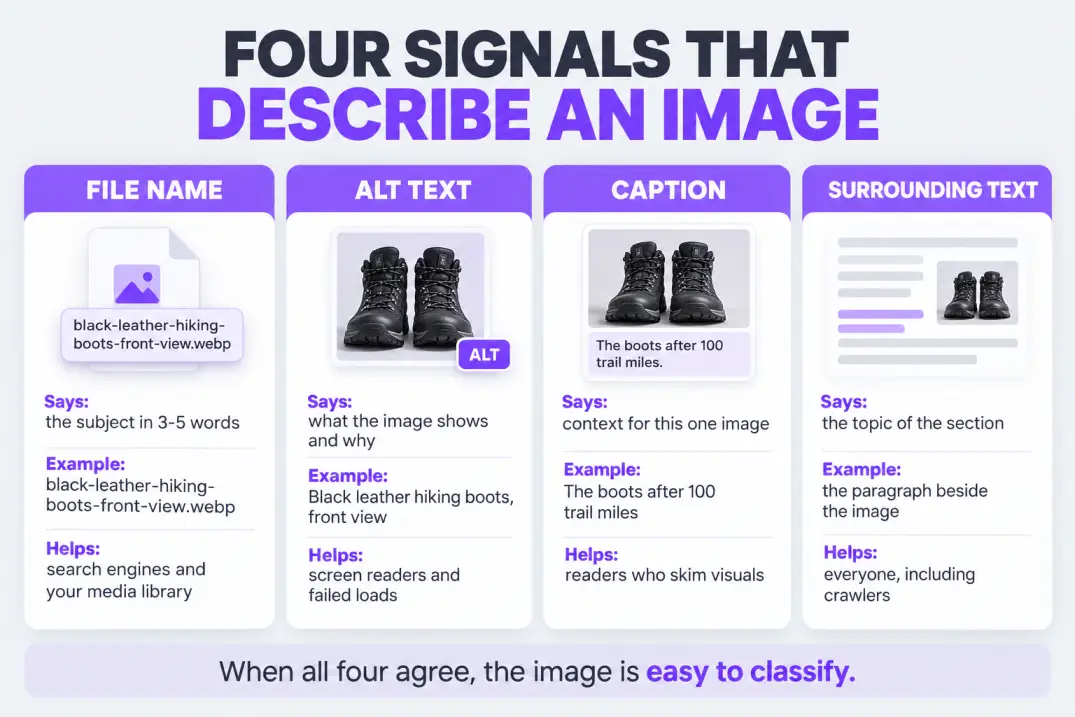
Google's image best practices list descriptive file names alongside alt text, captions and surrounding page content as inputs for understanding an image. That's the real model: no single field decides, but a consistent set of fields removes doubt.
Here's what each signal does and who it's for.
| Signal | What it tells search engines | Who else it helps |
|---|---|---|
| File name | The subject, in a few words | You, when searching your media library |
| Alt text | What the image shows and why it's there | Screen reader users, anyone when the image fails to load |
| Caption | Context for the specific image | Readers who skim visuals first |
| Surrounding text | The topic of the page and section | Everyone reading the page |
The so-what: when all four agree, the image is easy to classify. When the file name says IMG_4821 and the alt text is empty, search engines have only the surrounding text to go on.
Believing the file name is for accessibility. Screen readers rely on alt text, not file names. Naming files well helps search engines and your own workflow, so don't skip alt text because the name is good.
Why Image Names Still Matter for Image Search and AI Answers
Image search remains a real traffic source for visual topics: products, recipes, travel, design, DIY and how-to content. Someone searching for "standing desk setup" often wants pictures first and the article second.
Two shifts make careful naming more relevant, not less. First, search results often blend images with text answers, so the images on your page help shape how the page is understood and presented. Second, AI-powered search and shopping tools draw on the same web content, including images and the text around them, so clean, descriptive names make your media easier for any system to classify.
It's worth being honest about the limits. Search engines and AI systems read alt text, captions, structured data and page copy at least as heavily as file names. The name is a tiebreaker and a tidy-up, not a strategy.
That's fine, because tiebreakers are cheap. In a competitive result, a handful of small, consistent wins add up. Treat image names the way you treat URL slugs: short, boring, consistent and permanent.
The 9 Rules for SEO Image Names
These rules cover almost every case. They also work as an editorial standard: write them down once and nobody has to decide again.
1. Describe what the image actually shows
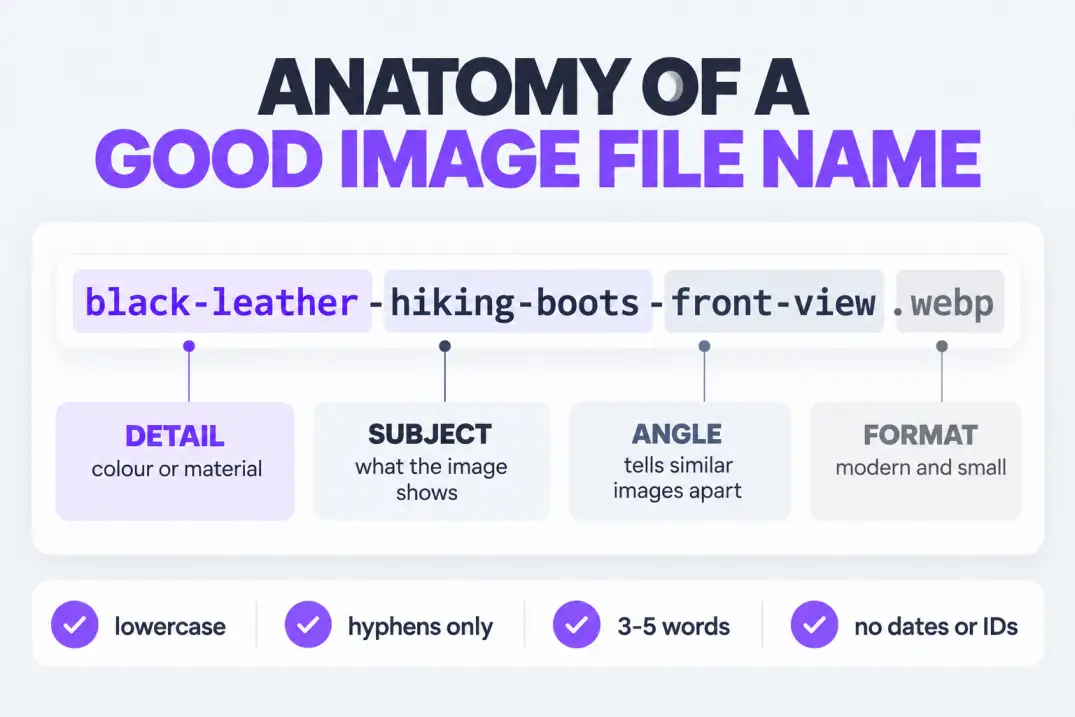
Start with the main subject, then add the details someone would use to tell it apart from similar images: color, angle, setting or action.
black-leather-hiking-boots-front-view.webp beats boots.webp because it says which boots and from where. It also beats best-hiking-boots-buy-cheap.webp, which describes a sales pitch rather than a picture.
The test is simple: if someone could picture the image from the name alone, it passes.
2. Use hyphens, not underscores or spaces
Google's URL structure guidance recommends hyphens to separate words, because they read as word separators while underscores can join words together. Spaces get encoded as %20, which makes URLs ugly and error-prone to copy.
So hiking-boots-front-view.jpg, never hiking_boots_front_view.jpg and never hiking boots front view.jpg.
3. Keep everything lowercase
Many servers treat Boots.JPG and boots.jpg as two different files. Mixed case creates duplicate paths, broken links when someone retypes a URL, and awkward redirects.
Lowercase everywhere removes a whole class of avoidable bugs. It's the easiest rule to automate, which is why the script later in this guide does it for you.
4. Aim for three to five words
There's no official length limit, but there's a practical one. Two words is usually too vague, and eight words starts to read like a sentence. Three to five meaningful words is the range that stays specific without becoming clutter.
Drop filler such as "image," "photo," "picture" and "of." The file extension already says it's an image.
5. Use the target keyword only when it's accurate
If the image really shows the topic, use the keyword in the name: a diagram on internal linking can be internal-linking-structure-diagram.webp. If it doesn't, don't force it.
Reusing the page's focus keyword on every image on the page doesn't help. It makes six files look identical, and it fails the test of describing what each one shows.
6. Stick to plain ASCII letters and numbers
Skip accents, emoji, brackets, ampersands, apostrophes and quotation marks. They get percent-encoded in URLs, behave differently across systems and break in scripts.
If you publish in another language, follow that language's conventions consistently, but avoid special characters that your CMS or CDN might mangle. Many teams use a plain-ASCII version of the word in the file name (cafe instead of café) and keep the accented spelling in the alt text and caption, where it reads naturally for people.
The same logic applies to international sites. Name images in the language of the page when it makes sense, and keep one convention per language so that editors can find files without guessing.
7. Strip dates, versions and random IDs
Names like final-v3, copy-2 and 1698765432 mean something to the person who exported the file and nothing to anyone else. Dates in file names also go stale and make a page look old.
Keep versioning in your design tool or folder structure, and keep the published file name clean.
8. Don't stuff keywords
seo-images-seo-image-names-image-seo-tips.jpg is not a name. It's the kind of repetition Google's spam policies warn against, and it tells readers nothing.
One accurate descriptor beats five repeated ones. If a name reads awkwardly out loud, rewrite it.
9. Make names unique and keep them stable
Two different images shouldn't share a name, even in different folders, because duplicate names cause overwrites during uploads and confusion in bulk tools.
Once an image is published, treat its URL as permanent. Renaming it later changes the URL and can break the image everywhere it appears unless you redirect it, which is covered below.
Bad vs Good: Real Rewrites
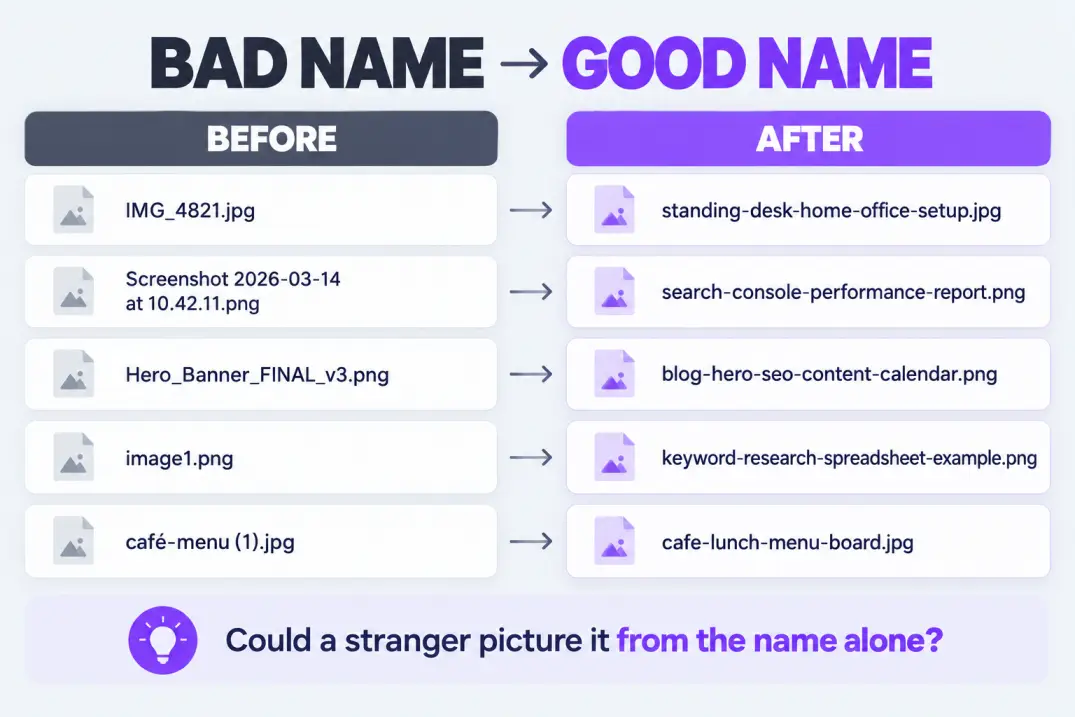
Rules are easier to remember with examples. Here's how common bad names should be rewritten.
| Bad name | What's wrong | Better name |
|---|---|---|
IMG_4821.jpg | Camera default, says nothing | standing-desk-home-office-setup.jpg |
Screenshot 2026-03-14 at 10.42.11.png | Spaces, date, no subject | search-console-performance-report.png |
Hero_Banner_FINAL_v3.png | Underscores, caps, version | blog-hero-seo-content-calendar.png |
image1.png | Generic and not unique | keyword-research-spreadsheet-example.png |
best-seo-images-seo-tips-seo.jpg | Stuffed | alt-text-example-product-photo.jpg |
café-menu (1).jpg | Accent, brackets, space | cafe-lunch-menu-board.jpg |
Notice the pattern: every "better" name could be understood by someone who has never seen the page. That's the standard.
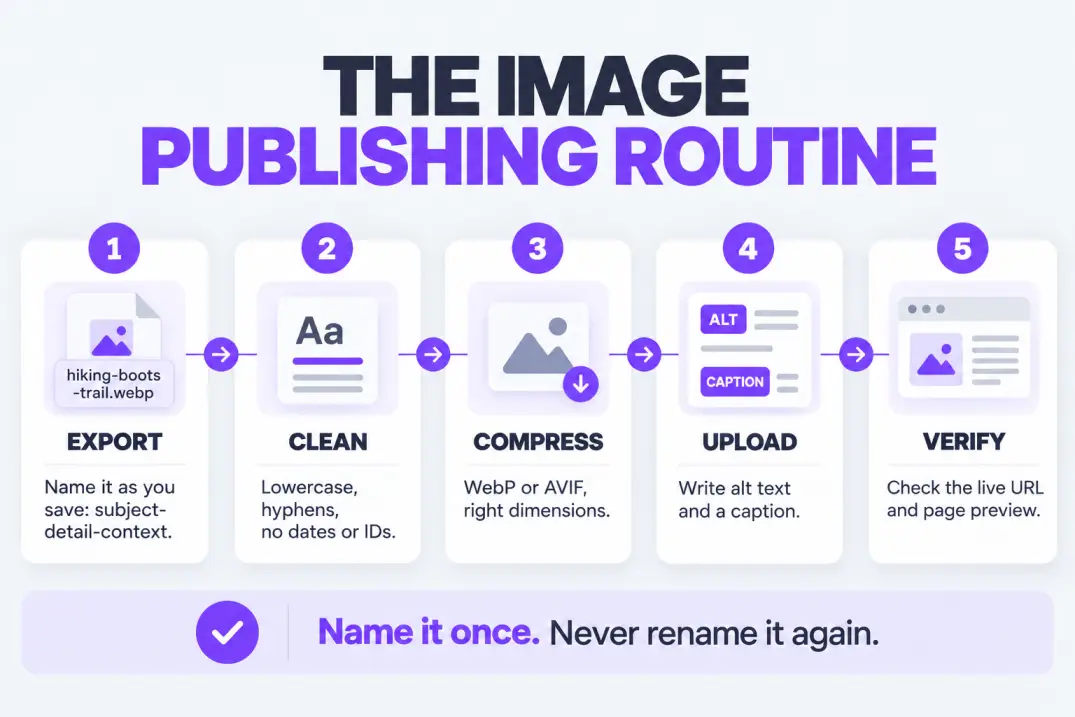
Name the file at the moment you export it from your design tool or camera, not when you upload it. By upload time, you've forgotten what the image was for, and you'll be tempted to accept the default.
How to Name Each Type of Image
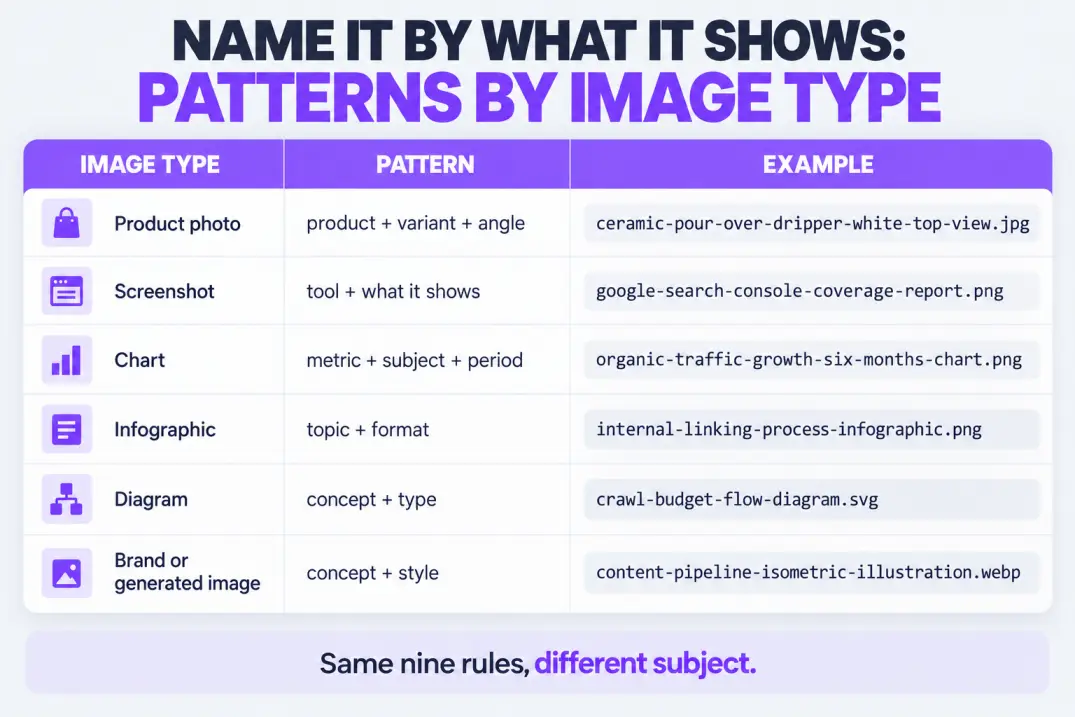
The nine rules stay the same, but what you describe changes by image type. Here are patterns you can adopt per type.
| Image type | Pattern | Example |
|---|---|---|
| Product photo | product + variant + angle | ceramic-pour-over-coffee-dripper-white-top-view.jpg |
| Screenshot | tool + what it shows | google-search-console-coverage-report.png |
| Chart or graph | metric + subject + period | organic-traffic-growth-six-months-chart.png |
| Infographic | topic + format | internal-linking-process-infographic.png |
| Team or portrait | name + role, with permission | maya-chen-head-of-content.jpg |
| Illustration or diagram | concept + type | crawl-budget-flow-diagram.svg |
| Generated or brand image | concept + style | content-pipeline-isometric-illustration.webp |
A few notes on why these patterns work.
Product photos are where file names matter most commercially, since image search often feeds shopping intent. Include the product type, the distinguishing variant and the angle so each shot of the same product has a distinct name.
Screenshots are the worst offenders because tools name them by timestamp. Rename them to say what's on screen. It takes ten seconds and makes your tutorials far easier to maintain.
Charts and infographics carry information that search engines can't read from pixels alone, so the file name and alt text should state what the data shows. If the data matters, also put it in text on the page.
People should only be named with their consent. Use the name and role the person already uses publicly.
Generated and brand images need the same discipline as photographs. Teams that publish at volume tend to hit this problem first, and Qoreta, for example, generates brand-consistent images and inserts them into each draft, which is exactly why settling a naming convention before output scales is worth the effort.
File Name vs Alt Text vs Title vs Caption
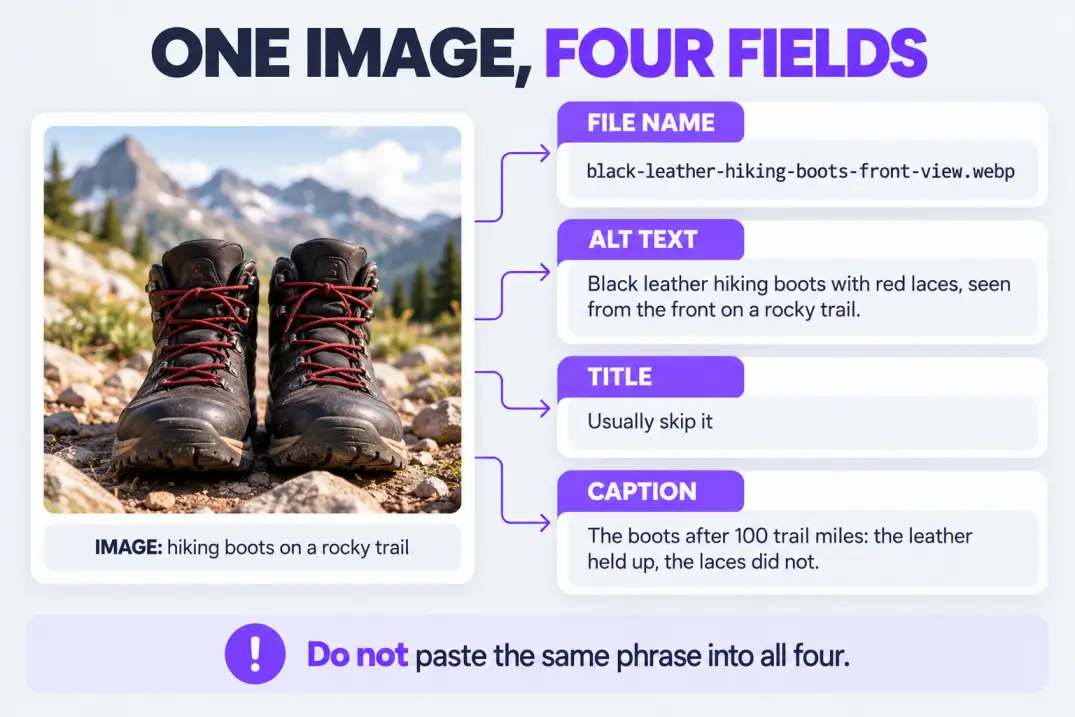
This is where most people mix things up. The four fields do different jobs, and writing the same phrase into all of them wastes three opportunities.
Take one image and write all four fields.
| Field | What to write | Example |
|---|---|---|
| File name | A short hyphenated subject | black-leather-hiking-boots-front-view.webp |
| Alt text | A sentence-style description for a person who can't see it | Black leather hiking boots with red laces, seen from the front on a rocky trail |
| Title attribute | Usually skip it | (leave empty) |
| Caption | Context that adds meaning for readers | The boots after 100 trail miles: the leather held up, the laces didn't. |
Three practical points follow.
Alt text should be written for people first. Describe the image in a natural sentence, stay concise, and mention the topic phrase only if it fits. Keyword lists in alt text are noise, and they make pages worse for screen reader users.
The title attribute rarely helps. It shows as a tooltip on desktop, is mostly ignored on mobile and adds little for search. Leave it out unless you have a reason.
Captions are underused. Many readers scan pictures and captions before the body text, so a good caption earns attention and adds relevant text beside the image.
If you also run an audit of existing pages, an image check fits naturally into a full website audit.
A Worked Example: Naming the Images for One Post
Consider a post about running an internal linking audit. It needs a cover, a diagram, a screenshot, a chart and an infographic. Here is how the names and alt text could look.
| Role | File name | Alt text |
|---|---|---|
| Cover | internal-linking-audit-cover-illustration.webp | Illustration of connected pages representing an internal linking audit |
| Diagram | hub-and-spoke-internal-link-diagram.webp | Hub and spoke diagram showing a pillar page linking to supporting posts |
| Screenshot | crawler-orphan-pages-report.png | Crawler report listing pages with no inbound internal links |
| Chart | internal-links-per-page-chart.png | Bar chart showing most pages have fewer than five internal links |
| Infographic | internal-linking-audit-process-infographic.webp | Five-step internal linking audit process from crawl to fix |
Three details are worth noticing. No two names share the same first three words, so none of them collide when uploaded. The names are shorter than the alt text, because they're labels rather than descriptions. And the alt text never repeats the file name word for word, which keeps the two fields doing different jobs.
This is also the point where internal links help the images do their work. A descriptive internal linking strategy ensures the pages around your images are discoverable, which in turn gives image files more context.
A Naming System That Scales
One well-named image is easy. Nine hundred are a process problem. The fix is a convention that turns naming into a fill-in-the-blanks task.
Pick a pattern and write it down
A pattern that works for most blogs is:
[subject]-[detail]-[context].[format]
For example, crawl-budget-flow-diagram.webp or keyword-gap-report-example.png. Add the pattern to your style guide, your design handoff template and your editor onboarding.
Name at the source
The cheapest place to fix a name is where the file is created. Set export presets in your design tool, rename screenshots right after capture, and require descriptive names from freelancers and vendors.
Bulk-clean what you can automate
Lowercasing, replacing spaces and underscores, and stripping stray characters are mechanical. This shell snippet cleans a folder of images safely: it won't overwrite an existing file.
for f in *.jpg *.jpeg *.png *.webp; do
  [ -e "$f" ] || continue
  new=$(echo "$f" | tr '[:upper:]' '[:lower:]' | tr ' _' '--')
  [ "$f" != "$new" ] && mv -n "$f" "$new"
done
This handles the formatting rules only (2 and 3). The descriptive part, the actual subject, still needs a human or a deliberate review step, because no script knows what's in your picture.
Group by folder, not by file name
Keep a folder structure for your own organization, such as /screenshots/, /product/ and /diagrams/, but don't rely on folders to carry meaning. The file name has to make sense on its own because it gets copied, uploaded and shared without its folder.
Make format and size part of the routine
Naming is one step in a short workflow. Modern formats like WebP and AVIF usually deliver smaller files at similar quality, and the free web.dev images course covers formats, responsive images and loading in depth.
What Happens to Your File Name in Popular Platforms
Your CMS decides what the file name becomes in the published URL, so it pays to know the behavior of the one you use.
| Platform | What commonly happens | What to do |
|---|---|---|
| WordPress | Keeps the uploaded file name in the uploads folder, adds suffixes such as -1 for duplicates and -scaled for very large images, and may preserve capitalization | Name before upload, and check for unwanted suffixes |
| Shopify | The file name becomes part of the image's CDN URL | Name before upload; changing it later means re-uploading |
| Static or headless sites | You control the path completely, often through a build step | Add a lint or build check for lowercase and hyphens |
| Design tools and DAMs | Exports use layer or frame names by default | Set export naming rules or presets |
The so-what: the upload is the point of no return on most platforms. A name chosen there becomes a URL, and URLs are expensive to change.
If your platform adds suffixes or transforms the name, look at the final published URL, not just the name you typed in. That's the value search engines and browsers actually see.
Who Owns Image Naming on a Team
Naming rules fail when everyone assumes someone else is checking. Assign it explicitly.
| Role | Responsibility |
|---|---|
| Designer or photographer | Names files at export using the team pattern |
| Writer or editor | Writes alt text and captions, flags generic names |
| SEO lead | Owns the convention and audits a sample monthly |
| Developer | Adds build or upload checks where possible |
A short monthly audit is enough. Sample ten recent posts, scan the image names and note any that break the rules. If the same mistake repeats, fix the process, not the person: change the export preset, add the pattern to the template or add a validation step.
Freelancers and agencies need the pattern in the brief. If it isn't written down, you'll receive final-image-v2.png and have to rename it yourself.
Special Cases: Stock Photos, GIFs, SVGs and User Uploads
The rules hold, but a few image types need extra thought.
Stock photos. They arrive named by the library, usually with an ID such as stock-photo-1829384756.jpg. Rename them before upload, and don't assume the image is unique: the same photo may appear on dozens of other sites. Where possible, pair stock images with original ones, such as annotated screenshots or your own diagrams, since originality is part of what helps a page stand out.
Animated GIFs and short loops. Name them by the action they show, such as adding-an-internal-link-in-editor.gif. Heavy GIFs slow pages, so consider a short video or animated WebP where your platform supports it.
SVGs and icons. SVG files are often decorative. Decorative images can carry an empty alt attribute so screen readers skip them, but meaningful diagrams in SVG deserve a real name and real alt text like any other image.
User-generated uploads. Customer photos and review images often arrive as camera defaults. If you can't rename them manually, add an upload rule that normalizes the characters and appends the product or post slug, so that IMG_4821.jpg becomes black-hiking-boots-customer-photo-4821.jpg or similar.
Images inside CSS or JavaScript. Background images set in CSS are generally treated as decoration rather than content. If an image carries meaning, such as a product shot or a diagram, publish it as a standard <img> element with a name and alt text.
Images that appear in several places. Reuse the same file and the same URL rather than uploading duplicate copies under different names. One canonical file is easier to maintain and avoids splitting any signals the image has built up.
Renaming Images You've Already Published
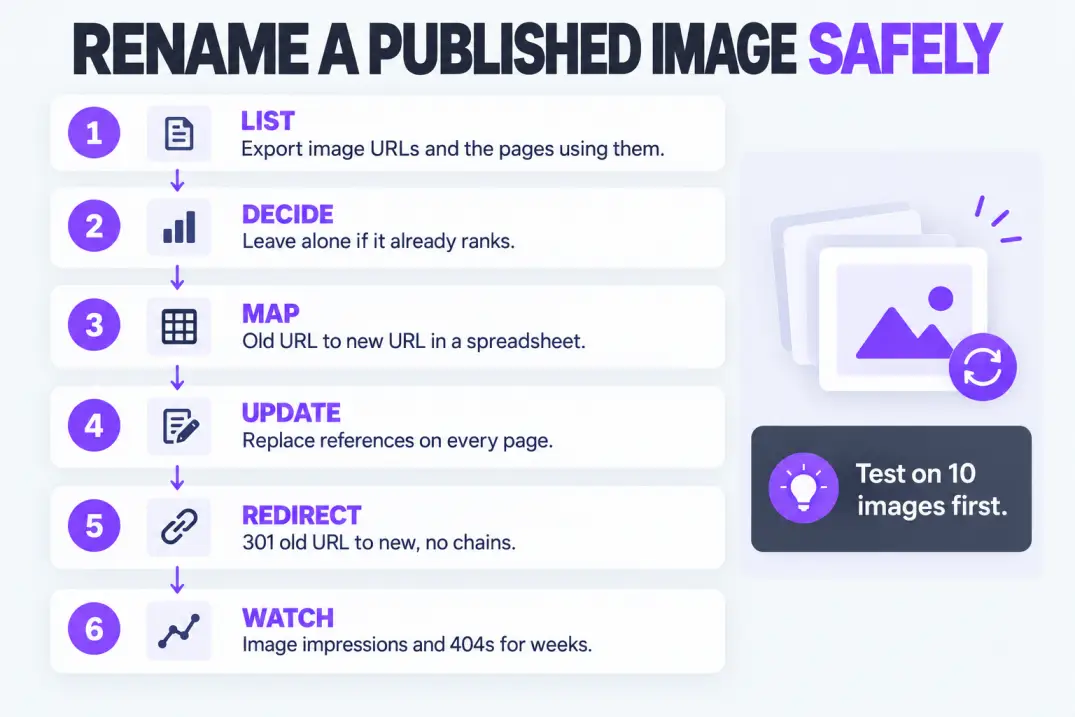
Here's the part most guides skip. Renaming a published image changes its URL, so a careless rename can break the picture on every page that uses it, drop it from image results and leave 404s behind.
So before you rename anything, ask whether you should.
When to leave it alone
If an image already ranks, drives traffic or is embedded on other sites, leave its URL as it is. A better name isn't worth losing established visibility. Fix the alt text and the surrounding copy instead, since those can change without touching the URL.
When a rename makes sense
Rename when the image is generic and unlinked, such as IMG_4821.jpg on a post that gets little traffic. Also rename when you're already redesigning, migrating or replacing the file.
A safe rename process
- Export a list of image URLs. Use your CMS media library, a crawler or Search Console to list the images you plan to change, with the pages that use them.
- Prioritize. Start with high-value pages such as products, top posts and landing pages.
- Map old to new. Make a two-column sheet with the old URL and the new one.
- Upload the renamed file and update the
<img>references on each page. - Redirect the old URL with a 301 to the new one, and avoid stacking redirects, since redirect chains slow crawling.
- Update your sitemaps and re-check after Google recrawls.
- Monitor. Watch image impressions and 404s for several weeks.
Bulk-renaming the whole media library in one weekend. If your CMS doesn't update references or add redirects automatically, you can break hundreds of images at once. Test on ten images first.
Google's image guidance also stresses using stable URLs for images, which is one more reason to get the name right the first time rather than plan to fix it later.
How to Tell Whether It's Working
File names don't move the needle overnight, and they rarely move it alone. Here's how to measure honestly.
Check the Search Console image report. In the performance report, filter by search type "Image" to see impressions, clicks and the queries that surface your images. Compare 30 or 60 days before and after a batch of changes, using a comparable set of pages.
Spot-check the live HTML. Open a few pages and confirm each image uses a standard <img> element with the file name, alt text and dimensions you expect. Images loaded only through CSS backgrounds are less likely to be understood as page content.
Search your own images. Search for a distinctive phrase plus your domain in image results and see which of your files appear. This is an informal check, but it shows whether your naming matches how people search.
Watch the crawl. If you have server logs, look for requests from Googlebot-Image, as covered in log file analysis for SEO. Rising image crawling after a cleanup is a good sign.
Set expectations. Rankings can take weeks to shift. If nothing changes, it doesn't prove naming doesn't matter; it more likely means the images weren't the bottleneck. Check page speed, indexing and content quality too.
Where File Names Fit in the Bigger Picture
Image names sit inside a wider set of image habits. Here are the neighbors worth getting right.
| Habit | Why it matters |
|---|---|
| Descriptive alt text | Accessibility and context for search |
| Compressed, modern formats | Faster pages and better user experience |
| Correct dimensions and responsive sizes | Avoids loading huge files on small screens |
| Don't lazy-load your main above-the-fold image | Protects loading speed for the first view |
| Image sitemap or clear markup | Helps discovery, covered in how search engines use sitemaps |
| Structured data where relevant | Adds machine-readable context, as in schema markup for SEO |
| Large, high-quality images | Required for visibility in feeds like Google Discover |
Common Naming Mistakes to Avoid
- Keeping camera and tool defaults.
IMG_,DSC_andScreenshotprefixes say nothing and repeat across files. - Using one keyword on every image. Six files named
seo-tips-1.jpgthroughseo-tips-6.jpgdescribe nothing. - Mixing case and separators. A library with underscores, spaces and capitals is a library you'll fight forever.
- Putting the date in the name. It dates the page and adds nothing for readers.
- Renaming ranking images casually. Without redirects, you can lose visibility you already earned.
- Ignoring alt text because the name is good. The two fields do different jobs.
- Treating the name as the whole strategy. Name, alt text, speed, format and context work together.
Your Image Naming Checklist
Paste this into your editorial notes and run it for every image before you upload it.
IMAGE NAMING CHECKLIST

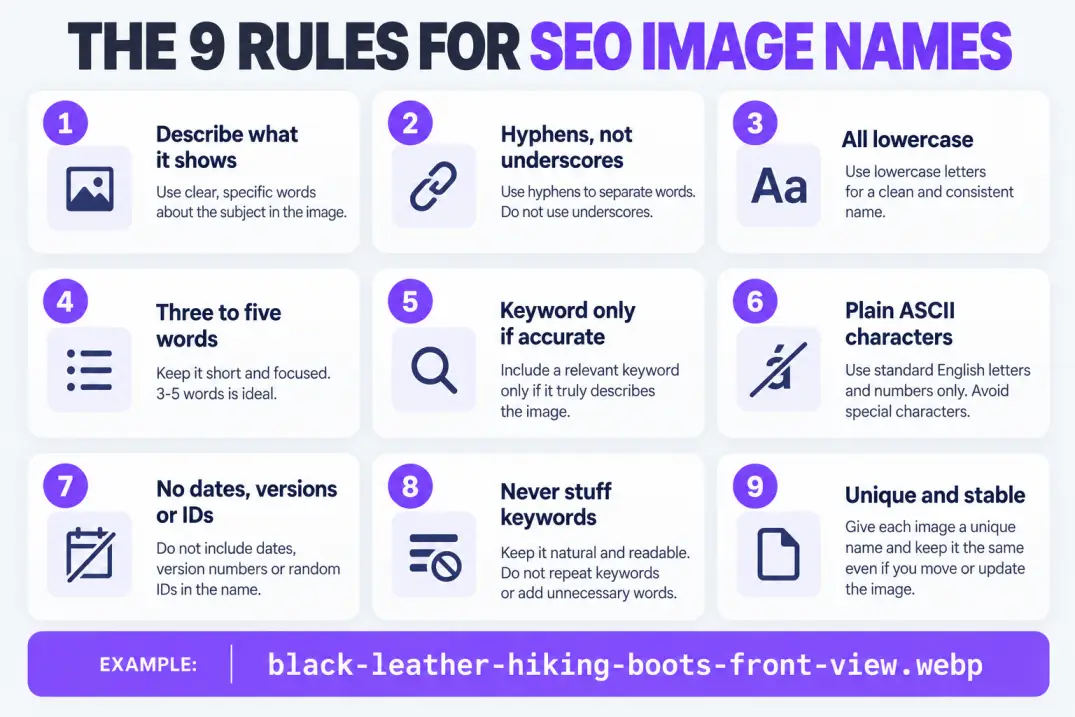
[ ] Describes what the image actually shows
[ ] Hyphens between words, no spaces or underscores
[ ] All lowercase
[ ] 3-5 meaningful words
[ ] Keyword included only if it's accurate
[ ] ASCII letters and numbers only
[ ] No dates, versions or random IDs
[ ] No keyword stuffing
[ ] Unique, and final (no plan to rename later)
[ ] Alt text and caption written separately
Final Thoughts
Naming images for SEO is one of the rare tasks that costs almost nothing and compounds quietly. Nine rules cover nearly every case: describe the subject, use hyphens, stay lowercase, keep it to three to five words, add the keyword only when it's accurate, use plain characters, skip dates and IDs, avoid stuffing and keep names stable.
Start with the next image you publish. Name it properly at export, write its alt text separately and move on. For the backlog, rename only what's generic, unlinked and low-risk, and redirect anything you touch. A tidy media library won't win rankings by itself, but it removes one more reason for search engines and readers to misunderstand your pages.
- A file name is one signal among several, so pair it with alt text, a caption and relevant surrounding copy.
- Use short, lowercase, hyphenated, descriptive names with no dates, IDs or stuffing.
- Name files at export, not at upload, and write your pattern into the style guide.
- Don't rename images that already rank, and redirect any URL you change.
- Measure with the Search Console image report over weeks, not days.
Artificial Intelligence
Intelligence without limits.
We believe great content deserves honest authorship—even when it's AI.
Frequently Asked Questions
It matters a little on its own and more as part of a set. Google lists descriptive file names among the signals it uses to understand an image, alongside alt text, captions and nearby text. It's a cheap, fully controllable signal, so it's worth getting right, but it won't rescue a slow or poorly indexed page.
Use three to five lowercase words separated by hyphens, describing the subject and one distinguishing detail, followed by the format, for example `crawl-budget-flow-diagram.webp`. Avoid spaces, underscores, dates and random IDs.
Hyphens. Google's URL guidance recommends hyphens as word separators because underscores can join words into one token. Hyphens also read more cleanly in the URL.
There's no official SEO limit, but practical limits apply: very long names are clumsy in URLs and get truncated in some tools. Three to five meaningful words is a good target.
No. They should agree on the subject but not be identical. The file name is a short hyphenated label, while alt text is a natural sentence written for people who can't see the image.
No. Use it only on images that genuinely show the topic. Repeating the same keyword across every file makes names look identical and doesn't describe anything.
Yes, but carefully. Renaming changes the image URL, so update every reference, add a 301 redirect from the old URL and monitor Search Console. If the image already ranks, it's usually safer to leave the file name alone and improve the alt text instead.
Nothing breaks. You simply miss a small clarity signal and make your media library harder to manage. Prioritize new uploads and high-value pages first rather than renaming the whole backlog.
The rules are identical. The format only changes the extension. Modern formats are generally smaller, which helps page speed, but the name should still describe the image.
Say what's on screen: tool plus view, such as `google-search-console-coverage-report.png`. Never keep the default timestamp name, because it carries no information and repeats across captures.
It works, but it's risky. Spaces become `%20` in URLs and many servers treat uppercase and lowercase as different files, which creates duplicates and broken links. Lowercase with hyphens avoids both.
Only where it helps identify the image, for example a product shot or logo. Adding your brand to every file adds length without describing the picture, and it can look like stuffing.
Automate formatting only: lowercase, hyphens and stripped special characters. Then review descriptions manually, because no script knows what the picture shows. Test on a small batch and keep a spreadsheet mapping old names to new ones.
Indirectly at best. Discover rewards large, high-quality images and strong content, and AI systems read the page's text and markup more than file names. Good names remain a useful clarity signal, but quality and context matter more.
Expect several weeks, and don't expect dramatic change from naming alone. Track image impressions and clicks in the Search Console performance report using the Image search type, and compare similar pages before and after.
Yes. It covers descriptive names, alt text, compression, modern formats, correct dimensions, responsive sizes, lazy loading for below-the-fold images, structured data where relevant and a clear page context. Naming images for SEO is one step in that chain.